

Confluence Google Drive Integration
Create a single source of truth with seamless syncing and real-time collaboration.
Read more


_2026-03-26_20-48-42-1.png?length=720&name=untitled_Gemini%203%20(Nano%20Banana%20Pro)_2026-03-26_20-48-42-1.png)


Take the very first steps to use the SharePoint Connector app for Jira
You can install the SharePoint Connector app from the Atlassian Marketplace, then open it by clicking the SharePoint Connector link on Jira’s sidebar, and it's ready to use.
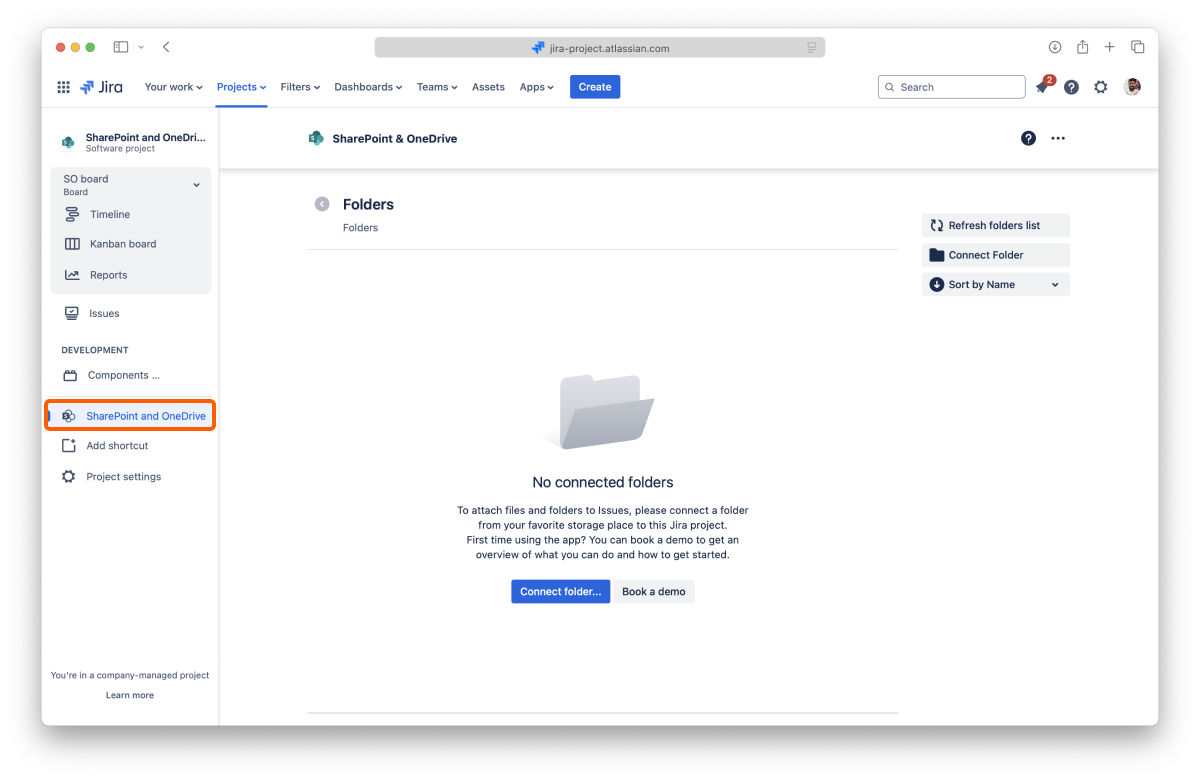
You don't need to create an account to use the app. The only thing required is to connect at least one folder to the Jira project so that you can start collaborating with your team and build your single source of truth.
If there's already a folder connected when you first open the app, that means someone in your team already shared a folder, and you can use that one or add more, following the same steps.
You can connect a folder stored in SharePoint or OneDrive for Business.
You can connect more places later from the file manager. Learn more
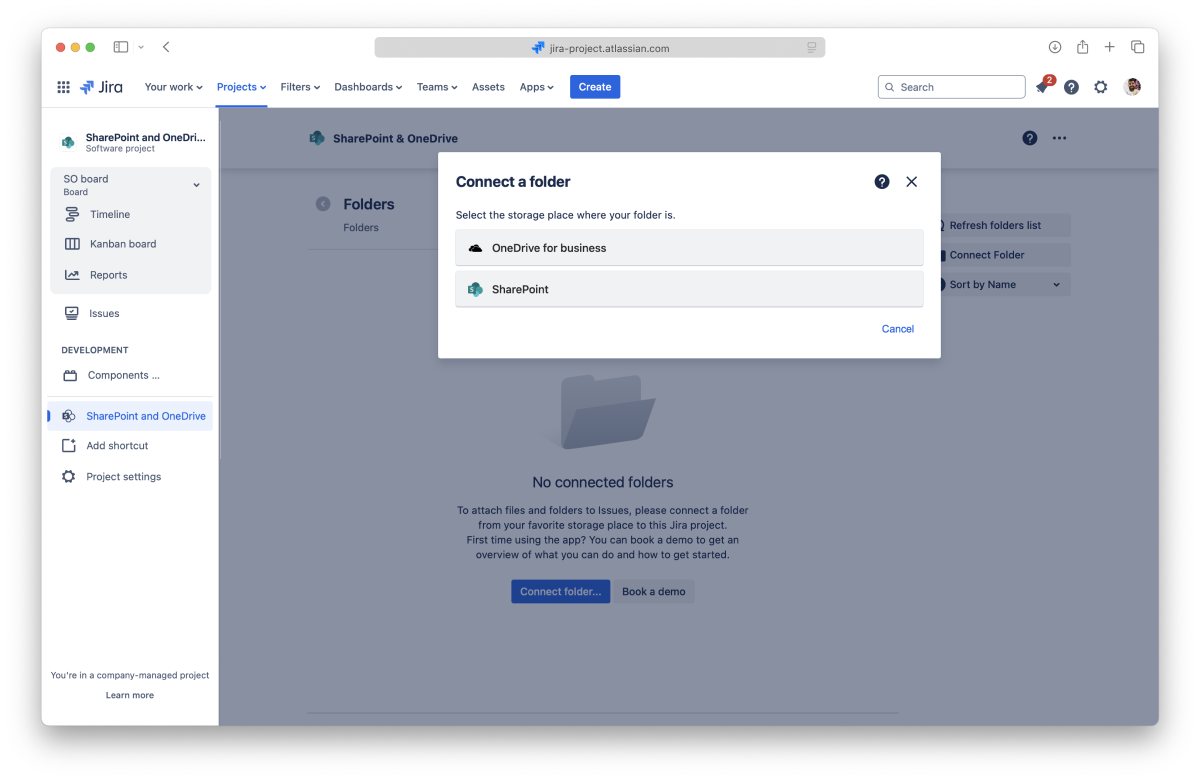
Learn how to authorize the Team Files app to access the content in your SharePoint account so that you can connect a folder.
If you have problems connecting your account, please check the SharePoint Permissions Setup
We NEVER store your user or password credentials. We use state-of-the-art OAuth 2.0 to connect securely through an encrypted connection. The app gets an authorization token to use the storage. You can revoke this authorization at any time.
Learn how to authorize the Team Files app to access the content in your OneDrive for Business account so that you can connect a folder.
If you have problems connecting your account, please check the SharePoint Permissions Setup
We NEVER store your user or password credentials. We use state-of-the-art OAuth 2.0 to connect securely through an encrypted connection. The app gets an authorization token to use the storage. You can revoke this authorization at any time.
SharePoint tip: If you can’t see the site where your folder is, you can use the “Find site” button and enter your SharePoint address. More info
Use the checkbox to select the folder you want to connect.
We recommend connecting a folder where you and your team store your documents, but you can start with a new one by clicking the "New folder" button.
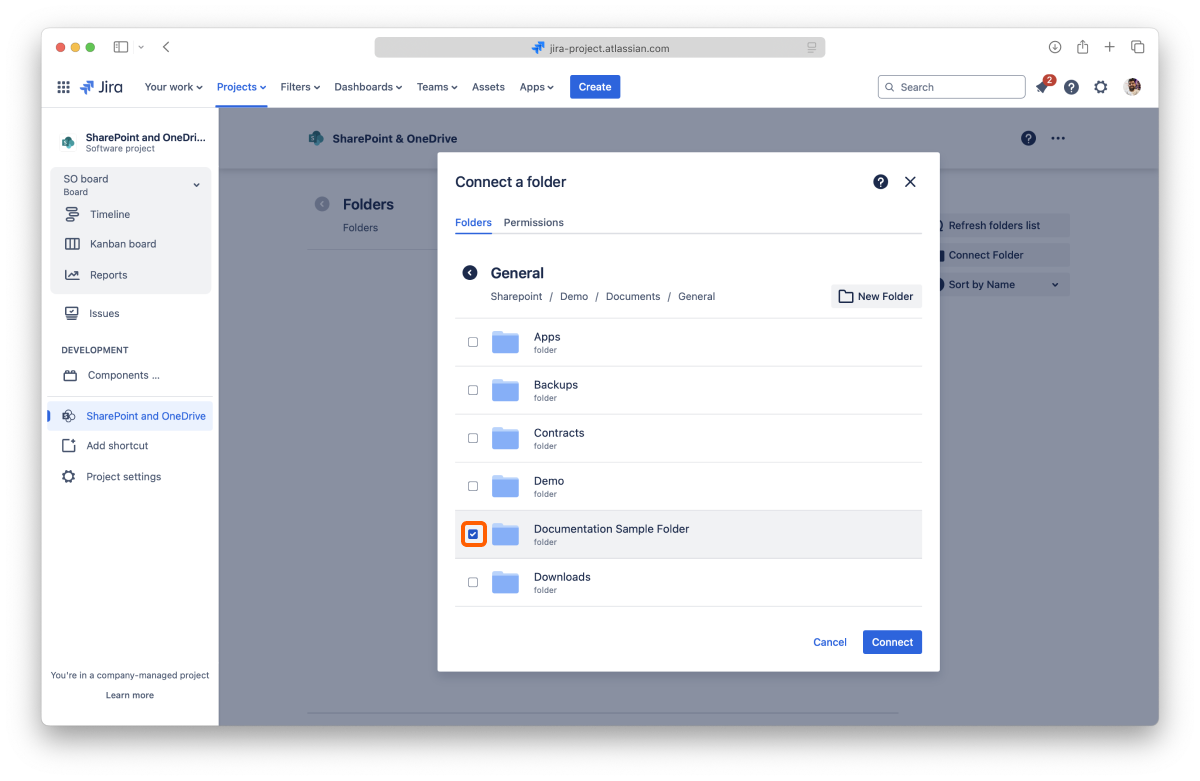
Tip: You can select multiple folders.
Click the "Permissions" tab. By default, any folder you connect will be visible and editable by your team. If you want to limit access or block the edit feature, click the dropdown to change the permissions.
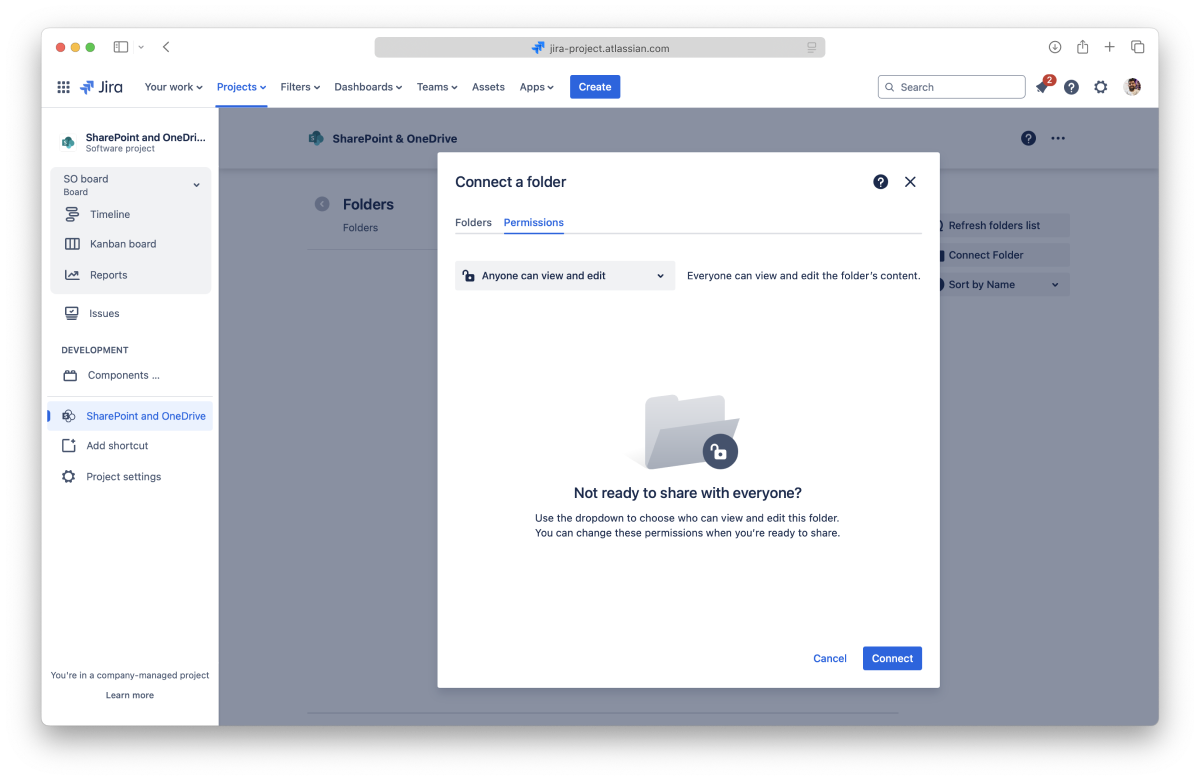
For more information, check the permissions page.
All done. You're ready to use the app. Learn more about the file manager, how to edit documents or Attach files and folders to issues.
IMPORTANT! Please read.
The app uses the storage place as the "single source of truth," However, you need to understand that it has some particular behaviors. Like:
You can browse the folders shared with a Jira project, preview files, edit documents, and more on the file manager.
The file manager is easily accessible from the sidebar, and it's the cornerstone for all that you can do with the SharePoint Connector app. When you attach files and folders to your issues, you'll also be using the file manager, and it works the same way.
On this page, you'll find everything about using the SharePoint Connector app. From what you can do with your files and folders to managing connected folders. Let's start with the latter since you always need at least one connected folder to use the app.
When you open the SharePoint Connector app, the first thing you'll see is a list of the connected folders that you can browse and use to collaborate with your team.
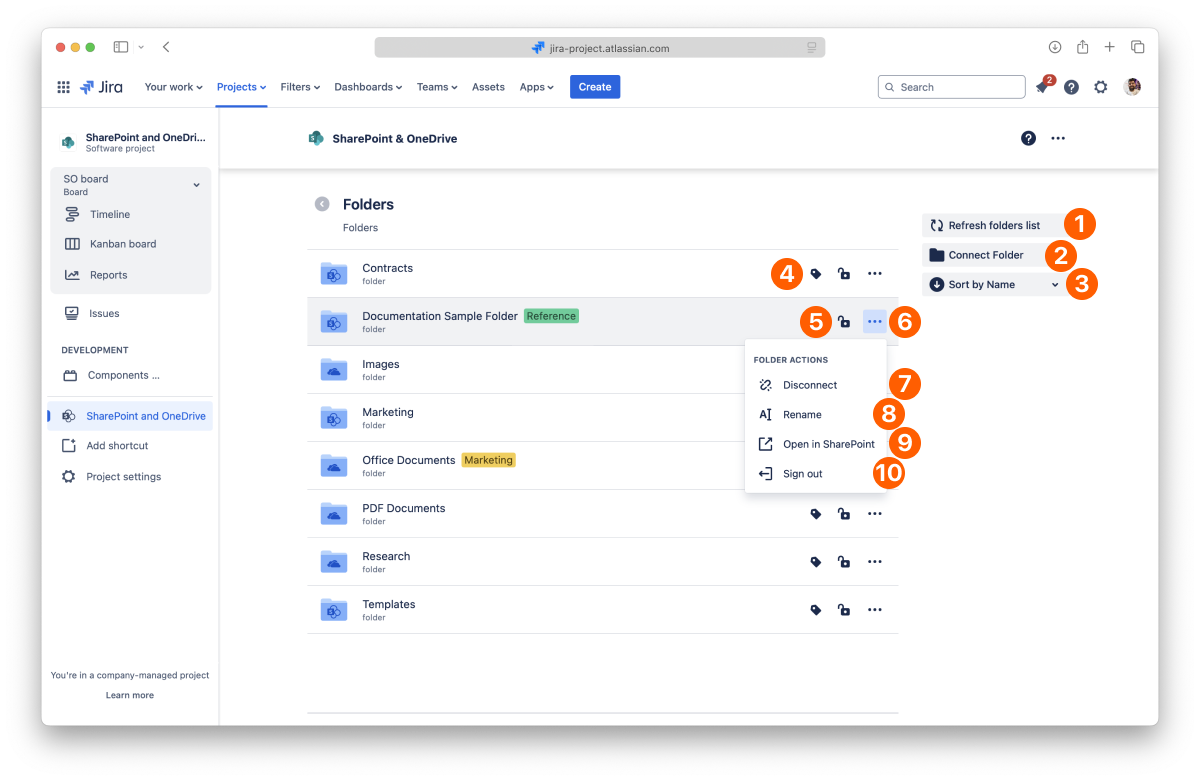
List of the connected folders to the current Jira project.
Use the "Refresh folders list" button to update the connected folders list and access folders your team shared with the latest permissions.
In the Getting started page, we covered how to connect your first folder. The empty screen makes it easy to see how to do it, but you can connect as many folders as you need.
We recommend connecting a folder where you and your team store your documents, but you can start with a new one by clicking the "New folder" button.
SharePoint tip: If you can’t see the site where your folder is, you can use the “Find site” button and enter your SharePoint address. More info
All done. You can now use your new folder or add more using the same process.
The connected folders are ordered alphabetically by default.
You can change this by clicking the "Sort by name" button and selecting a sort of option and the order you prefer. You can sort them by name or added date. The button will always reflect your selection.
You can add a tag to your connected folders to help you keep them organized and easily accessible.
Only the person who connected the folder can add and edit the tag.
To add a tag:
All done.
To edit the tag, click the tag button again. You can change the description and color. When you’re done, click Save.
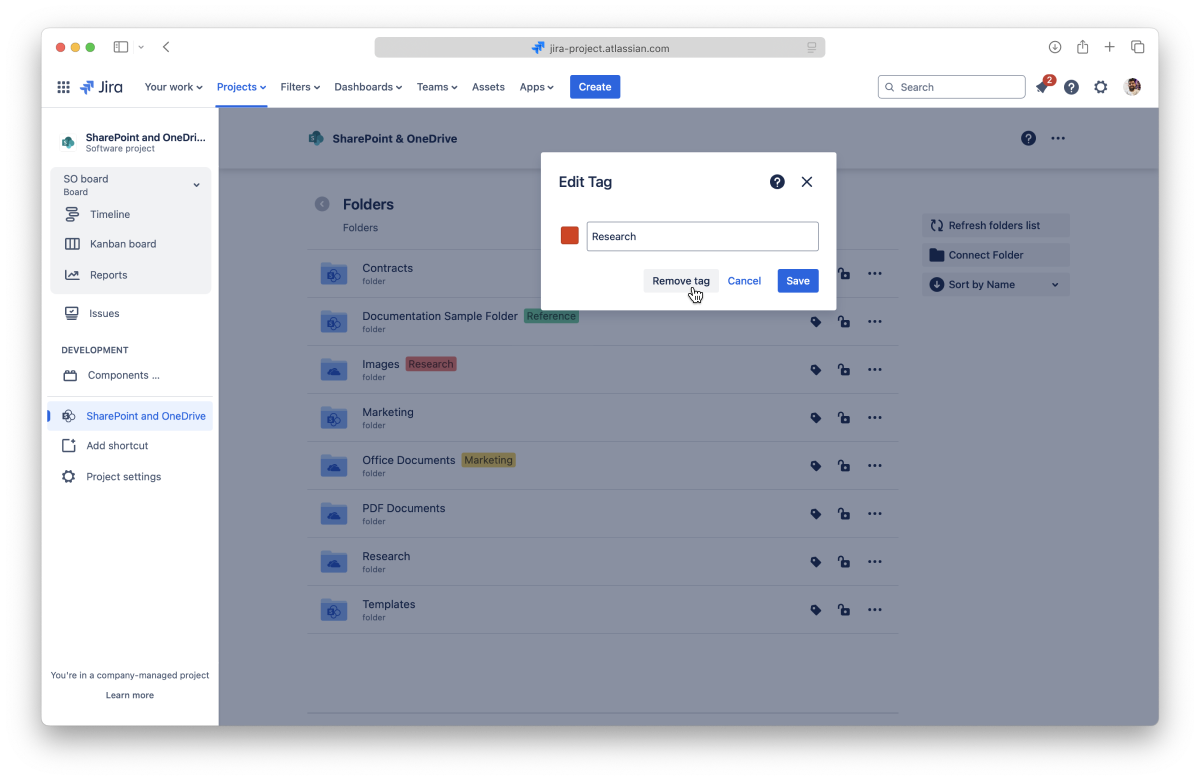
To altogether remove a tag:
All done.
This action is undoable, but you can add a tag again at any moment.
You can set permissions for connected folders from the File Manager at any time by clicking the lock icon. For more information, check the permissions page.
It's also possible to disconnect folders you no longer need. Before getting into how to do it, it's relevant to know that you're only breaking the link in the SharePoint Connector app to the original storage when you disconnect a folder. All your content is safe, but any files and folders you or your team attached to Jira issues from the disconnected folder also lose the link to the original storage and become unavailable.
If you accidentally disconnect a folder, you can connect it again in 30 days to restore the attachments. After this period, it’s no longer possible to restore the existing attachments.
All done. Your folder is safe and sound, but your team can't use it anymore in the SharePoint Connector app.
Keep in mind that you can only disconnect the folders you added.
When you change the name of a folder, it's updated in the connected storage, too.
Changing the name of connected folders from Dropbox and Egnyte breaks existing attachments.
The folder opens in a few seconds on the original storage site.
This option lets you sign out from a connected folder if the “Replicate storage permissions” setting is active. This is useful if you need to connect with a different account.
While using the SharePoint Connector app, you can connect folders stored in SharePoint or OneDrive for Business. You only need to authorize the app to access that storage place first. You're in control of your storage places: only you can see the places you allowed, and you, and only you, can disconnect them.
You can view your connected places when you connect a new folder or from the settings page.
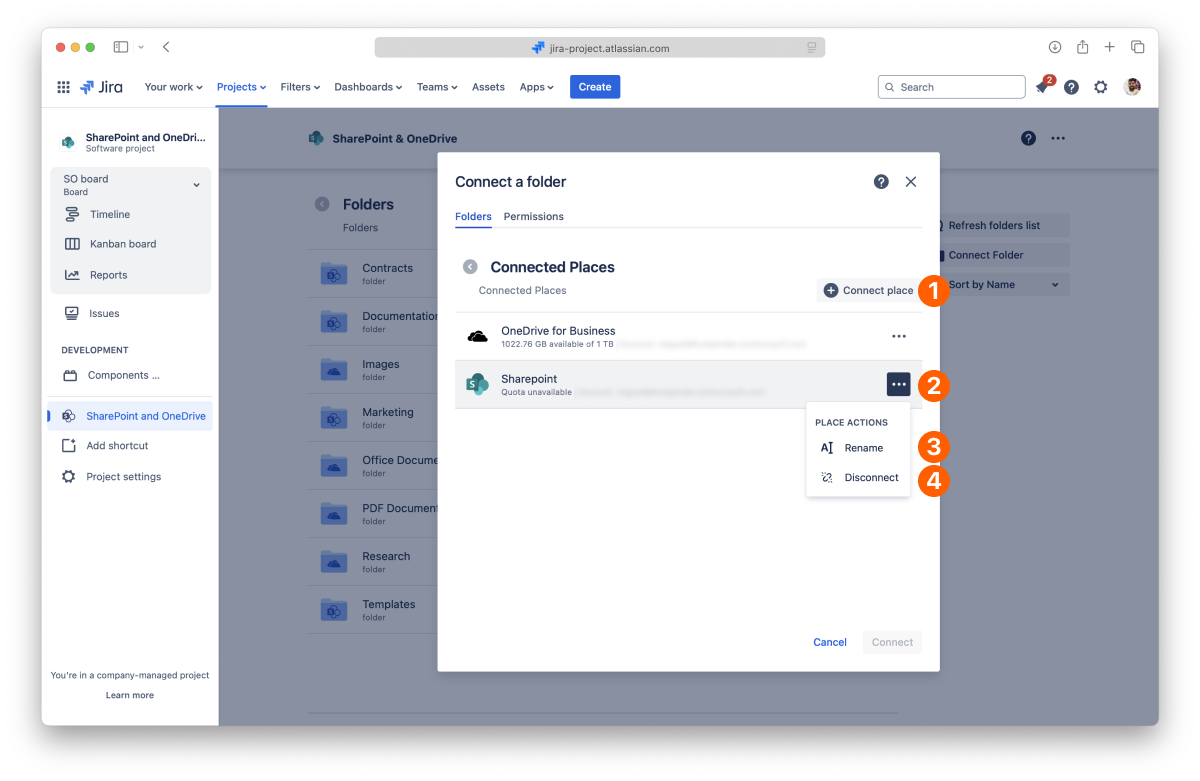
List of your connected places.
You can connect several accounts of the same service. For example, you can connect a Personal Dropbox and Dropbox for business.
Learn how to authorize the Team Files app to access the content in your SharePoint account so that you can connect a folder.
If you have problems connecting your account, please check the SharePoint Permissions Setup
We NEVER store your user or password credentials. We use state-of-the-art OAuth 2.0 to connect securely through an encrypted connection. The app gets an authorization token to use the storage. You can revoke this authorization at any time.
Learn how to authorize the Team Files app to access the content in your OneDrive for Business account so that you can connect a folder.
If you have problems connecting your account, please check the SharePoint Permissions Setup
We NEVER store your user or password credentials. We use state-of-the-art OAuth 2.0 to connect securely through an encrypted connection. The app gets an authorization token to use the storage. You can revoke this authorization at any time.
All done. Your new place is now connected. You can now browse it to connect a folder or return to the file manager.
You can connect several accounts from the same service, and by default, we add a number at the end when you do it to differentiate them. To help you keep things organized, you can rename your places to something more meaningful to you.
That's it. It just takes a few moments to update the name, and it's ready to use.
You can also rename and manage your places from the settings page.
Before getting into how to do it, it's relevant to know that you're only breaking the SharePoint Connector app's link to the original storage when you disconnect a place. All your content is safe, but any folders you have connected from that place will also be disconnected. Consequently, files and folders you or your team attached to Jira issues from the disconnected folders also lose the original storage link and become unavailable.
If you accidentally disconnect a place, you can connect it again in 30 days to restore the connected folders and attachments. After this period, it’s no longer possible to restore the existing attachments.
All done. Your storage place is safe and sound but no longer accessible in the SharePoint Connector app.
You can also disconnect and manage your places from the settings page.
Now that we know how to connect folders, it's time to learn how to make the most of the SharePoint Connector app. This section will cover what you can do with files and folders and how to add content to your connected folder.
Click a connected folder to view its content. The navigation is at the top, your content is in the center, and extra options are to the right.
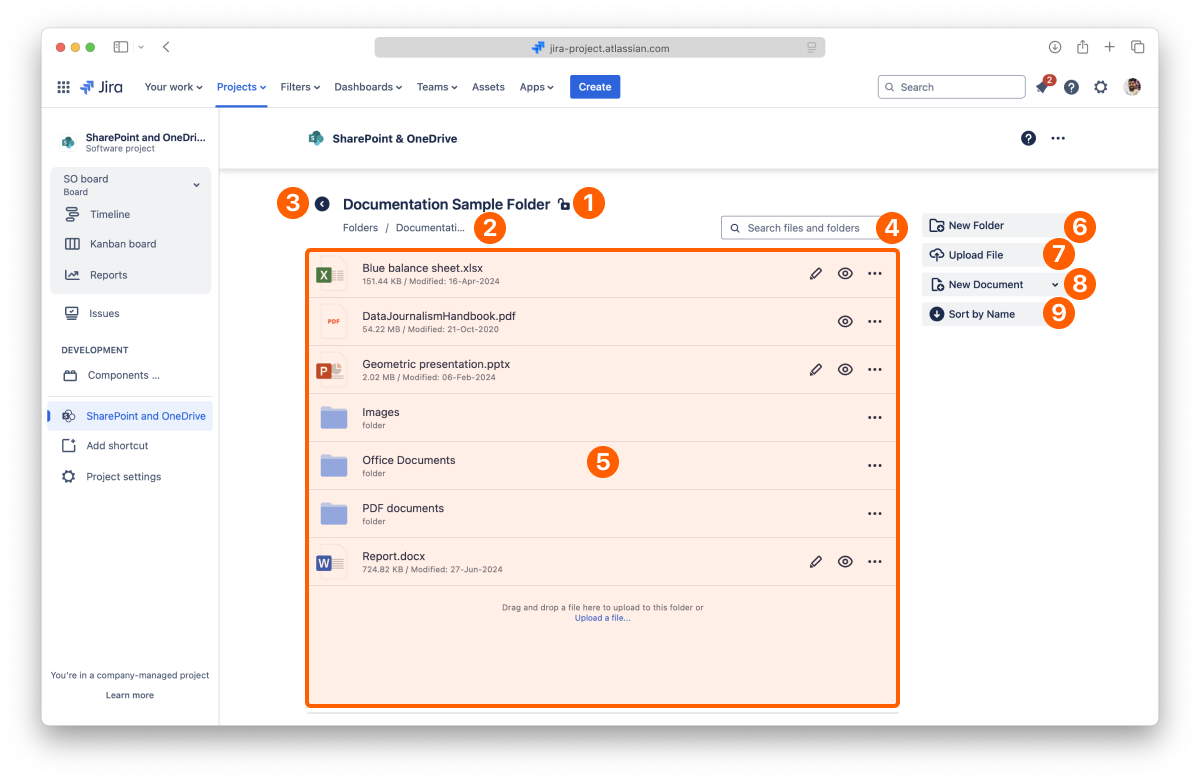
If your window is too narrow, the right section is hidden, but all the options are available in the context menu next to the navigation.
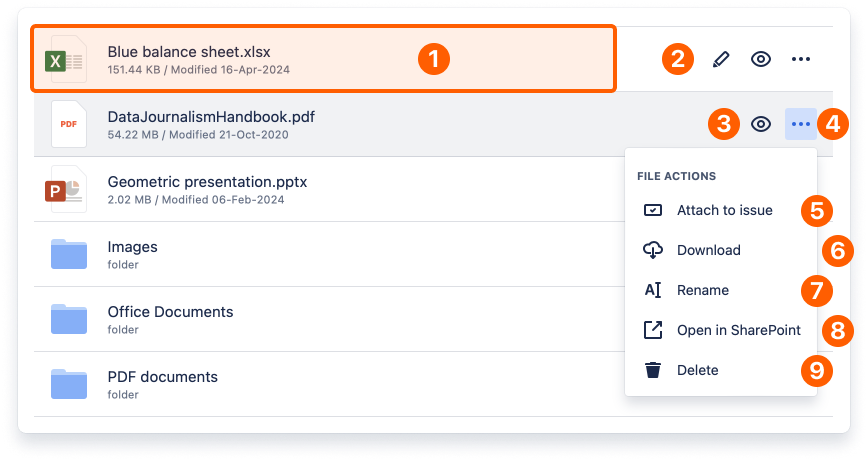
You can preview the content of your files by clicking the name of the file you want or the preview button. You can preview images, PDFs, Microsoft Office, and Google Docs files. For more details, check the preview and edit documents page.
You can edit Microsoft Office files from the file manager by clicking the Edit button. A new tab opens with the corresponding Microsoft Office 365 editor, and it's ready for edition. It supports real-time collaboration, so there are no file lockdowns. There's an autosave feature, so when you finish, just close the tab.

The edit option is also available when you're previewing the file (check Preview files on Jira Cloud) and when you attach the document to an issue.
For more details, check the Edit documents on Jira Cloud page.
In Jira, you can attach files and folders to your issues directly from the file manager.
All done. Your file is now attached to the issue. You can click the "View issue" button to jump to the issue page.
You need to add the app to the issue page to view the attached files and folders from the file manager.
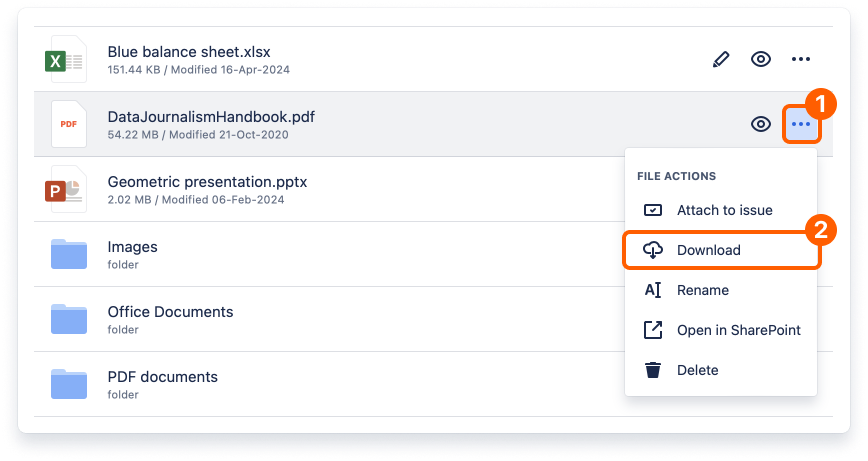
Your browser will open a new tab to download the file automatically. Depending on the browser you're using, the tab closes itself when the download starts, or it might ask you permission to download the file (noticeably Safari browser), requiring that you click the "Allow" button.
Depending on its size, the file will be available in your default download folder after a few moments.
The download option is also available in preview mode (check Preview files on Jira Cloud) and files attached to issues.
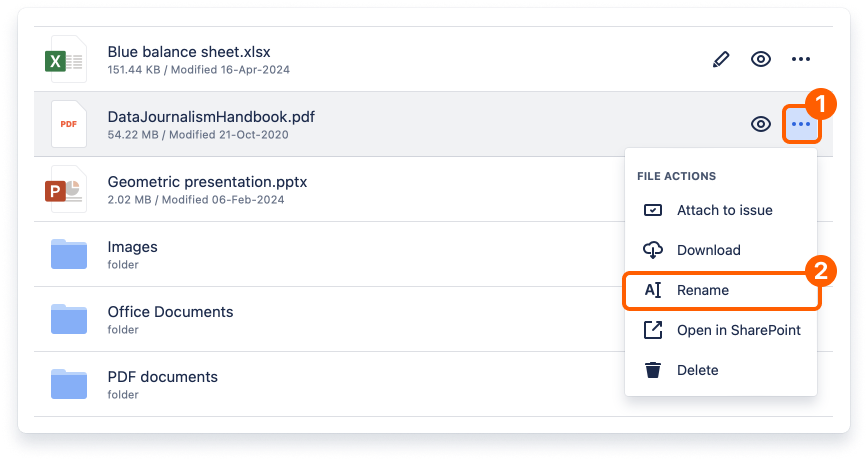
When you change the name of a file, it's updated in the connected storage too.
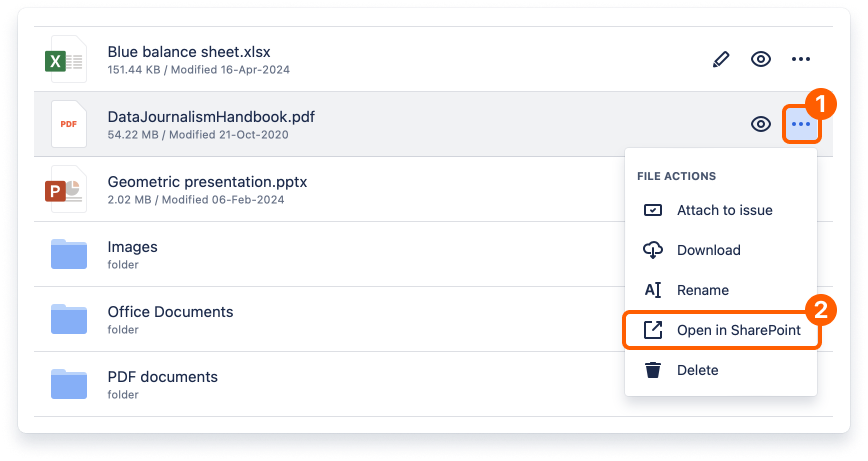
The file opens in a few seconds on the original storage site.
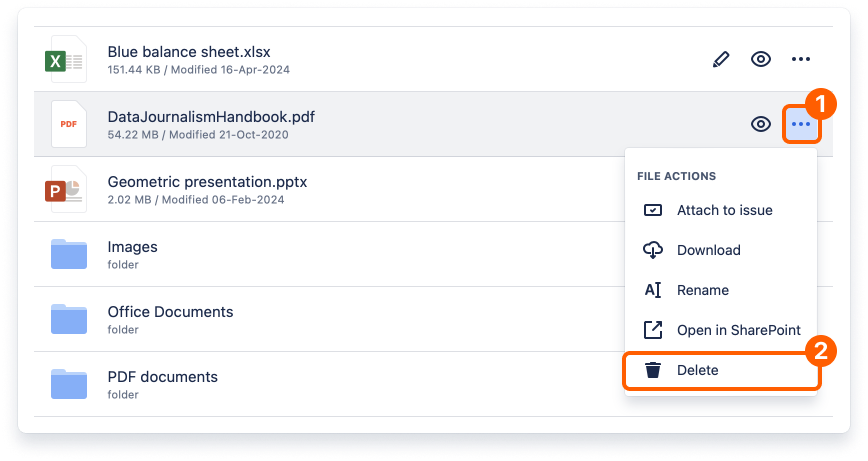
When you delete a file, it's removed in the connected storage place too. This action is undoable in the SharePoint Connector app.
You can drag a file from a local folder and drop it in the folder you have open in the SharePoint Connector app to upload it there. Doing this will save the file in the storage place containing the connected folder, helping you build your single source of truth.
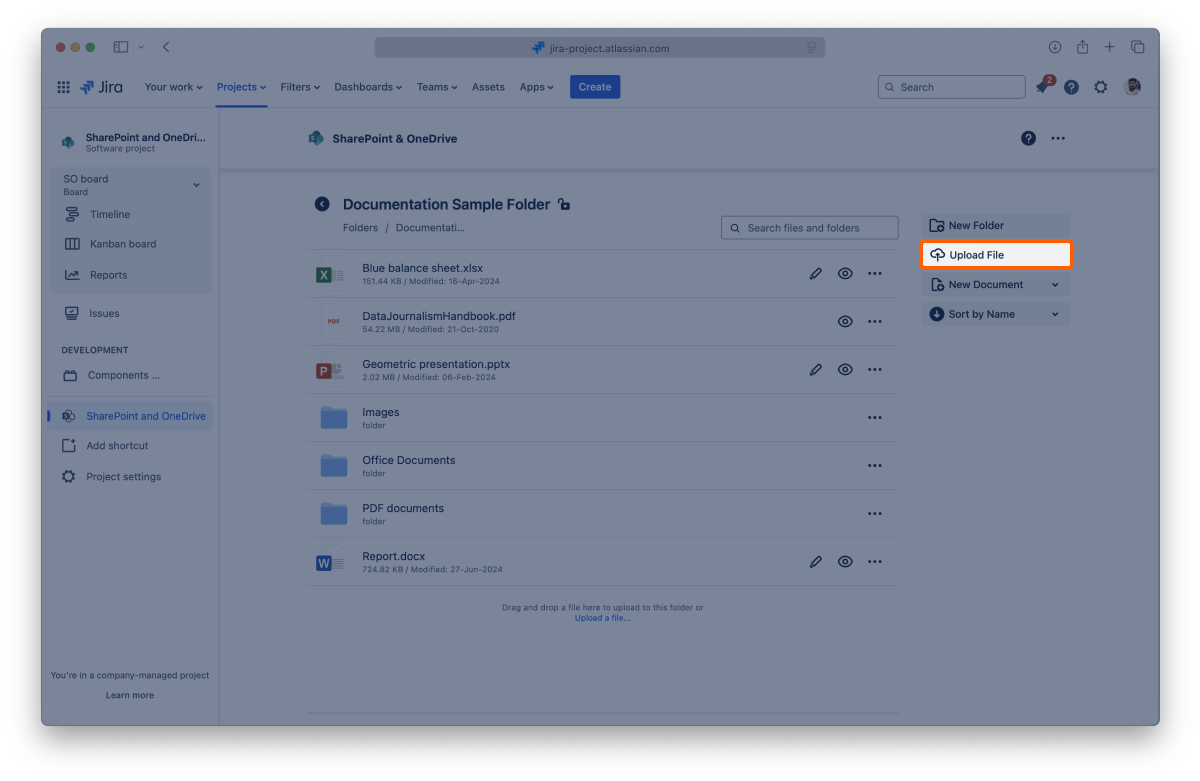
Depending on the file's size, your file can take a few moments to become available in the app.
The upload option is also available when you attach a folder to an issue. You can drag and drop a file there to upload it.
With the SharePoint Connector app, you can create documents where needed. They are always ready for real-time collaboration, with no file locks, and are saved back to the storage place containing the connected folder, avoiding duplicates.
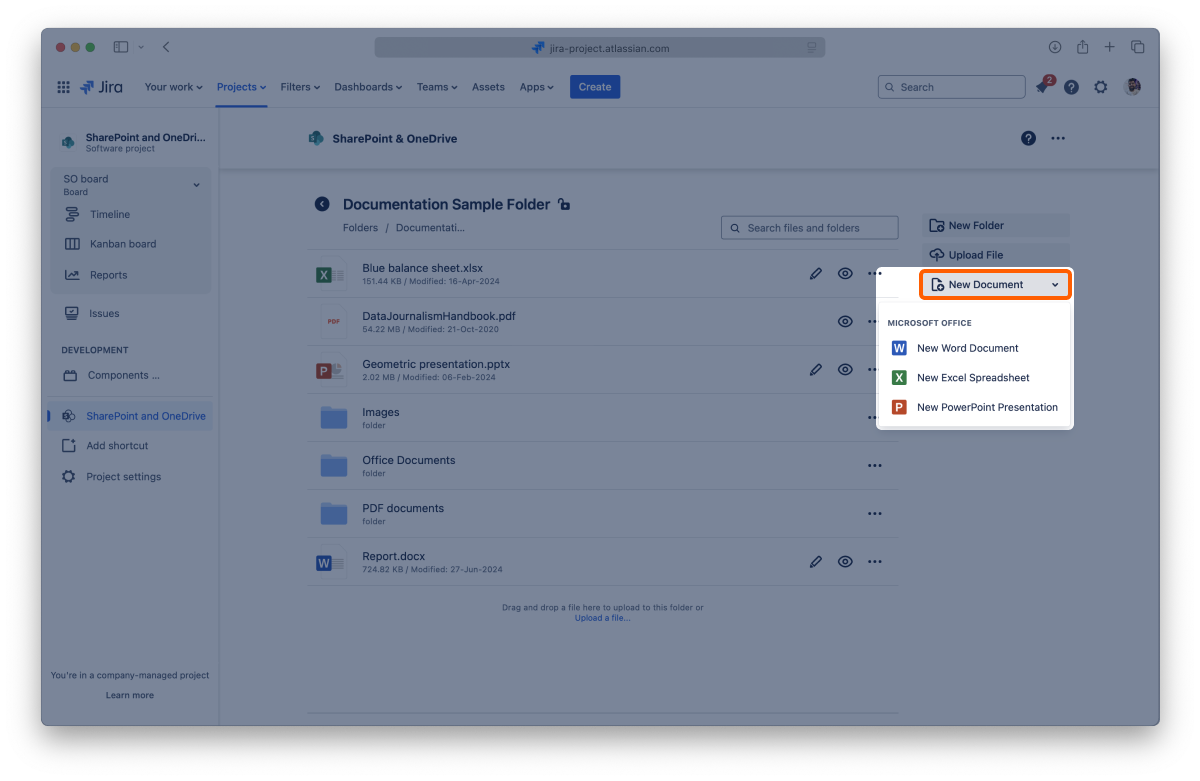
After a few moments, your document appears in the folder, and you can edit it.

You can see the content of a folder by clicking on it. You can also click folders inside to view the content or click the back button to return to the previous one.
In Jira, you can attach files and folders to your issues directly from the file manager.
All done. Your folder is now attached to the issue. You can click the "View issue" button to jump to the issue page.
You need to add the app to the issue page to view the attached files and folders from the file manager.
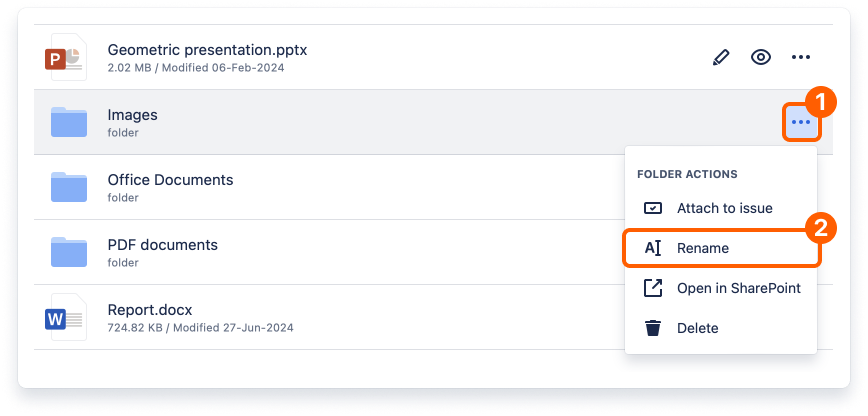
When you change the name of a folder, it's updated in the connected storage too.
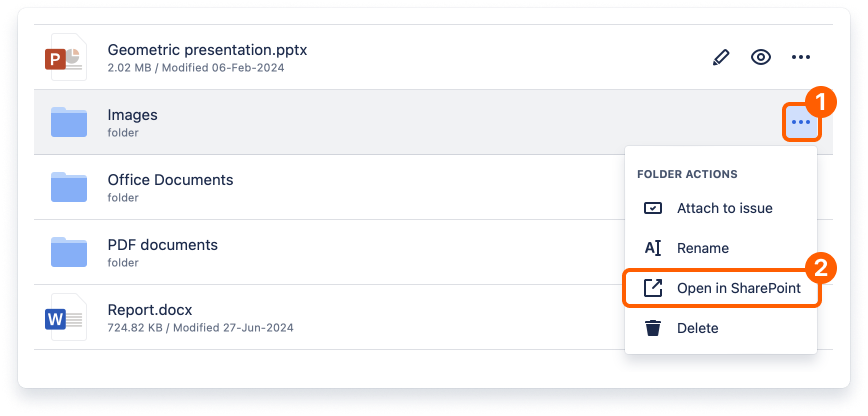
The folder opens in a few seconds on the original storage site.
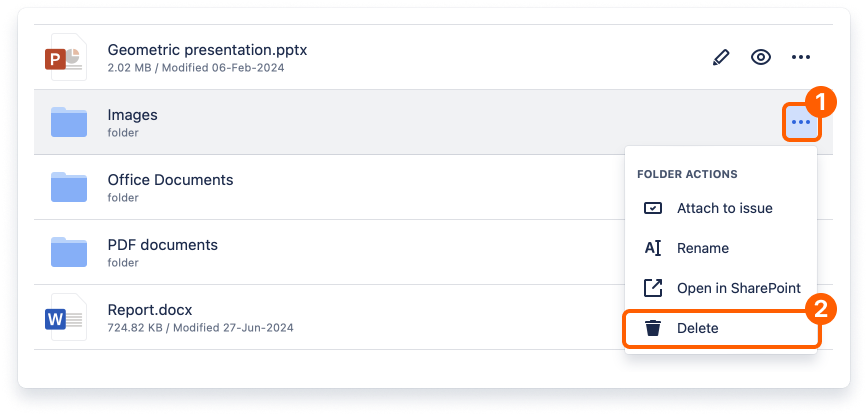
When you delete a folder, it's removed in the connected storage too. This action is undoable in the SharePoint Connector app.
To help you keep things organized, you can create new folders whenever needed.

After a few moments, the view reloads, and your new folder will be listed and ready to use.
The content of your folders is ordered alphabetically by default.
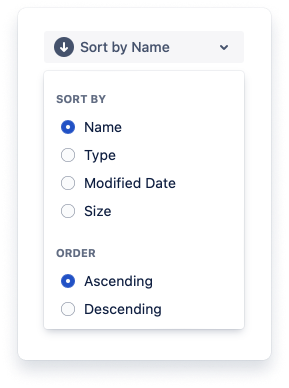
You can change this by clicking the "Sort by name" button and selecting a sort of option and the order you prefer. You can sort content by name, type, modified date, and file size. The button will always reflect your selection.
Now you know all that you need to use the file manager. You can now learn more about previewing files, editing documents, or attaching files and folders to Jira Cloud issues.
If you still have questions about the topics covered on this page, visit our support portal and send them to us. Our team is always happy to help.
Learn how to preview files on Jira with the SharePoint Connector app.
On this page, we'll cover the different ways to preview your files on Jira using the SharePoint Connector app, expanding the topics on the page about the file manager.
The SharePoint Connector app lets you preview files in the file manager and the attached files and folders on issues. It supports the most common Office file formats, PDFs, and popular image formats.
This way, your Jira issues can easily be used as your one source of truth, with content that is always accessible and updated.

When using the File Manager, you can preview your files' content by clicking the icon or name of the file you want with the full-screen preview. You can also use the “Preview” button to open the preview. The options available vary slightly depending on the kind of file.
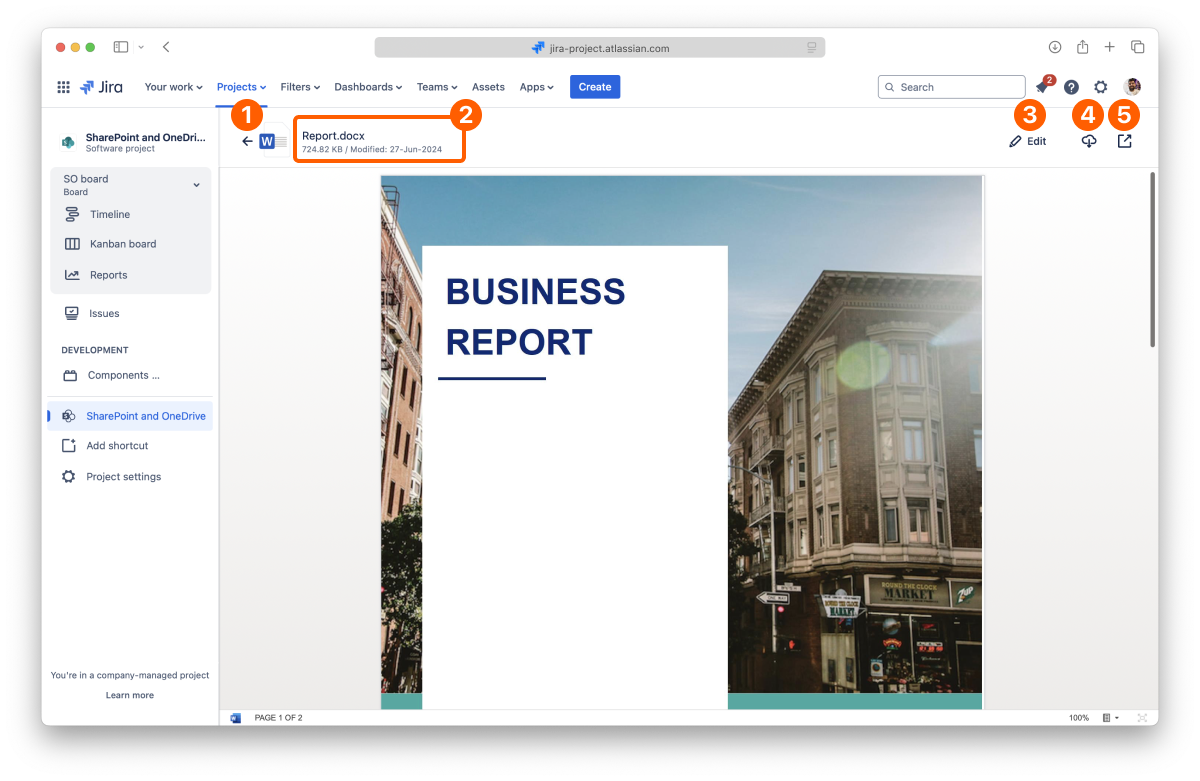
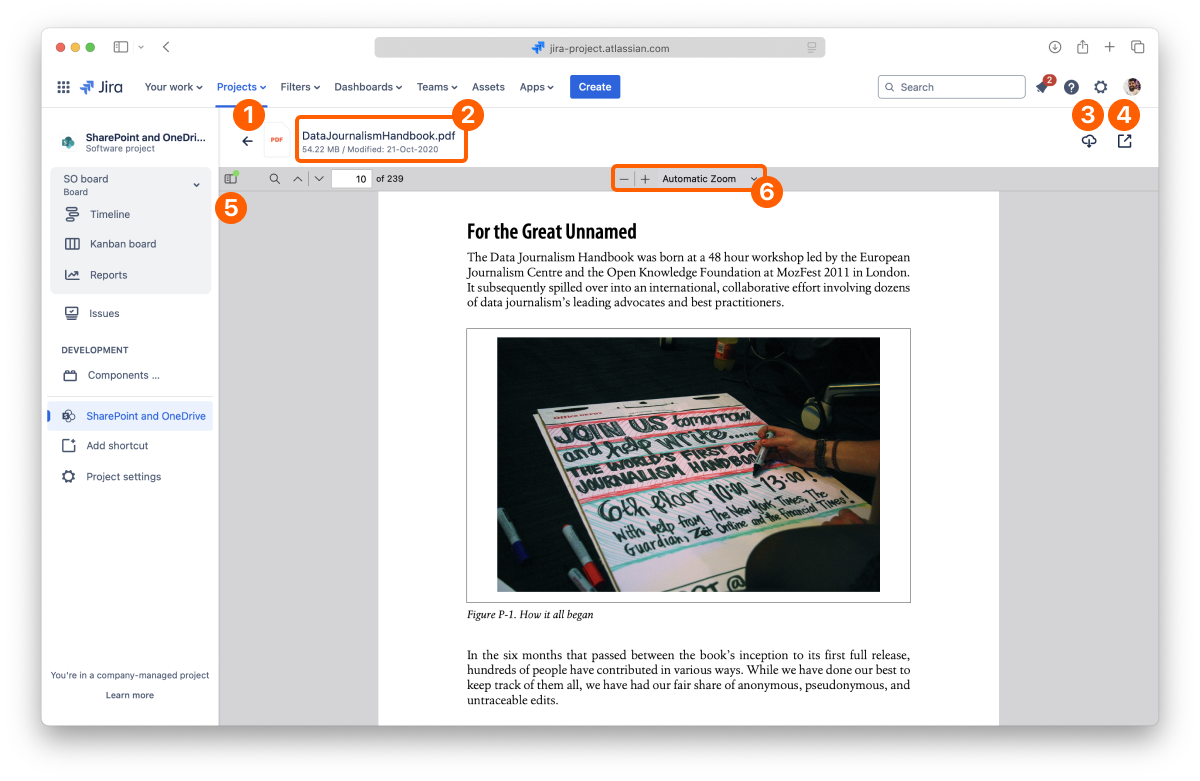
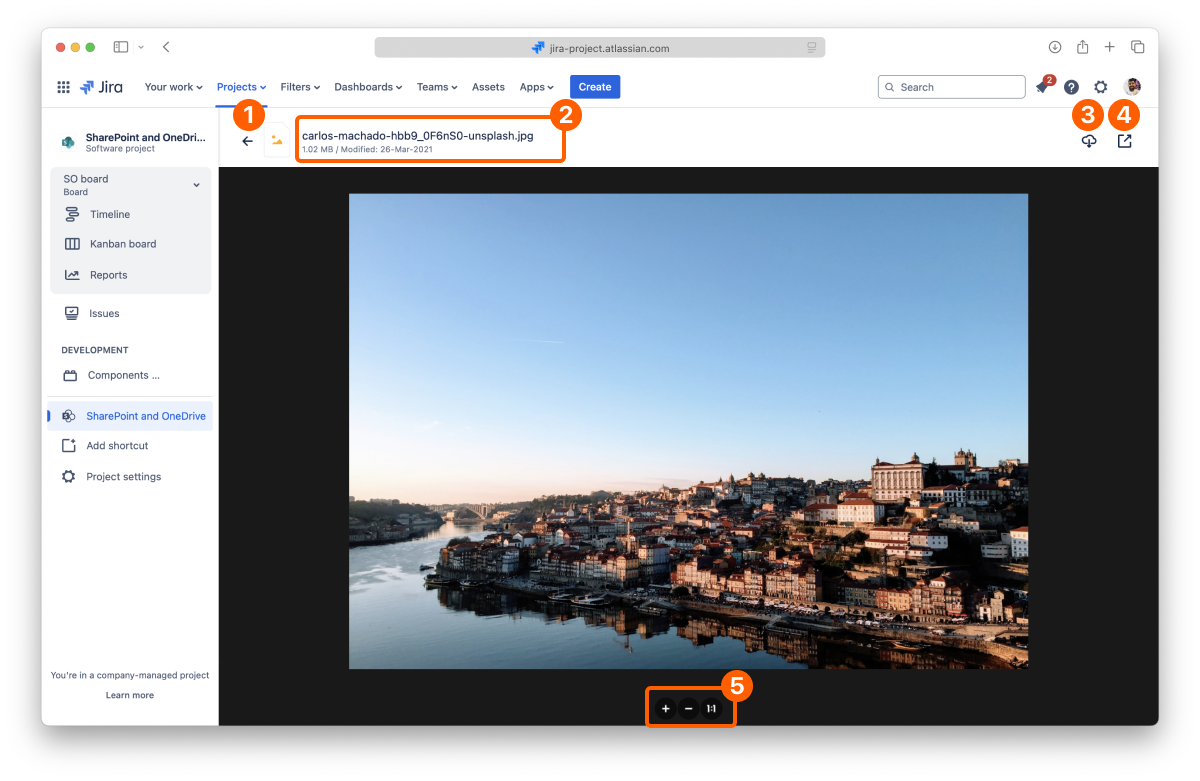
Using the SharePoint Connector app, you can attach files and folders to your Jira issues, preview their content, edit documents, and browse folders.
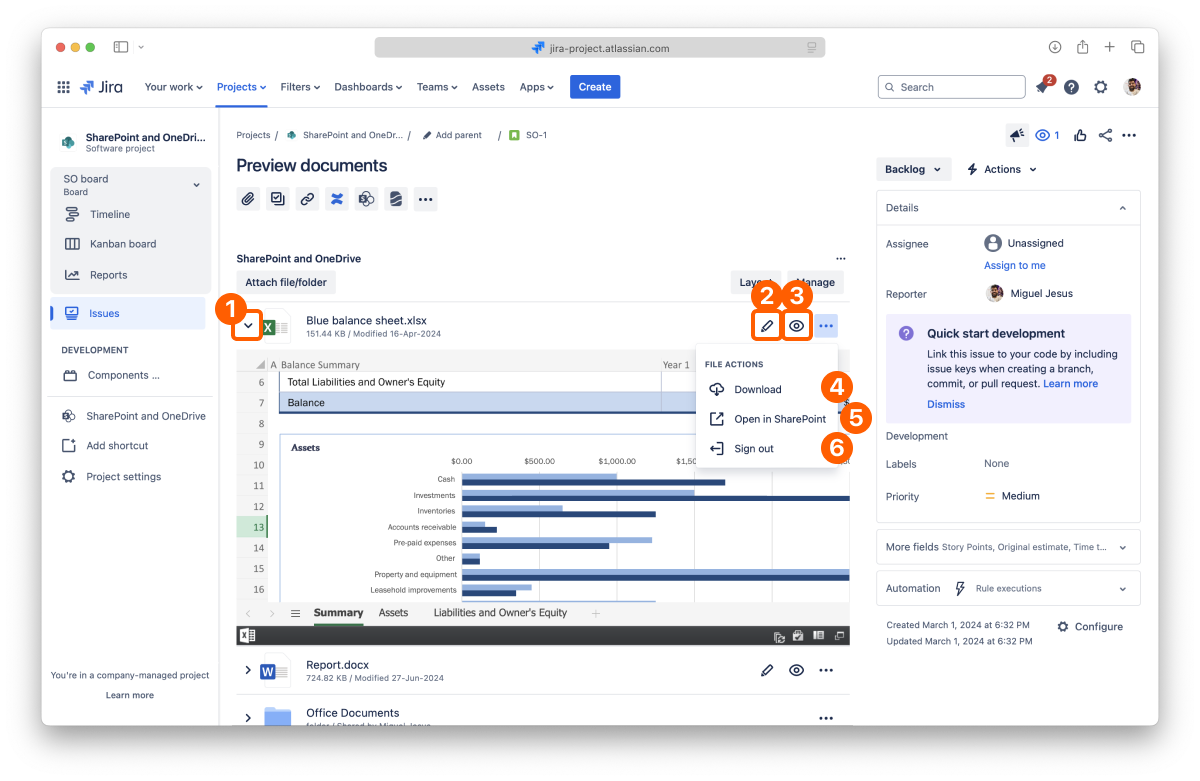
The full-screen preview for the files attached works the same way as described for the file manager. Click the icon or name of the file you want to open the preview.
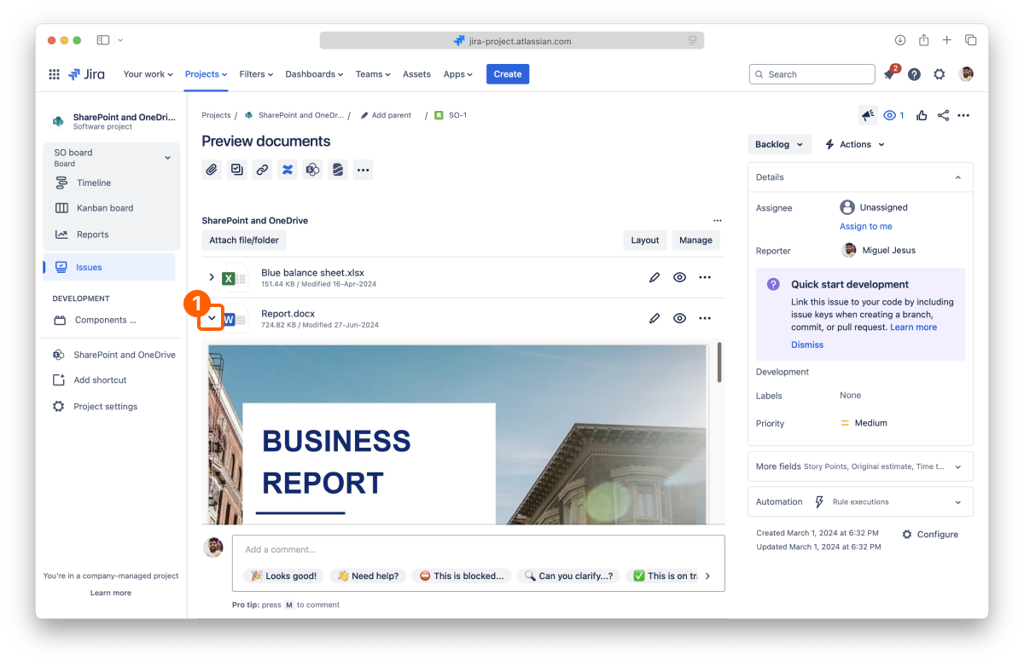
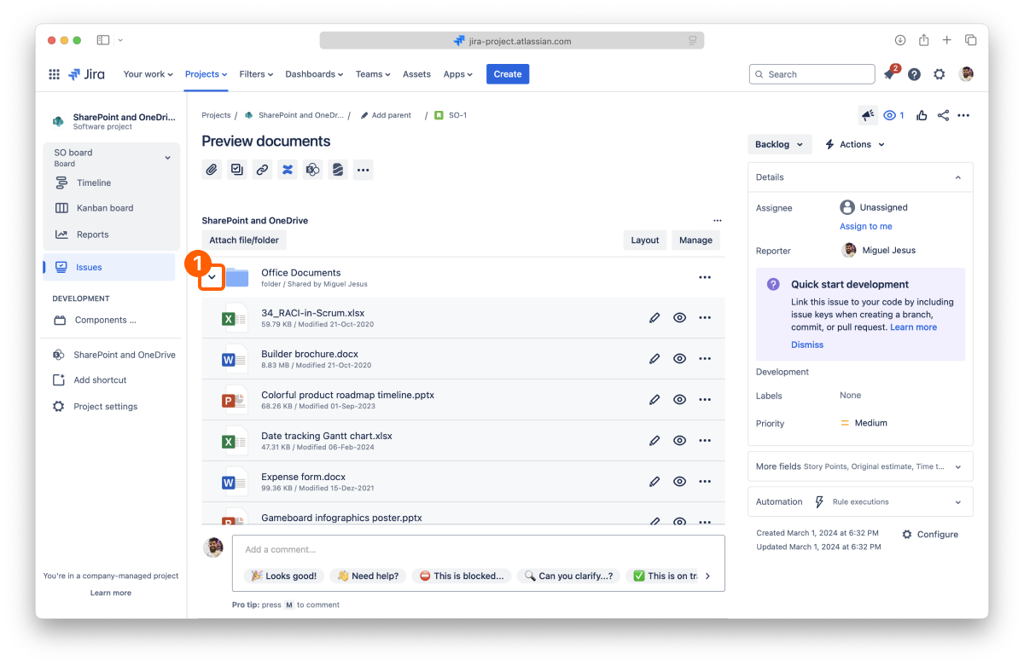
Another option exclusive to the preview in issues is to view the content inline without hiding your issue page. By default, every attached file and folder is displayed in a collapsed view to save screen space. You can expand each file by clicking the disclosure button on the left to preview its content.
You can expand attached folders similarly to see their content easily and even navigate sub-folders. You can also preview the files' contents inside the attached folder by clicking the name to open the full-screen preview.
When you have an attached folder on your issue, you can drag and drop a file from a local folder to upload it there. Doing this will save the file in the storage place containing the connected folder, helping you build your single source of truth.
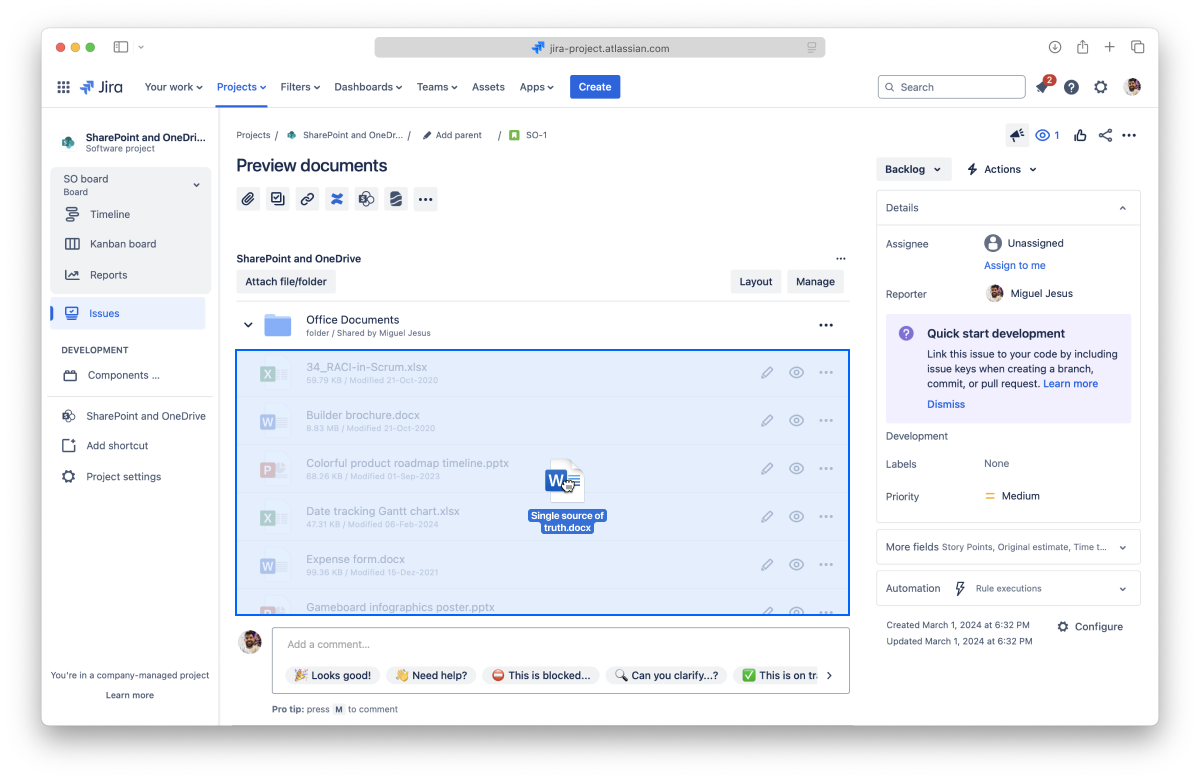
Depending on the file's size, your file can take a few moments to become available in the app.
1 Partial support for WEBM, some browsers like Safari don’t support it.
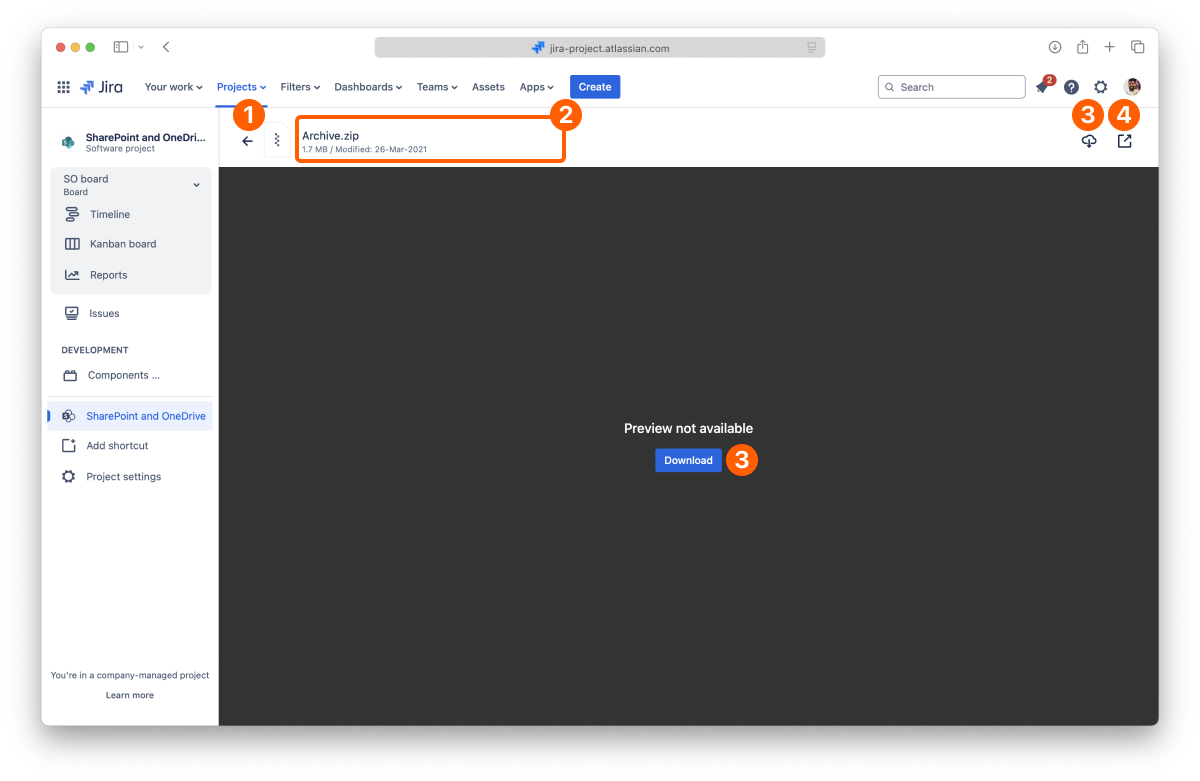
The SharePoint Connector app can preview many popular file types, but not all. When you try to preview a file type not specified above, the preview window will open with the message "No preview available" and a "Download" button so that you can open it with your desktop apps.
You can turn off downloads for shared files by restricting the permissions.
That's all on previewing files. Did you know you can also edit documents attached to your issues? Or create new documents on the file manager?
If you still have questions about the topics covered on this page, visit our support portal and send them to us. Our team is always happy to help.
Learn how to edit documents on Jira with the SharePoint Connector app.
We'll cover the different ways to edit your documents on Jira using the SharePoint Connector app, expanding the topics presented on the page about the file manager.
While some files are preview-only, like images and PDFs, when it comes to Office files, you can also edit the most popular formats right inside Jira. You can edit documents on the file manager and issues in which you attached files and folders without downloading to edit and re-uploading multiple copies or locking other people out while editing the document.
This way, it's easy to use your Jira issues as your one source of truth, with content always accessible, updated, and editable.
You can edit an Office file from the file manager, including the full-screen preview, and when they’re attached to your pages.
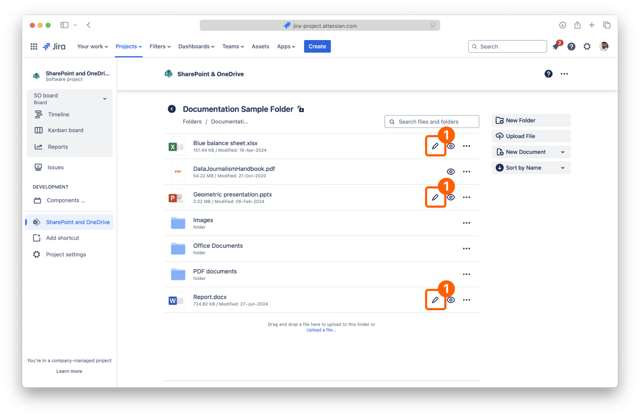
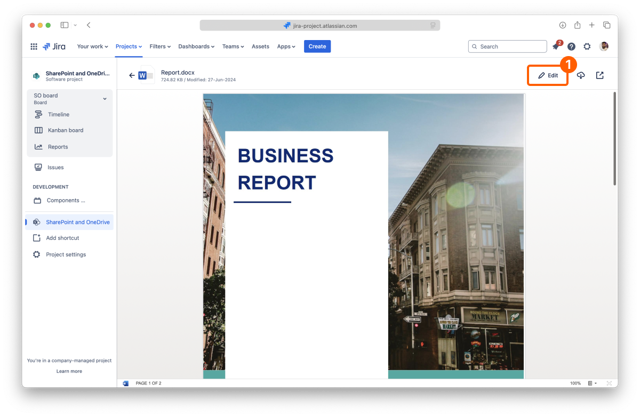
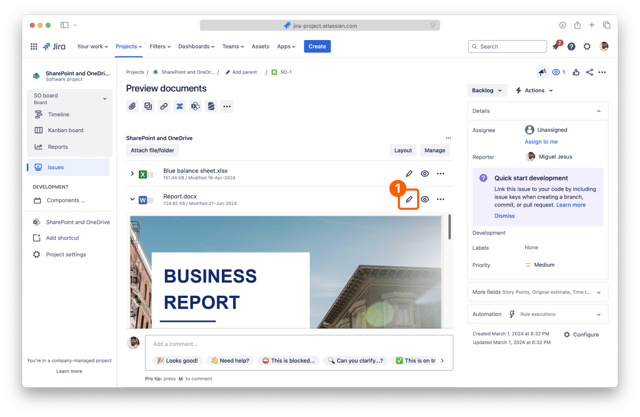
Regardless of the context, you can edit Office files by clicking the Edit button. A new tab opens, where the appropriate editor opens, and you can edit your file in a few seconds.
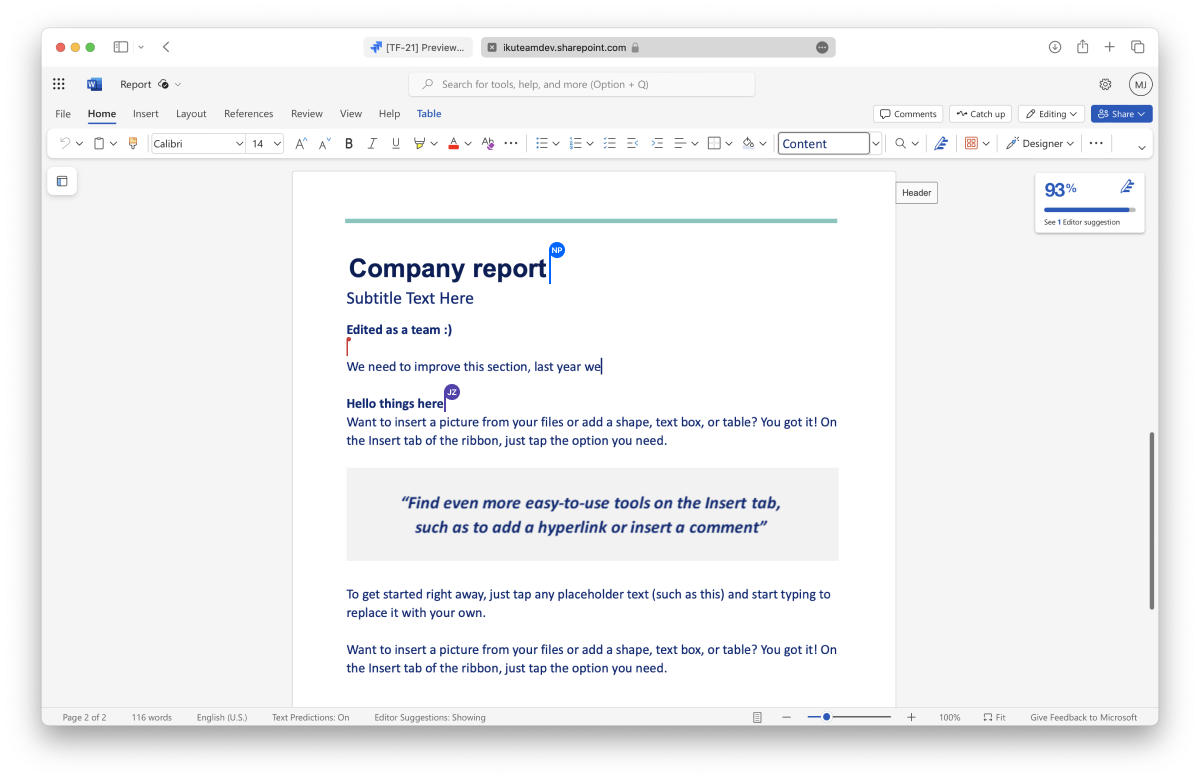
You and your team can work together when editing a Microsoft Office document, spreadsheet, or presentation. The Microsoft 365 editor supports real-time collaboration, so there are no file lockdowns. There's also an autosave feature, so you can close the tab when you finish.
Open Office files work the same way as Microsoft Office files, using the Microsoft 365 editor, but do not support real-time collaboration.
As mentioned before, Microsoft Office and Google Docs files support real-time collaboration.
You can start editing a document attached to a page or from the file manager. The editor seamlessly creates a collaboration session when another person clicks to edit the same document. You can continue to edit the document as before and leave it anytime by closing the browser tab.
That's all for editing documents. Did you know you can also create new documents on the file manager?
If you still have questions about the topics covered on this page, visit our support portal and send them to us. Our team is always happy to help.
Learn how to attach files and folders to your issues with the SharePoint Connector app to share the knowledge with your team.
With the SharePoint Connector app on Jira, you can attach files and folders to your issues to share knowledge with your team.
On this page, we’ll show you how to do just that, from the issue view and the file manager, helping you and your team keep all the information updated and in one place. If you want to attach files and folders for your customers, check the Attach files and folders for customers page.
By default, Jira hides installed apps. So, the first step is to add the SharePoint Connector app to your issue.
Click the “SharePoint” button below the issue title.
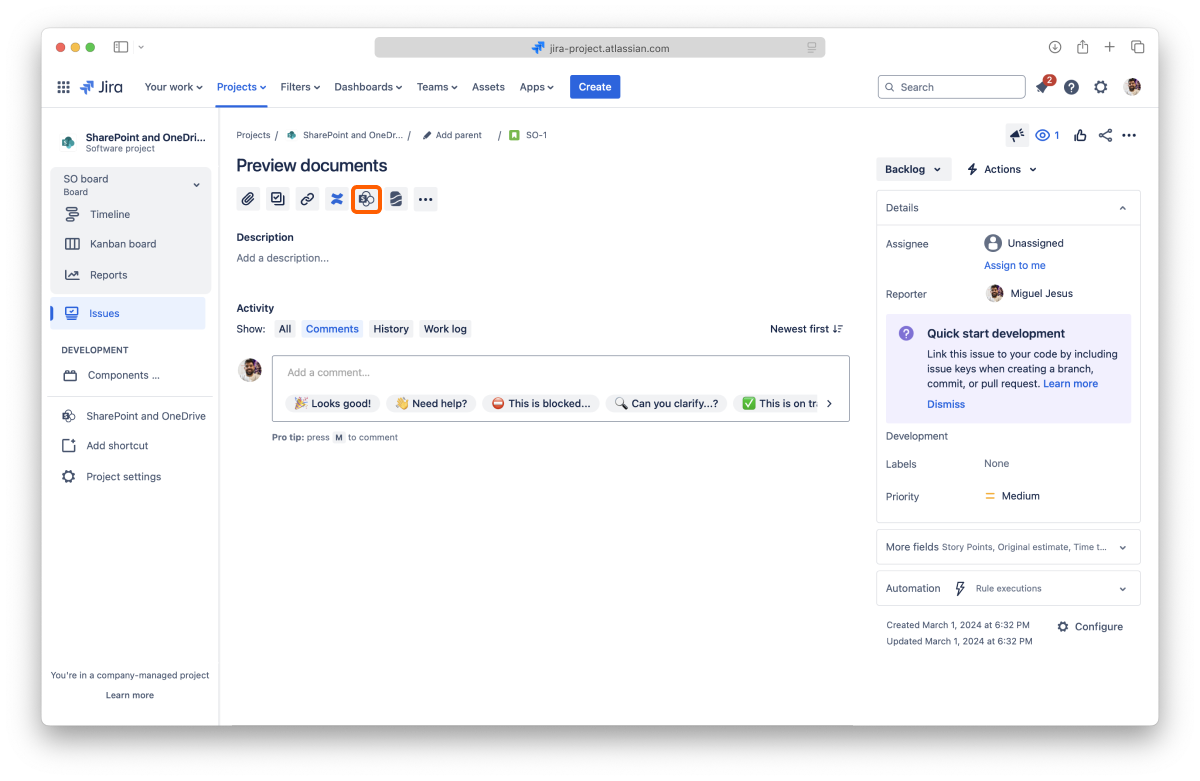
And that’s it. The app will load below the issue description and always appear when you return to that issue (but you can hide it again).
Remember to add the app to the issue when you attach files and folders from the file manager.
With the app in place, you can start attaching files and folders.
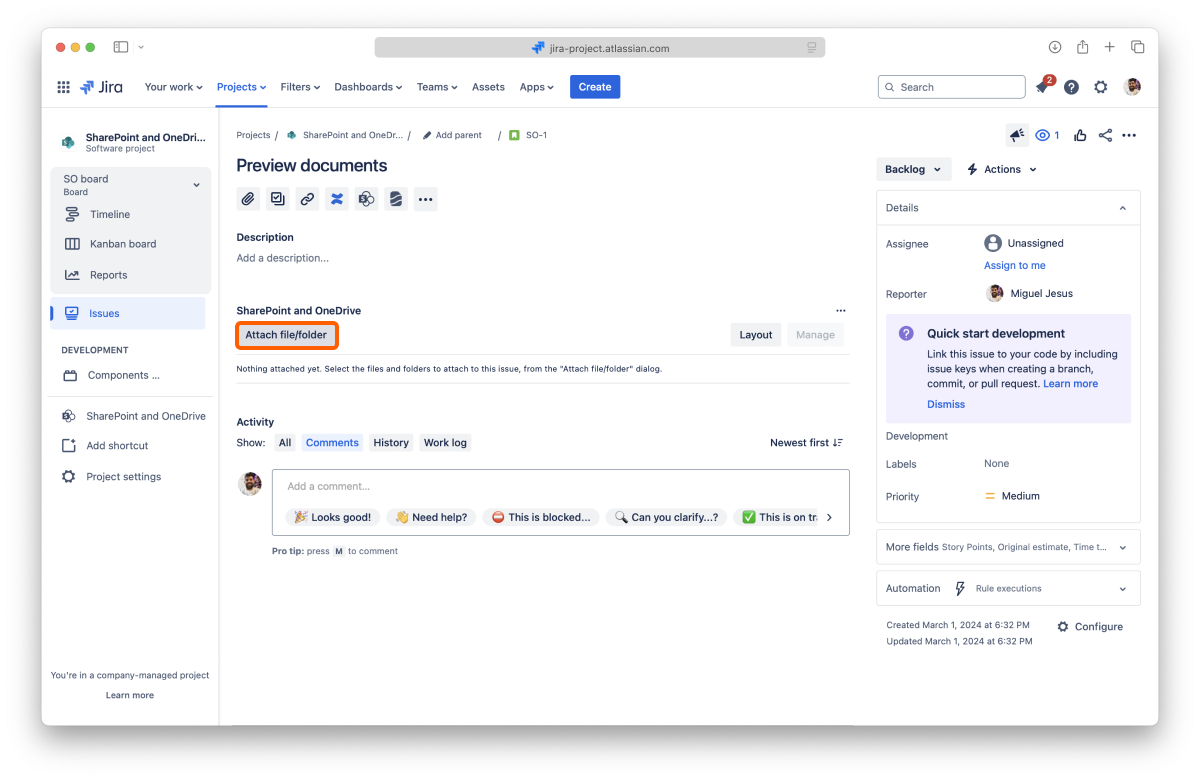

All done. Your attached files and folders are now visible on the issue.
In Jira, you can attach files and folders to your issues directly from the file manager, which is accessible from the sidebar.

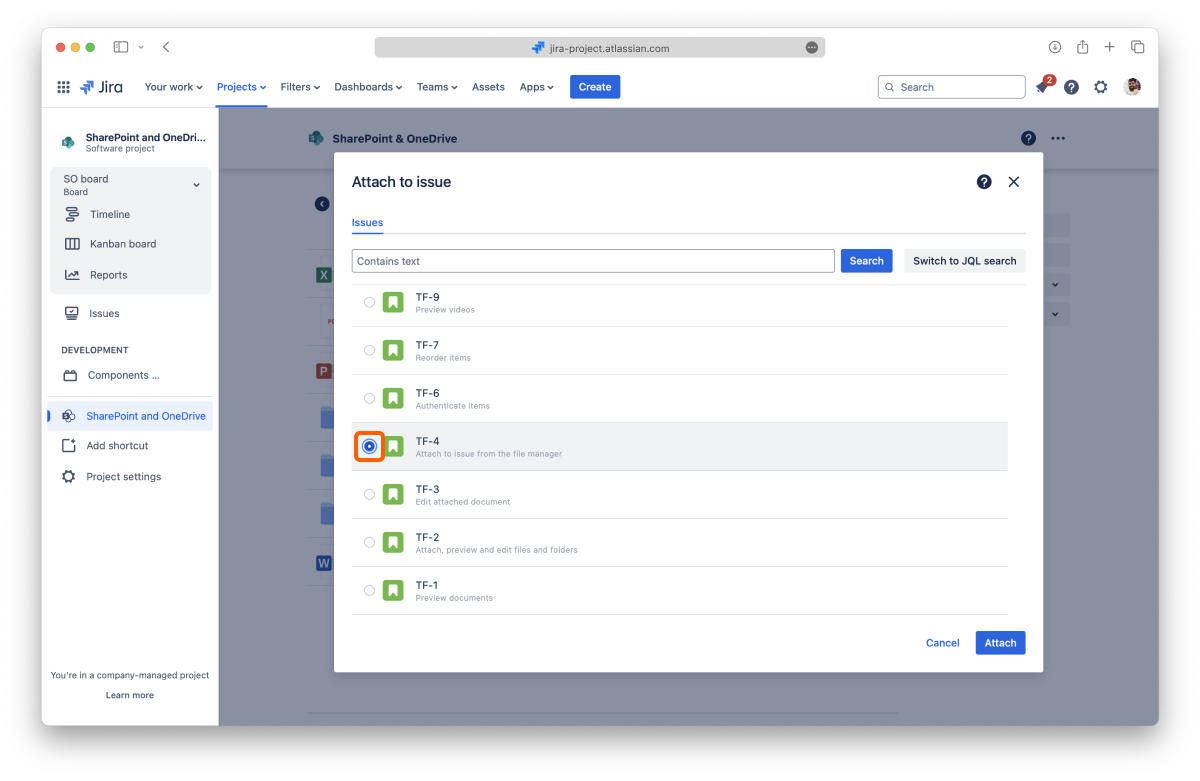
All done. Your file or folder is now attached to the issue. Click the "View issue" button to jump to the issue page.
You need to add the app to the issue page to view the attached files and folders from the file manager.
By default, the files and folders attached to Jira issues use a regular header and appear in the collapsed view to use less space on the screen. It’s easy to preview the file by clicking the arrow to open the expanded view, which uses the width of the page and is 464px tall.
The Admin can set different defaults, and you can customize individual issues.
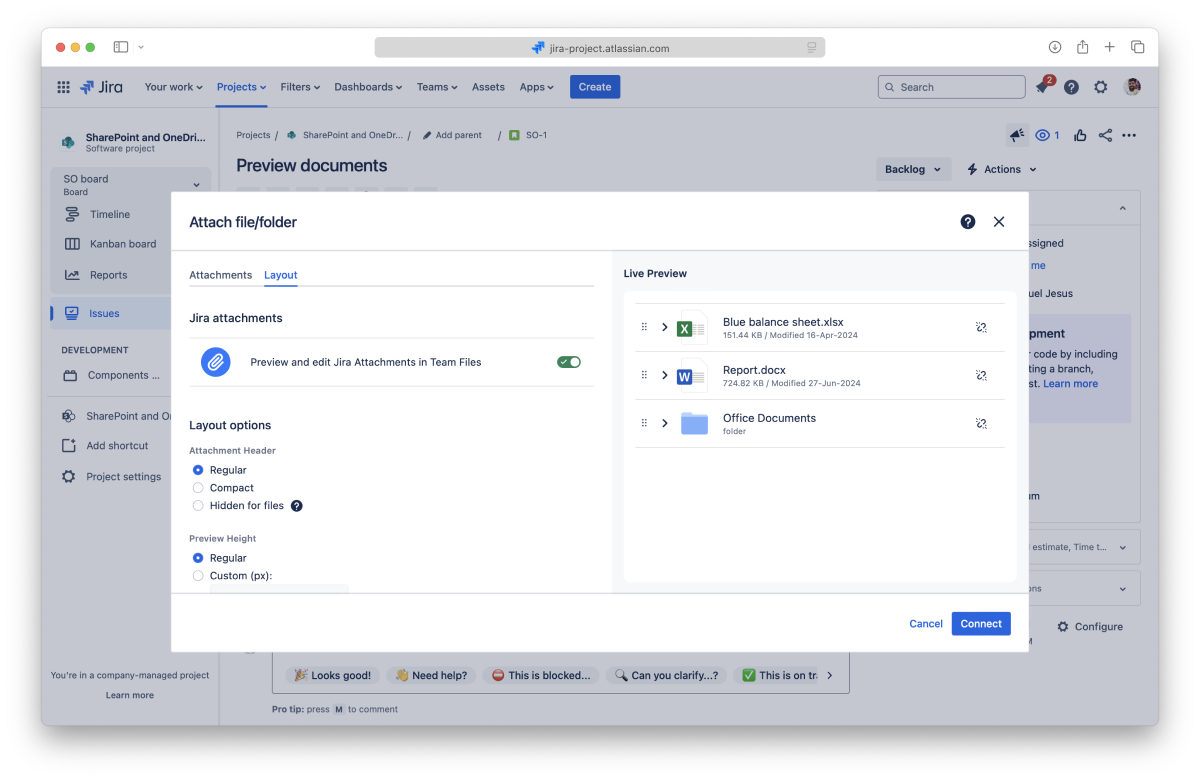
You can set different layout settings when attaching files and folders to your issue or by clicking the “Layout” button when you already have attached something. You can preview the changes in the “Live Preview” panel. When you save the changes, you’ll see the new layout applied to your issue page.
You can also edit the layout of attached files and folders by clicking the “Layout” button in the app.
Select the size for the header of the attachment:
Select the height for the preview:
Select the behavior for the preview:
You can reorder files and folders in the app.
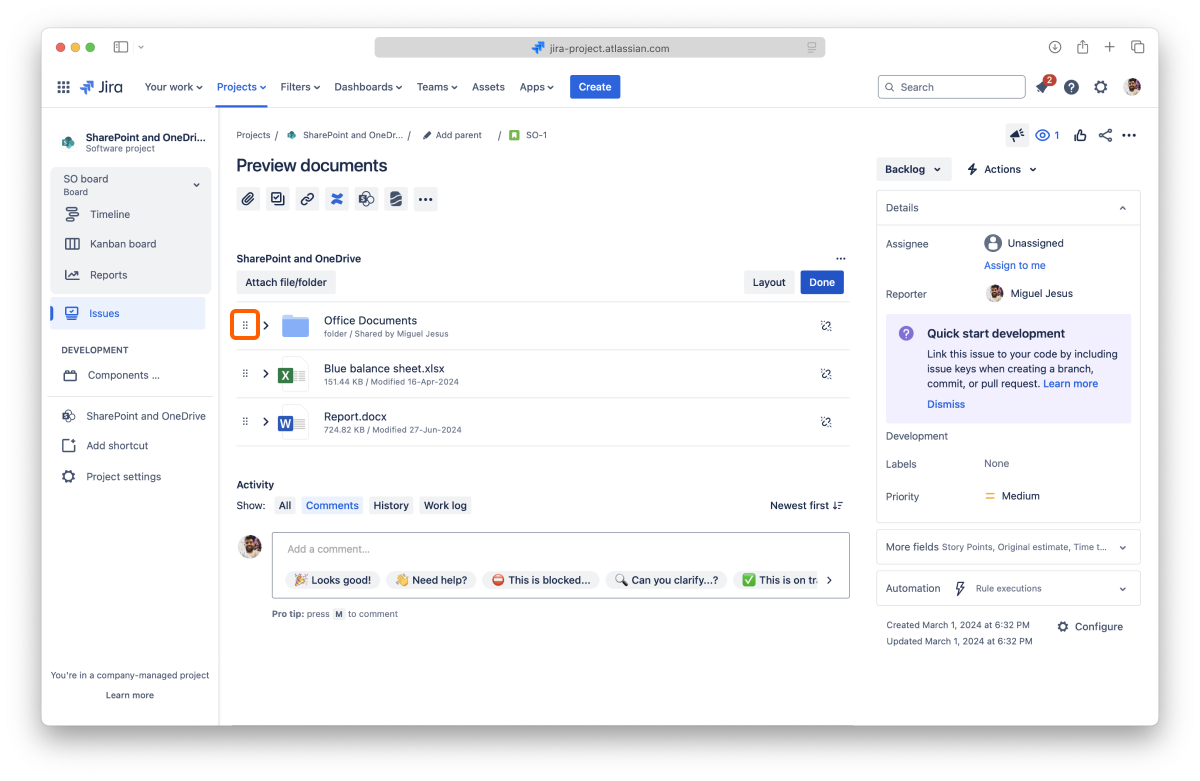
All done. The app is updated.
You can remove specific files and folders attached to an issue at any moment.

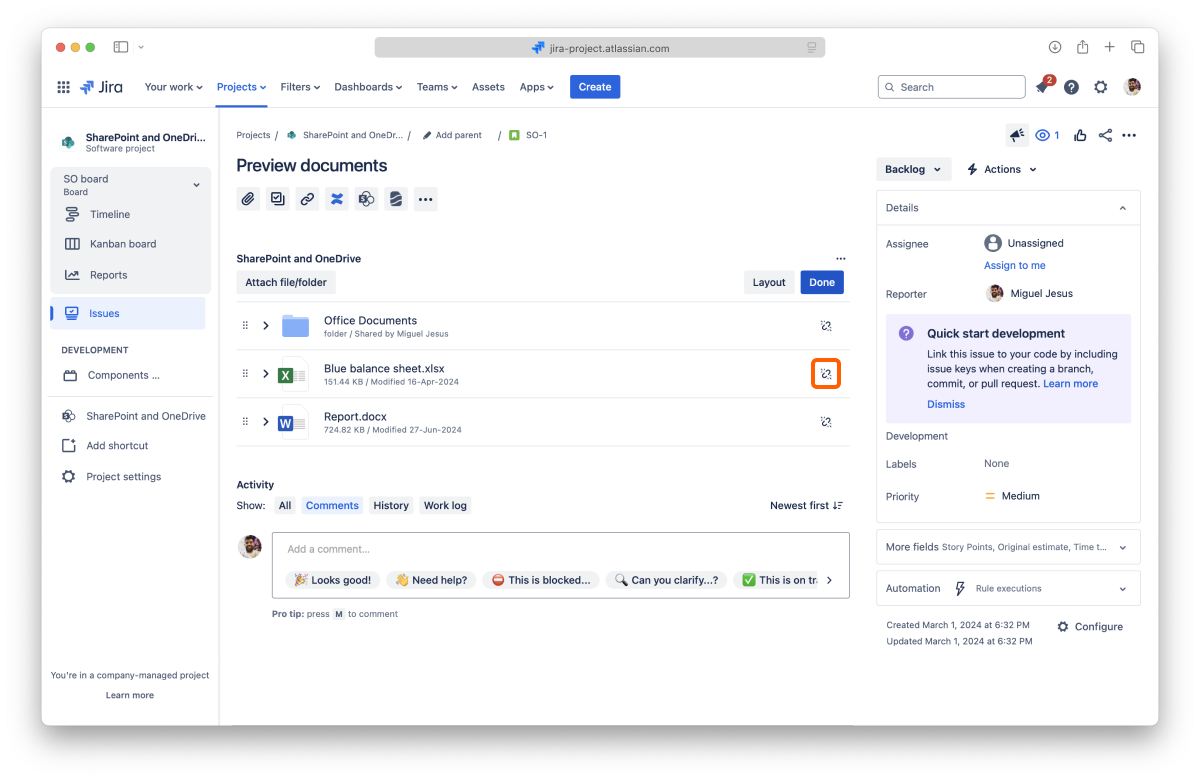
It's all done. Your files and folders are safe and sound in your storage place, but they are no longer connected to the issue.
This action is undoable, but you can attach the files and folders again.
You can also hide the entire app on the issue page while keeping all the files and folders attached.
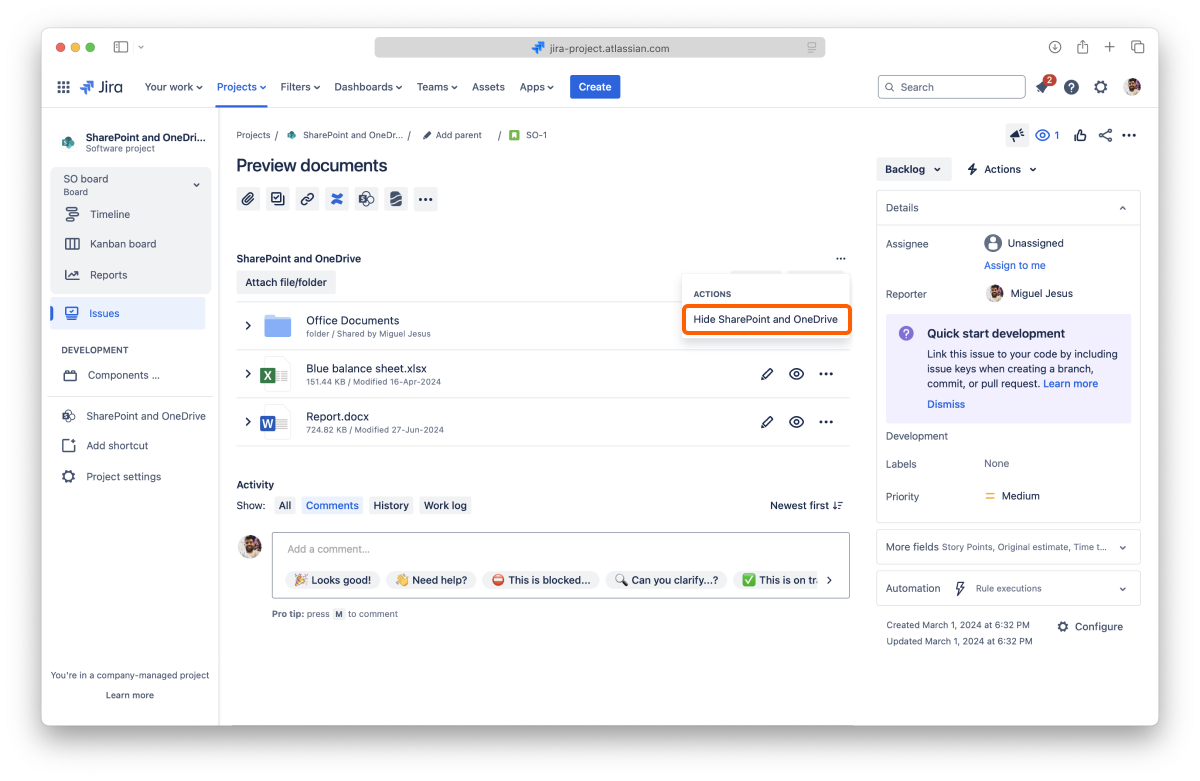
All done. Your files and folders are still attached to the issue but not visible. To show them again, add the app back.
Now you know how to attach files and folders to your issues. Don’t forget you can also attach files and folders for your customers (Jira Service Desk projects only).
If you still have questions about the topics covered on this page, visit our support portal and send them to us. Our team is always happy to help.
Learn how to attach files and folders for your customers with the SharePoint Connector app.
The SharePoint Connector app on Jira Service Management projects works the same way as in the regular Jira projects, with some extra features. You can attach files and folders to share knowledge with your team, and now you can also do it for your customers.
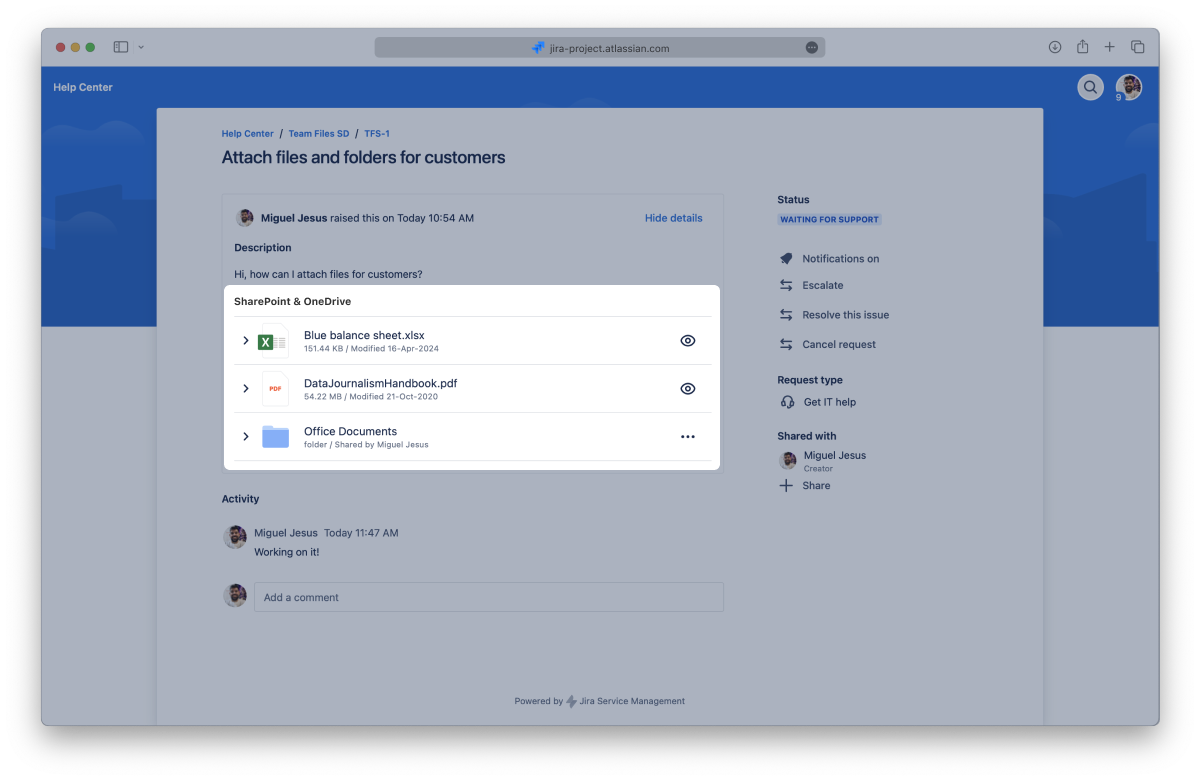
This page will show you how to do just that from the issue view and the file manager while setting the appropriate permissions. This will help you and your team keep all the information updated and in one place. If you only want to attach files and folders for your team, check the Attaching files and folders to issues page.
By default, Jira hides installed apps. So, the first step is to add the SharePoint Connector app to your issue.
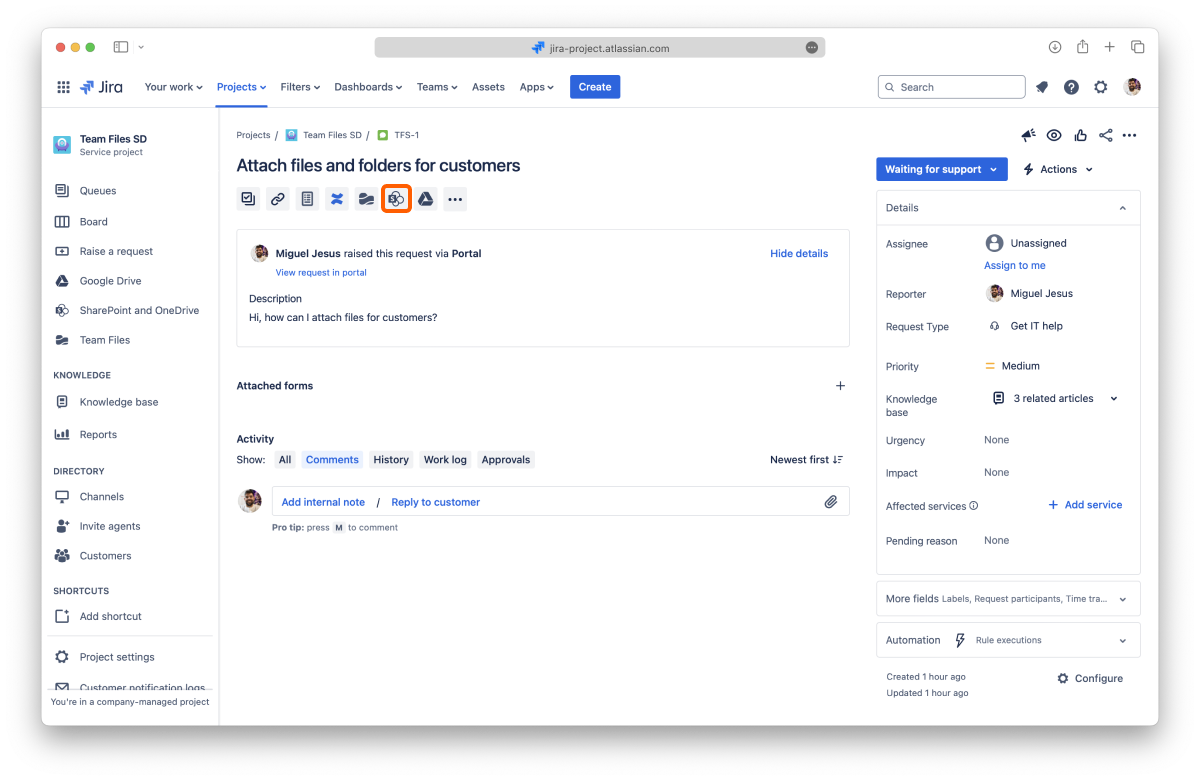
Click the "Attach items with SharePoint" button below the issue title.
And that's it. The app will load below the issue description and always appear when you return to that issue (but you can hide it again).
Remember to add the app to the issue when you attach files and folders from the file manager.
With the app in place, you can now start attaching files and folders.
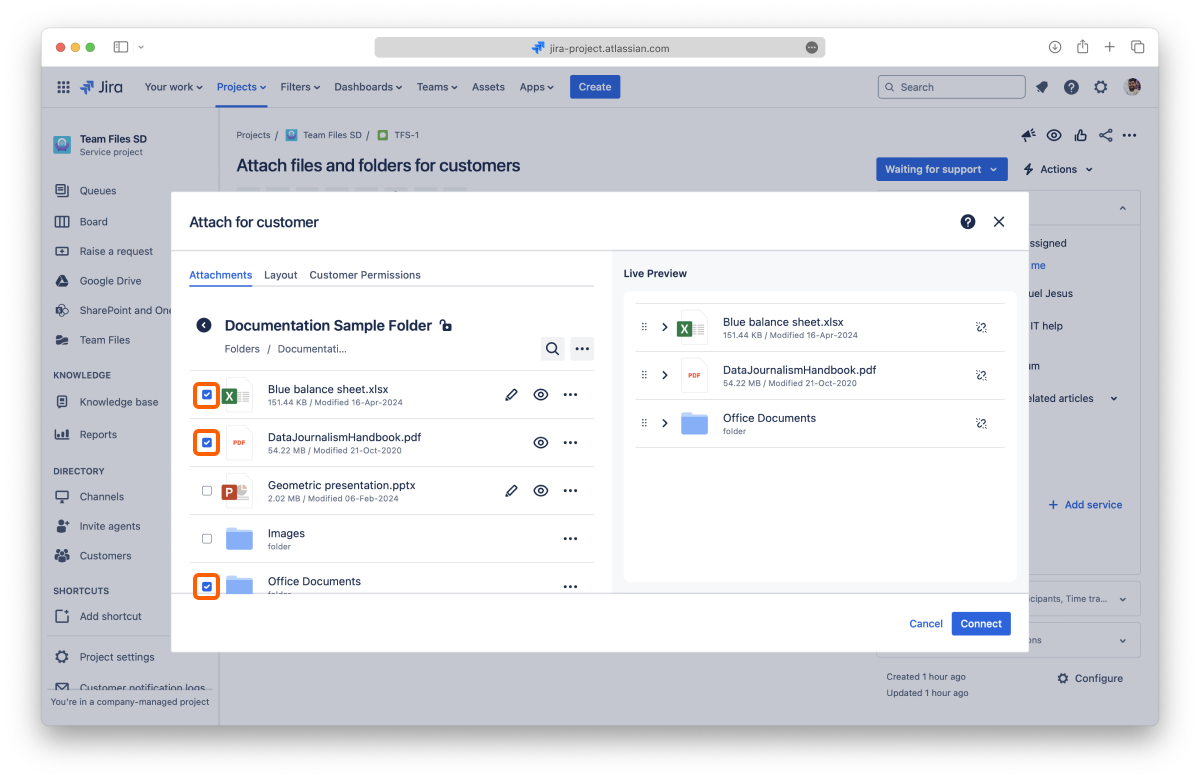
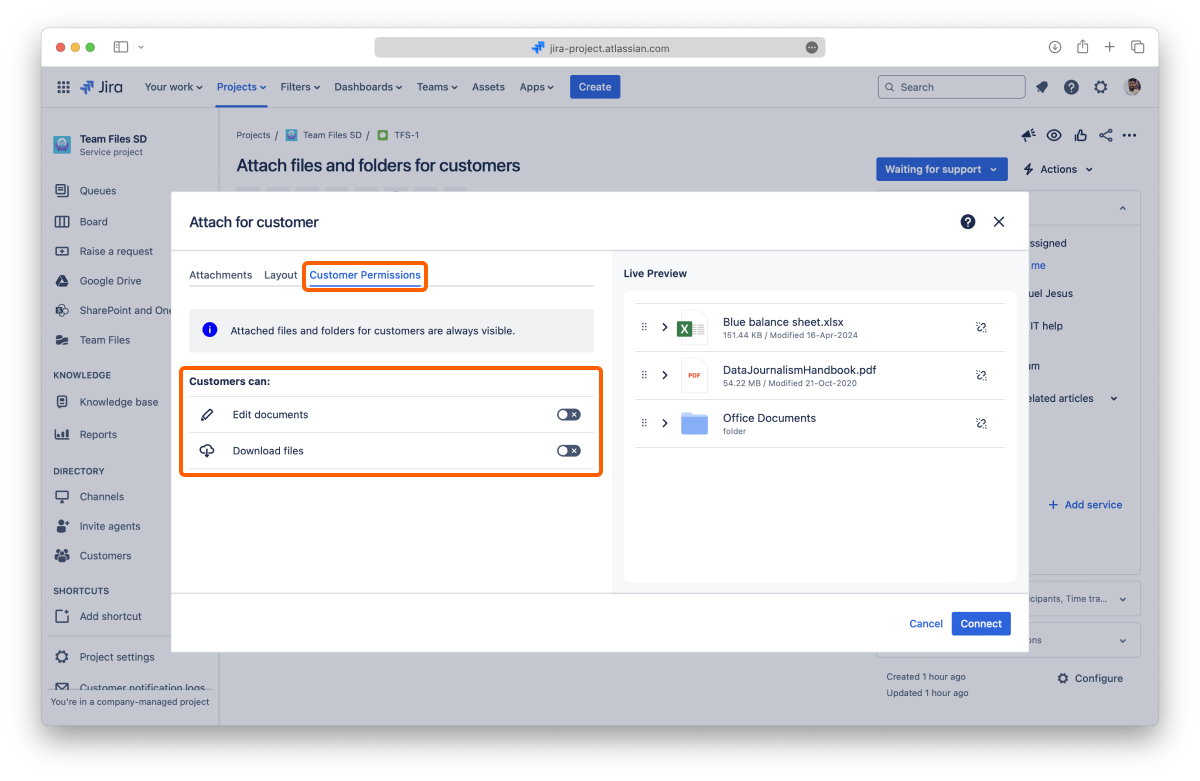
Customers can't download or edit files attached to the issue by default.
The attached files and folders for customers are always visible but only editable and downloadable if you allow it.
All done. Your attached files and folders are now visible on the issue page and the customer portal.
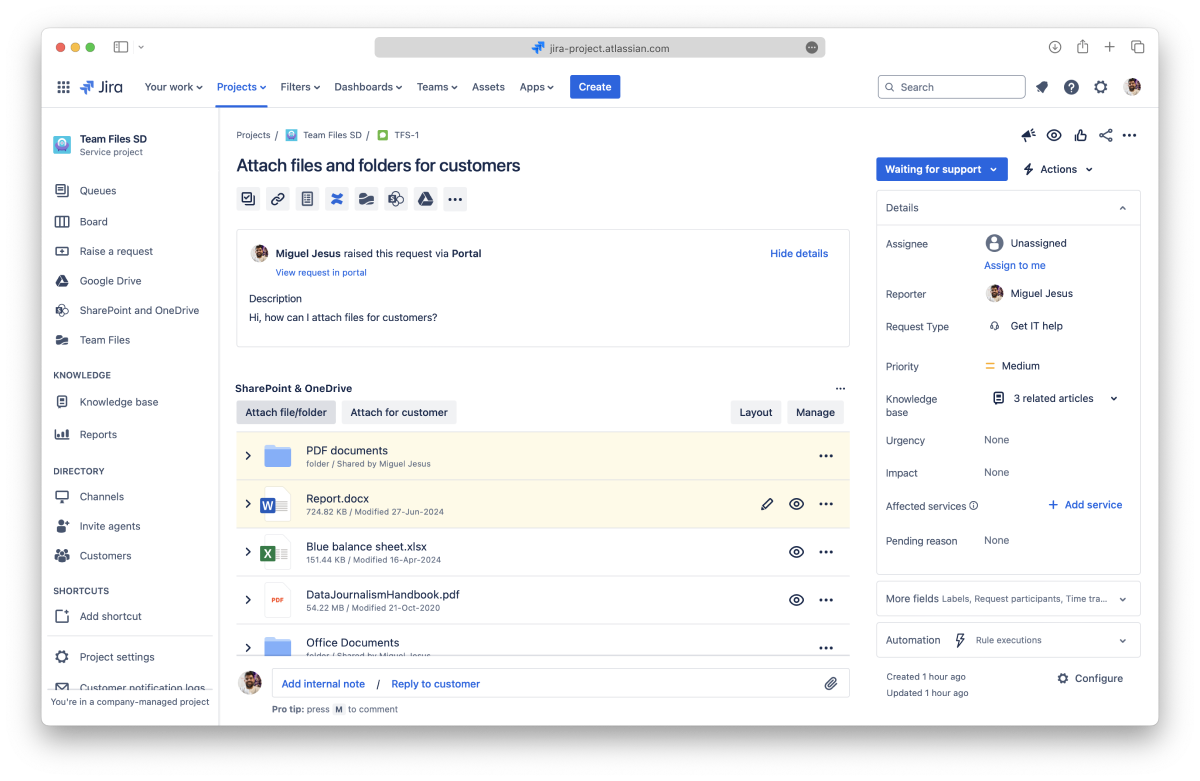
The attached files and folders for customers have a white background. In contrast, the files and folders shared with the team have a light yellow background to help you distinguish them the same way Jira differentiates messages for the customer and internal notes.
In Jira Service Management, you can attach files and folders to your issues directly from the file manager, accessible from the sidebar, whether for your team or customers.
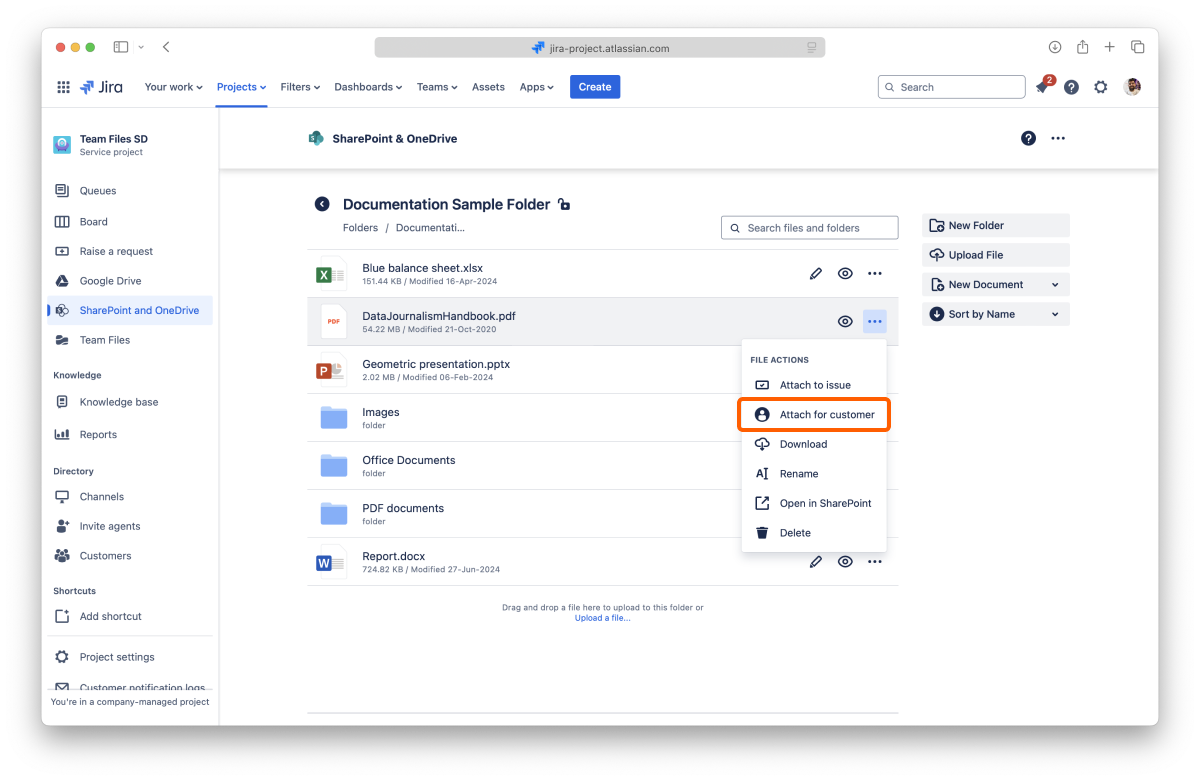
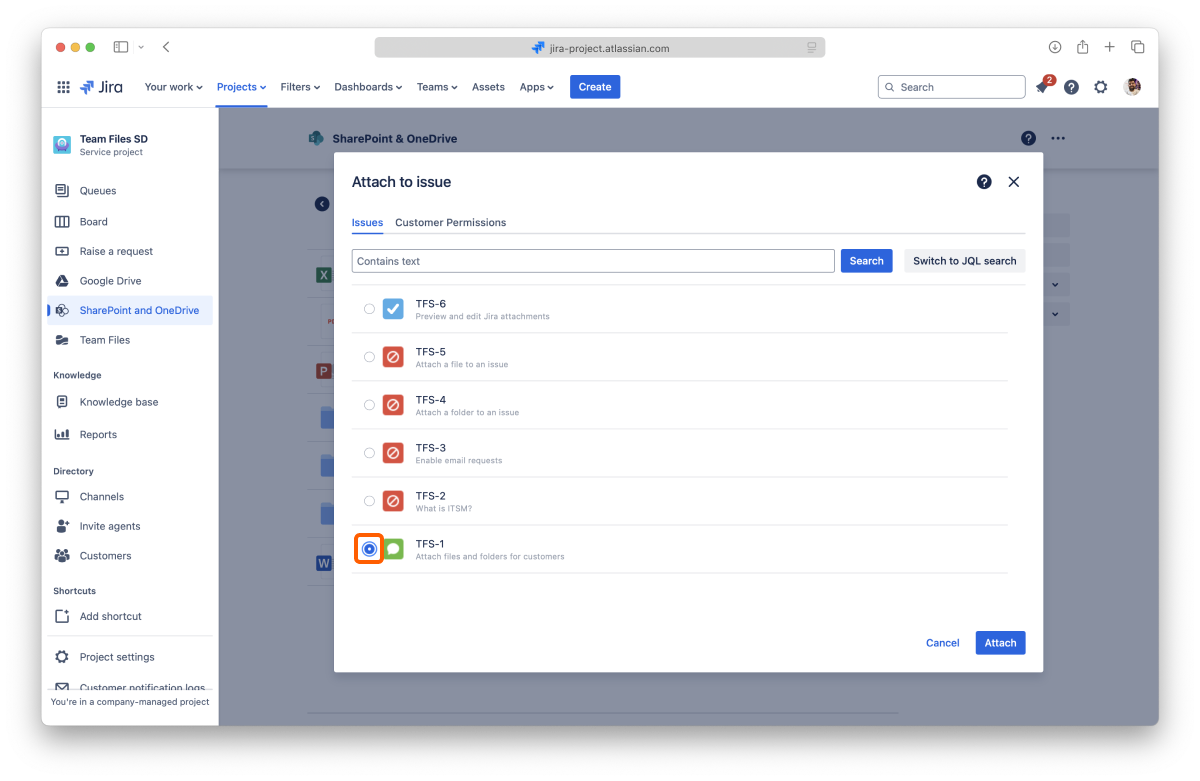
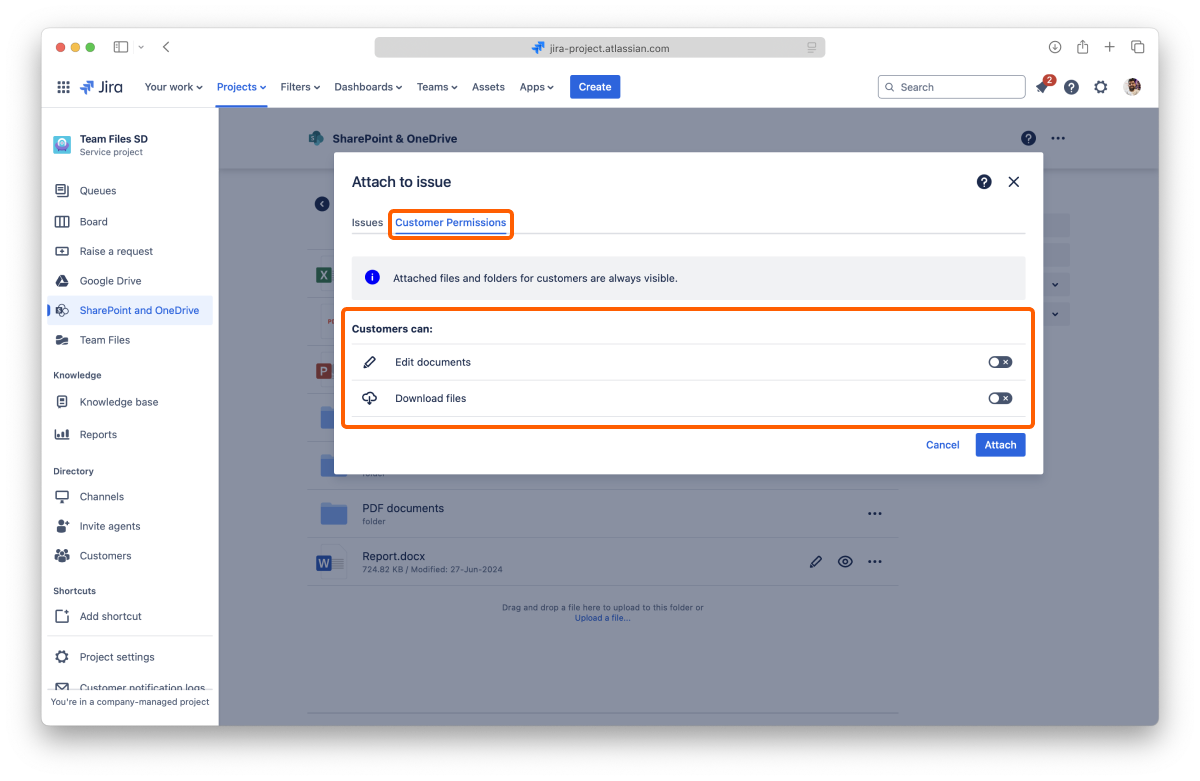
By default, customers can't download or edit files attached to the issue.
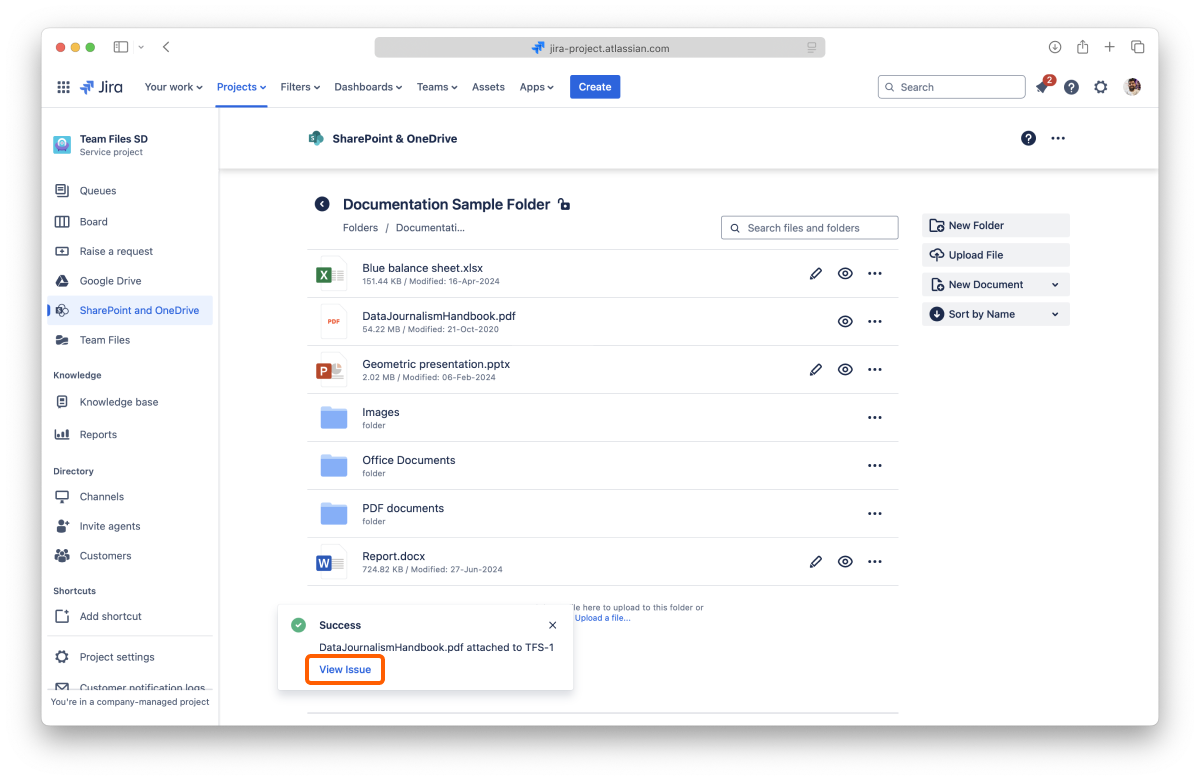
All done. Your attached file or folder is now visible on the customer portal. You can click the "View issue" button to jump to the issue page.
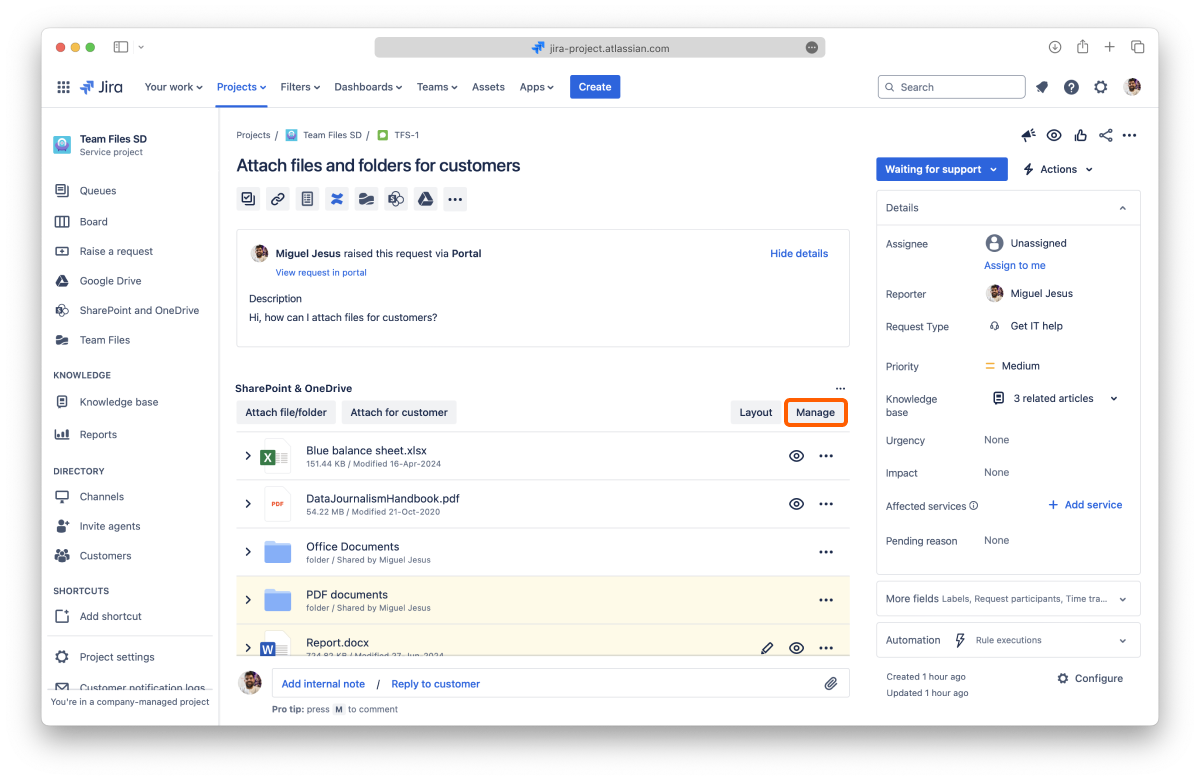
The attached files and folders for customers have a white background. In contrast, the ones shared with the team have a light yellow background to help you distinguish them the same way Jira differentiates messages for the customer and internal notes.
You need to add the app to the issue page to view the attached files and folders from the file manager.
You can remove specific files and folders attached to an issue at any moment.
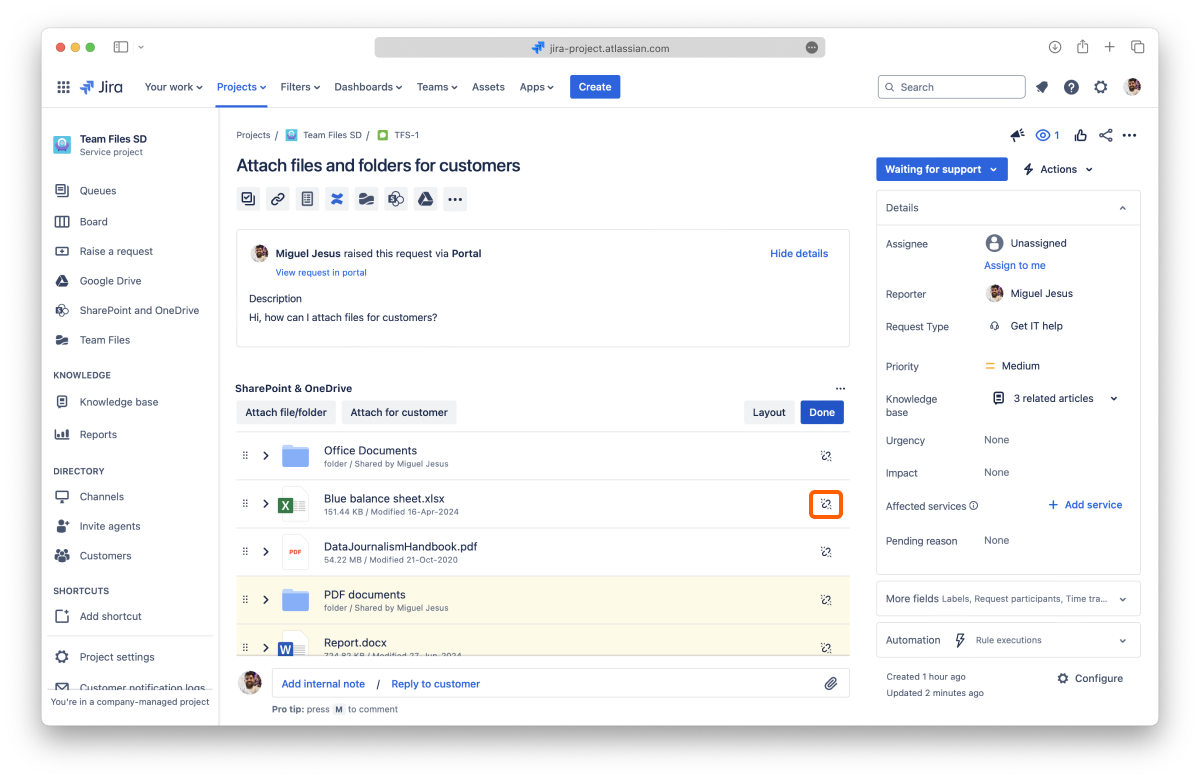
All done. Your files and folders are safe and sound in your storage place but no longer connected to the issue.
This action is undoable, but you can attach the files and folders again.
You can also hide the entire app on the issue page while keeping all the files and folders attached. Files and folders attached for customers are always visible in the customer portal.
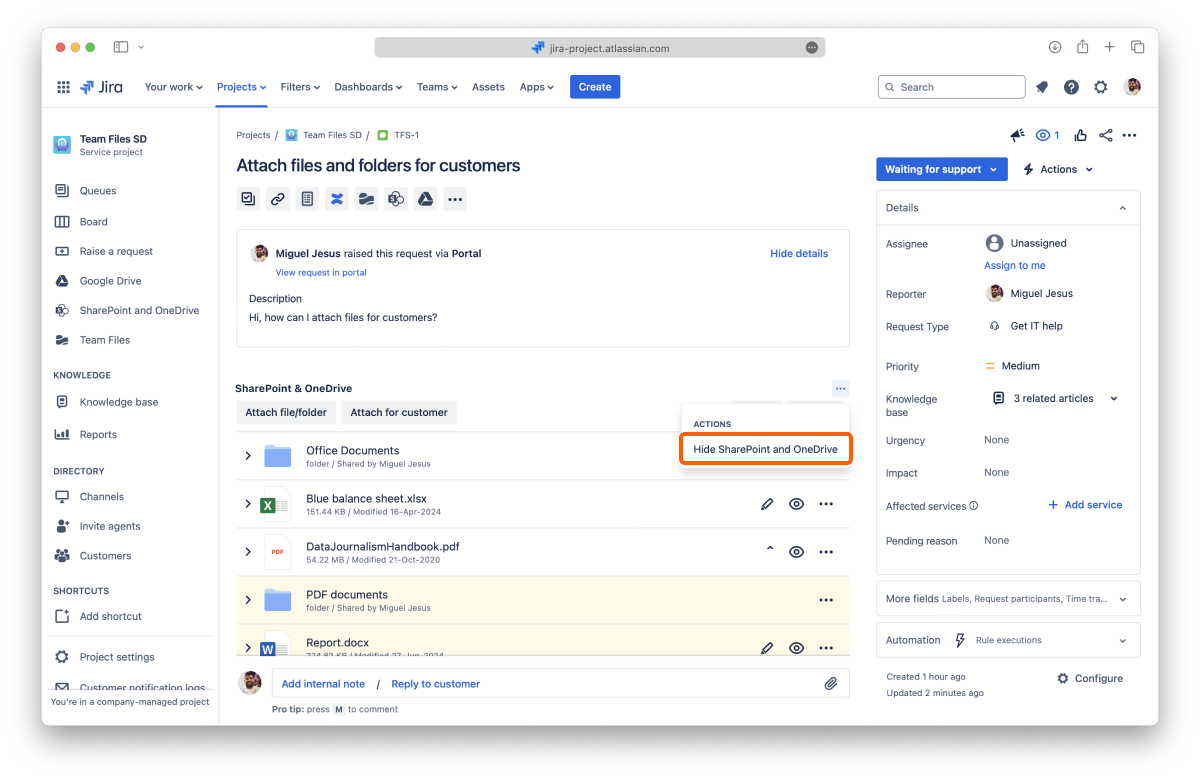
All done. Your files and folders are still attached to the issue but not visible. To show them again, add the app back.
Now you know how to attach files and folders for your customers. Don't forget you can attach files and folders just for your team.
If you still have questions about attaching files and folders to your issues, visit our support portal and send us your questions. Our team is always happy to help.
Learn how to set permissions for connected folders.
You can set different permissions to the connected folders to tailor the app experience to your team's needs. You can decide whether other people can view the folders you connect to and whether they can edit the content or download files. If you are familiar with Jira's permissions for issues, you'll feel right at home.
You can set permissions when connecting a folder in the "Permissions" tab or from the File Manager at any moment by clicking the lock icon.
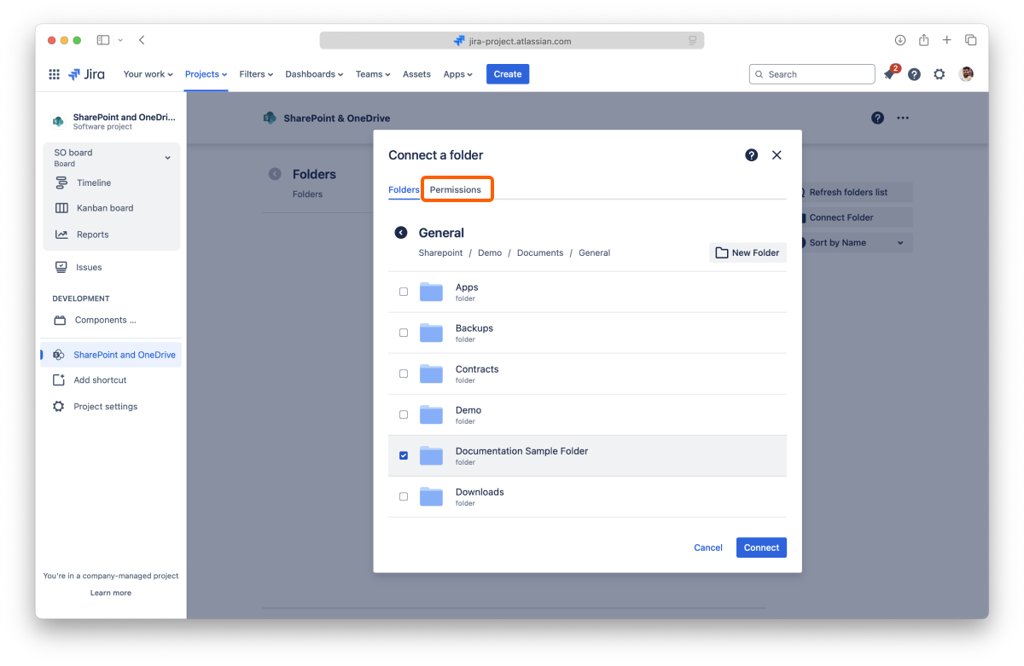
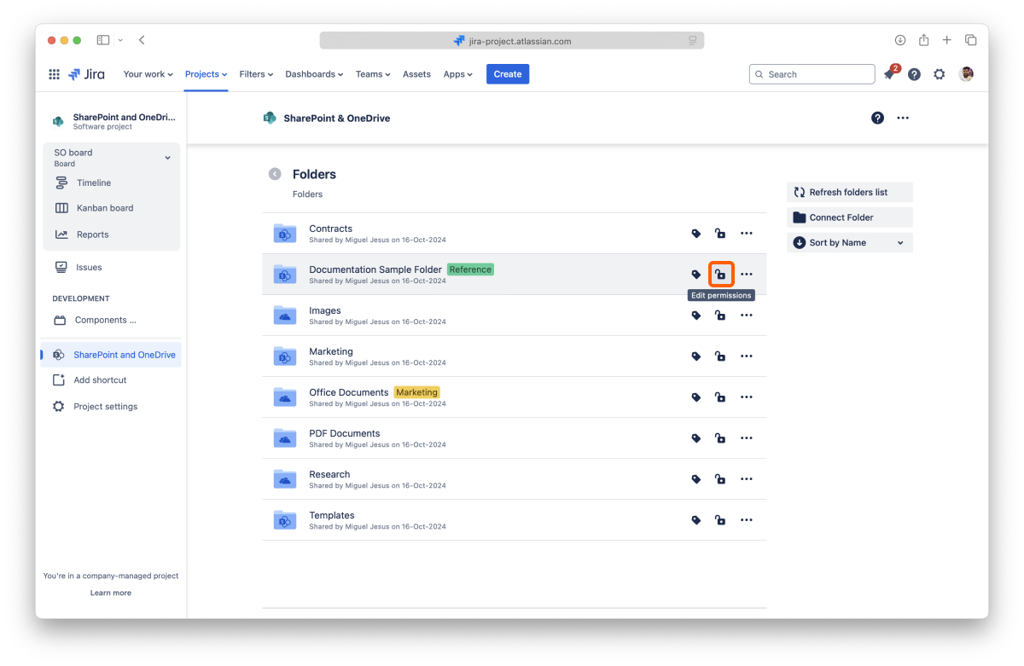
The "Permissions" tab shows the current settings and how they affect your connected folder.
There are three main options that you can select from the drop-down menu:
It is the default option, which means everyone with access to the Jira Project can view and edit the content of the connected folder.
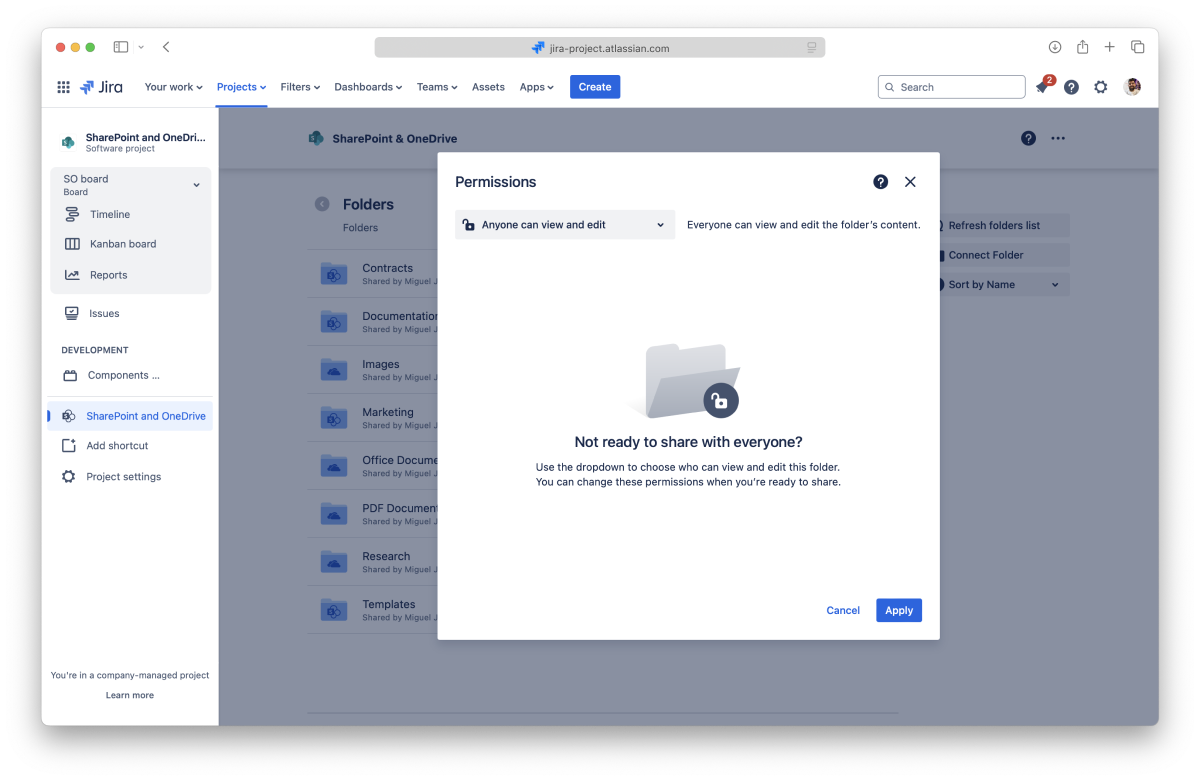
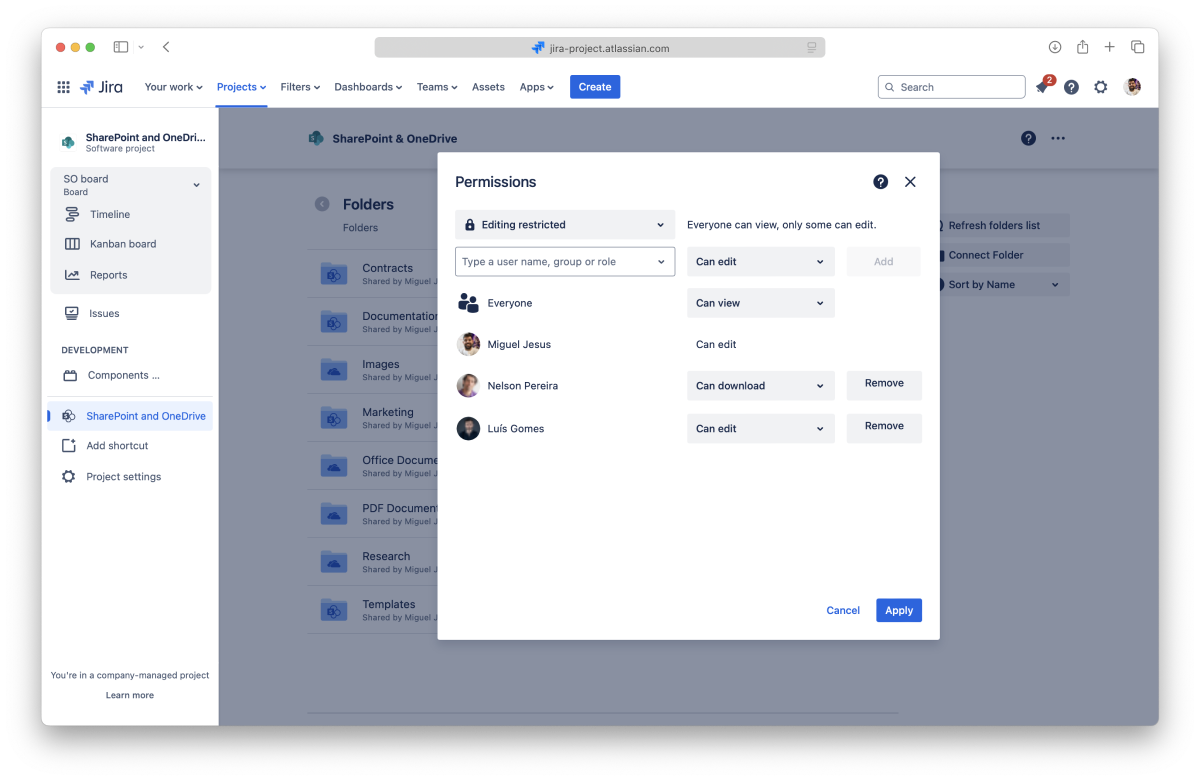
Everyone can view the folder and its content, but only the person who attached it (the owner) can edit it. The owner can also grant permission to download files or edit documents to specific people, groups, and roles.
Everyone has no access to the folder; only the owner can view the folder and edit the content. Only people, groups, or roles added by the owner will have permission to view the folder or edit its content.
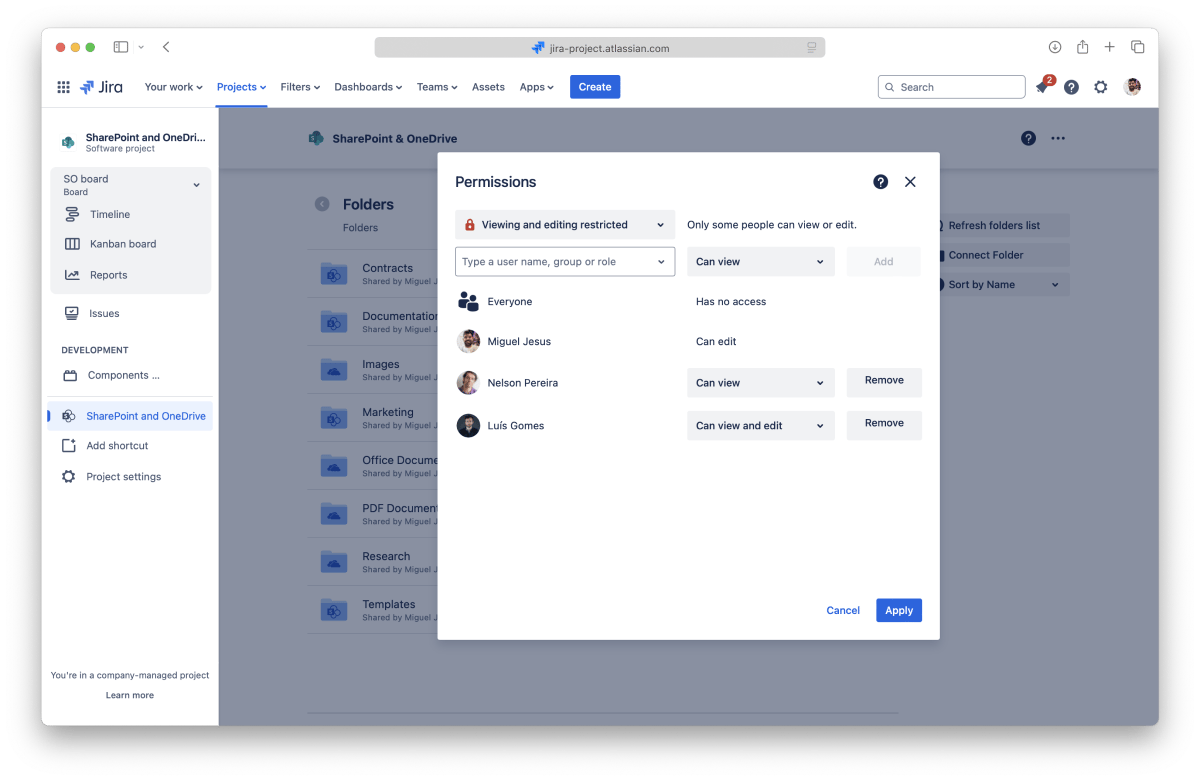
The list will be updated to include the new addition. You can add as many entries as you need and click the "Connect" button (when connecting a folder) or the "Apply" button (when editing permissions).
Changing any person's permissions, group, or role in the permissions modal is possible. The connected folder owner can change the permissions anytime, returning to the permissions modal. The owner can add more people and groups or revoke granted permissions by clicking the "Remove" button.
Please keep in mind that permissions are additive. If a person can only view a folder as an individual and is part of a group that can edit, this person will be able to edit the folder, as SharePoint Connector combines all the permissions.
Files and folders attached to issues will only be visible to people with appropriate permission for the folder.
When you use the app to attach files and folders to an issue, SharePoint Connector uses the connected folder's permissions at that moment. If you change the folder's permissions, the macro's attachments will not get the updated permissions. If you need them to use the new permissions, you'll need to attach them again.
The SharePoint Connector app simplifies access to shared content by default, favoring ease of use with simplified permissions. This default overrides file permissions set in SharePoint or OneDrive for folders connected to Confluence. The original storages are unchanged and keep the permissions set.
Admins can require users to authenticate with an account with access to the connected folders to respect the set permissions in the storage. Use the "Replicate storage permissions" setting with folder permissions to better control how files are shared, viewed, and edited.
Now you know how to set permissions for your connected folders to your issues and make changes to your macros. Don't forget you can connect more folders from the file manager.
If you still have questions about the topics covered on this page, visit our support portal and send them to us. Our team is always happy to help.
Project managers can adjust the SharePoint Connector project settings to the team’s needs.
Project managers can find the SharePoint Connector project settings in the “Apps” section of the Project settings, accessible from the project sidebar or menu.
The SharePoint Connector app is available by default for every project. Project managers can deactivate it in the project settings if it isn’t required in that project.
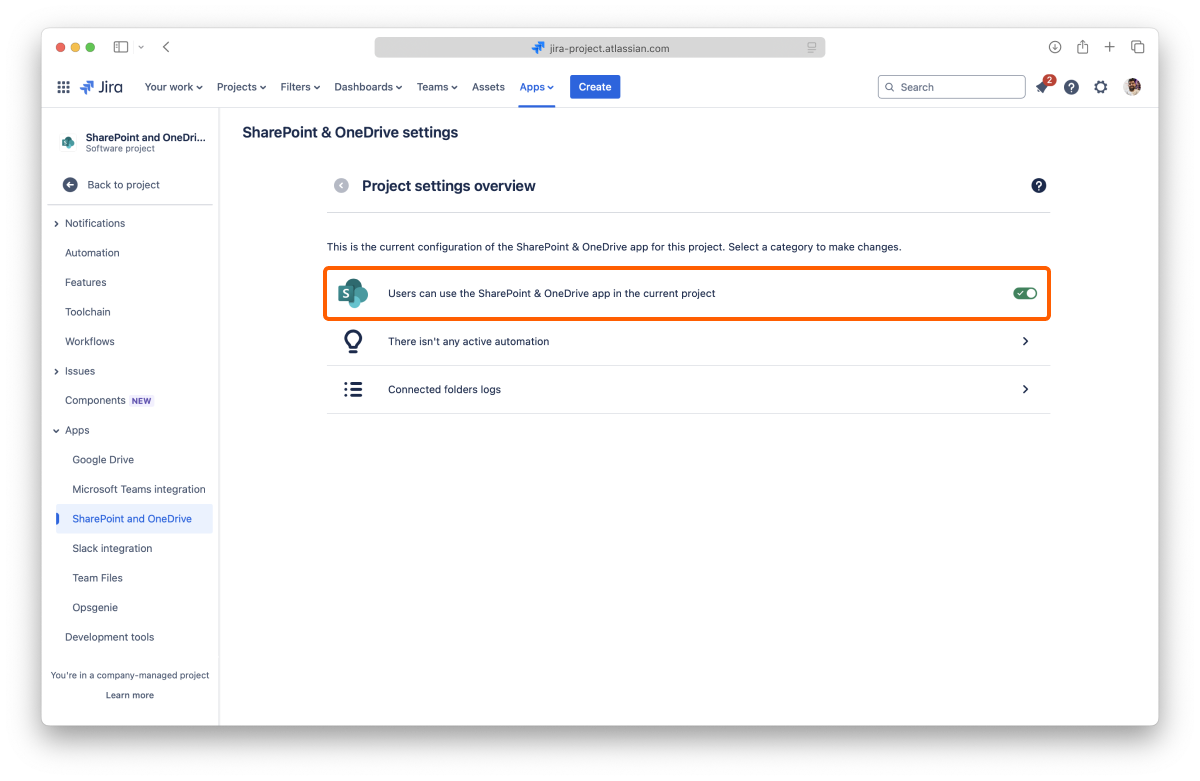
To deactivate the SharePoint Connector app, click the toggle to turn it off. You can reactivate it anytime by clicking the toggle again to turn it on.
Changing this setting saves automatically and applies immediately.
In the automation panel, you’ll find options to have repetitive tasks done automatically.
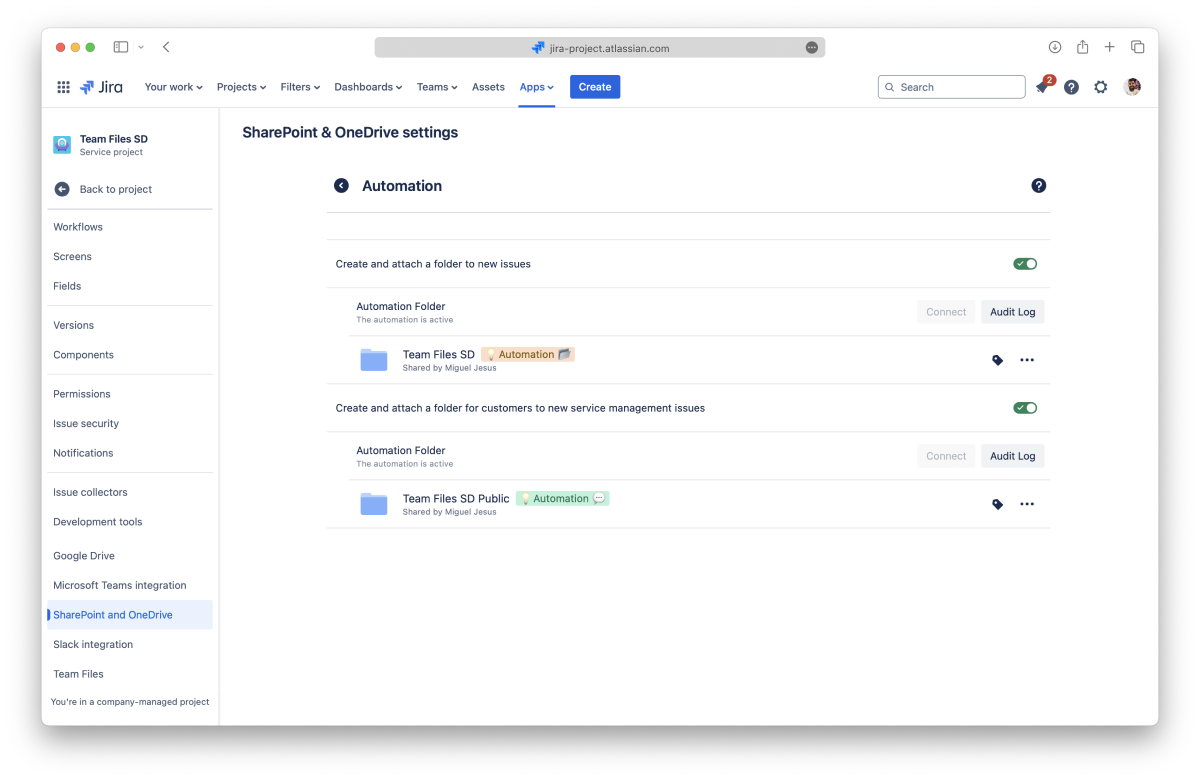
With this automation active, whenever a user creates an issue, SharePoint Connector creates a folder with the issue key and attaches it to the issue.
With the automation active, the folders are created and attached to the issue, but you still need to add SharePoint Connector to the issue to view them.
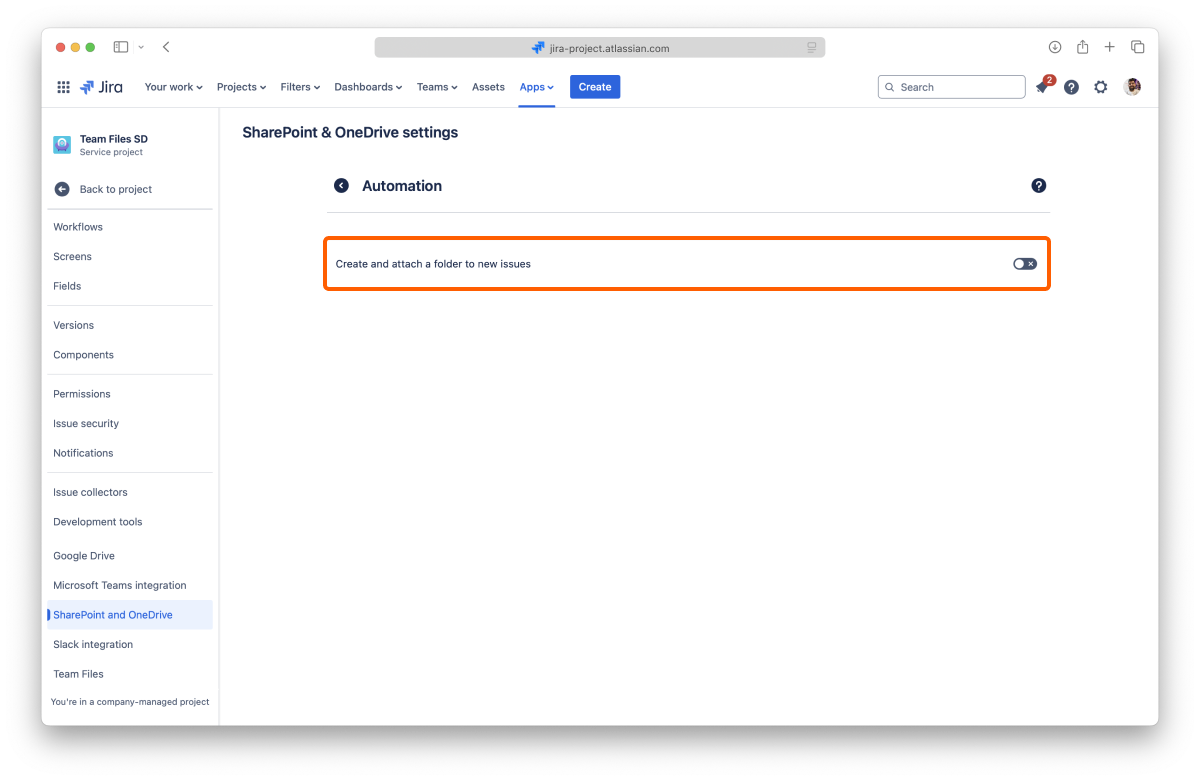
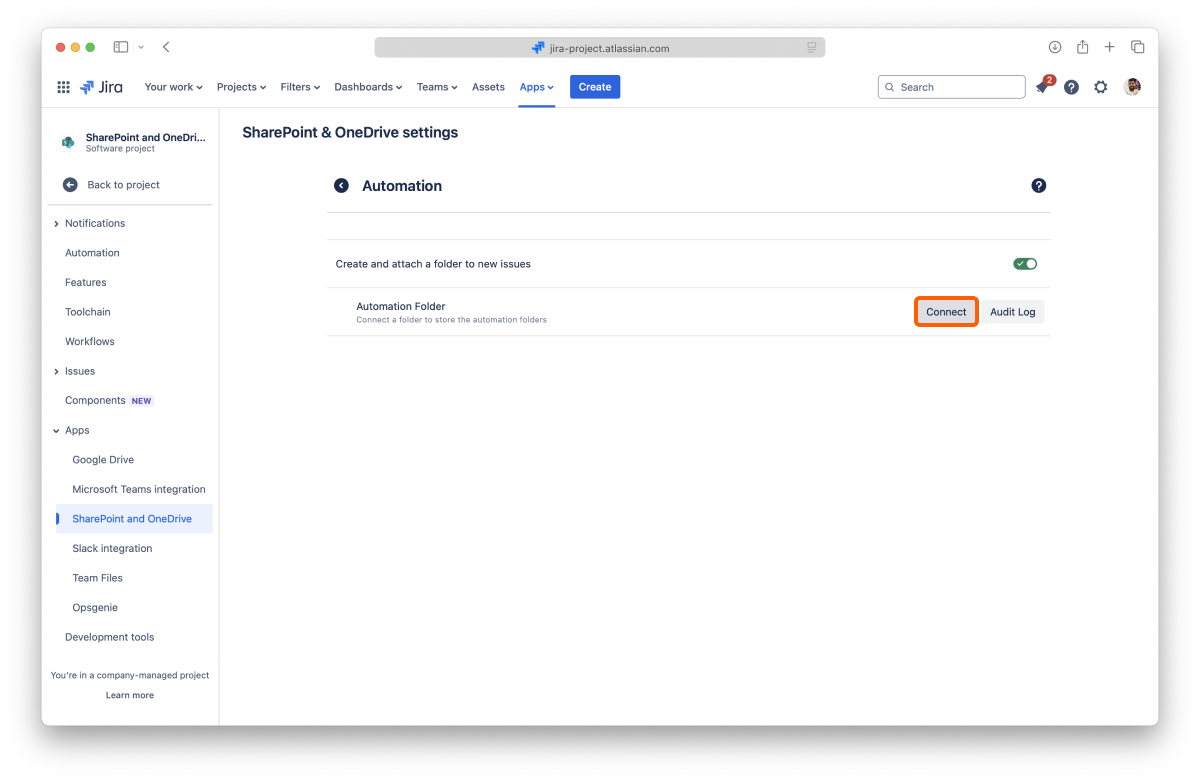
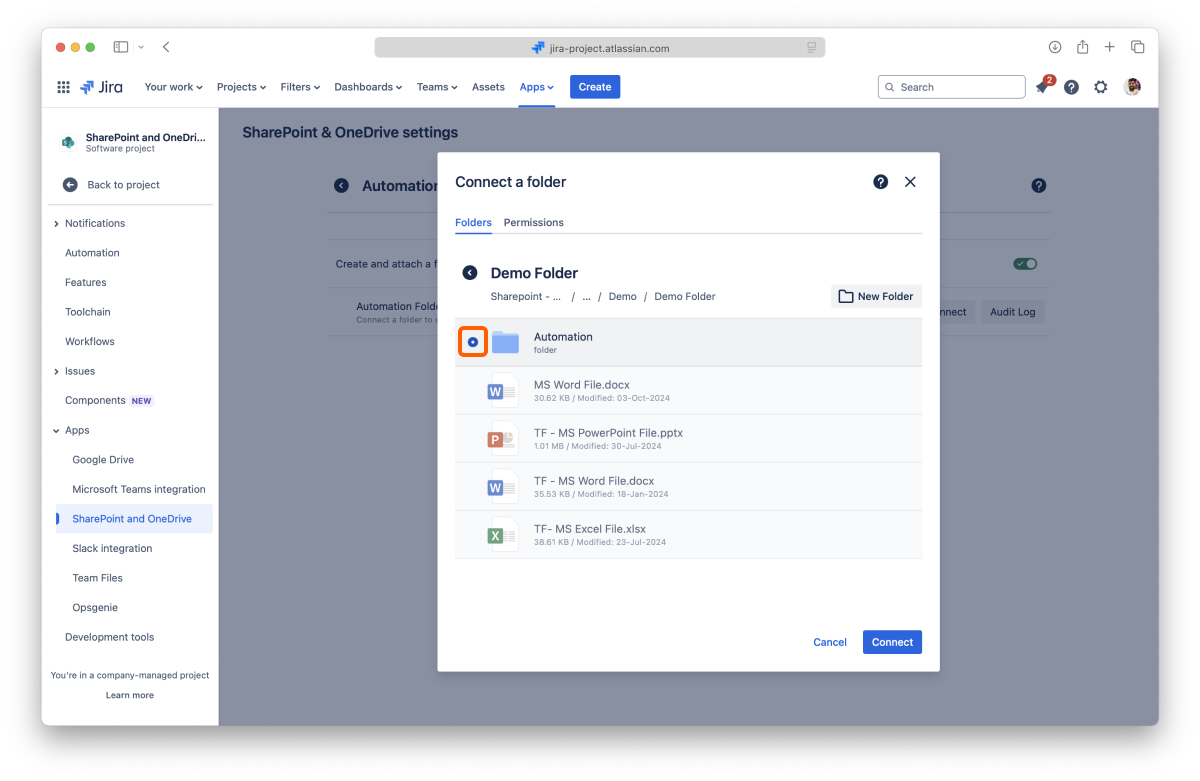
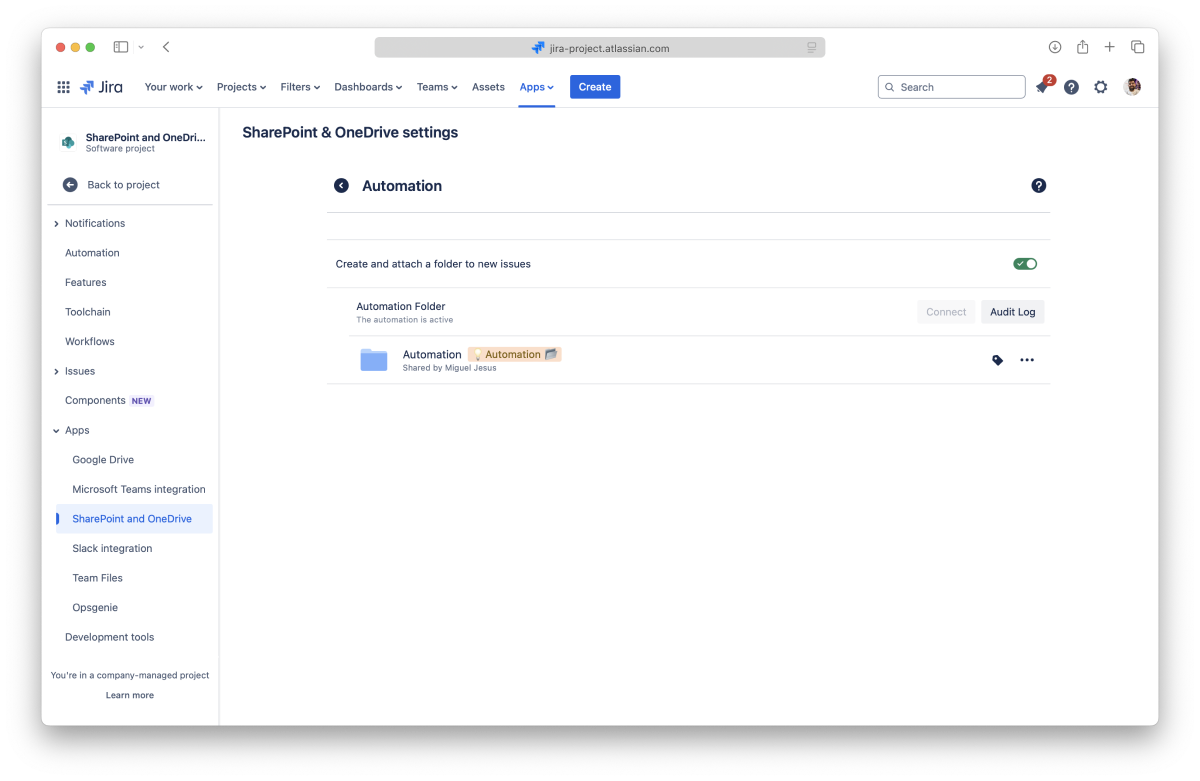
The automation is ready and starts working immediately.
Automation uses different connected folders to avoid breaking the configuration when multiple users connect and disconnect folders. Even if you have places connected in the File Manager, you’ll still need to connect them for automation.
The automation requires a connected folder to work. If you only turn on the toggle, the automation won’t work.
The automation stops working immediately.
You don’t need to disconnect the folder to deactivate the automation. The information is saved, so the automation is ready to go if you want to reactivate it.
To connect a new automation folder, you must first disconnect the current one.
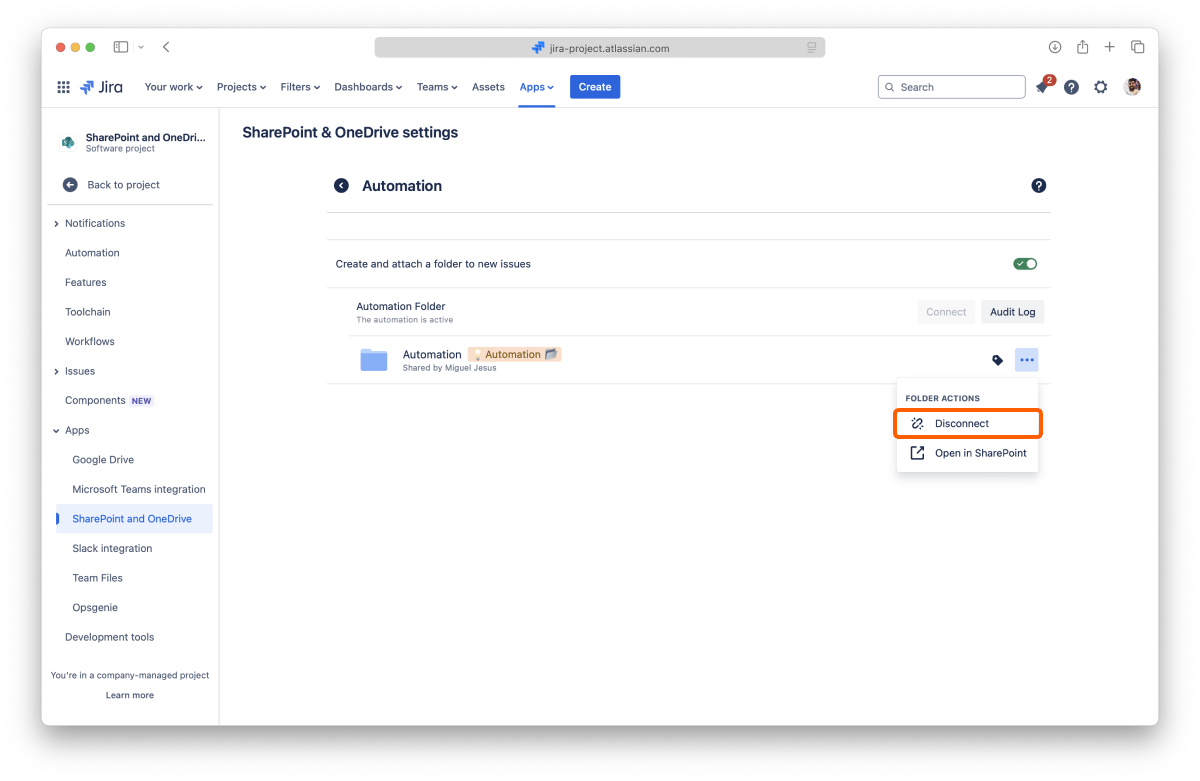
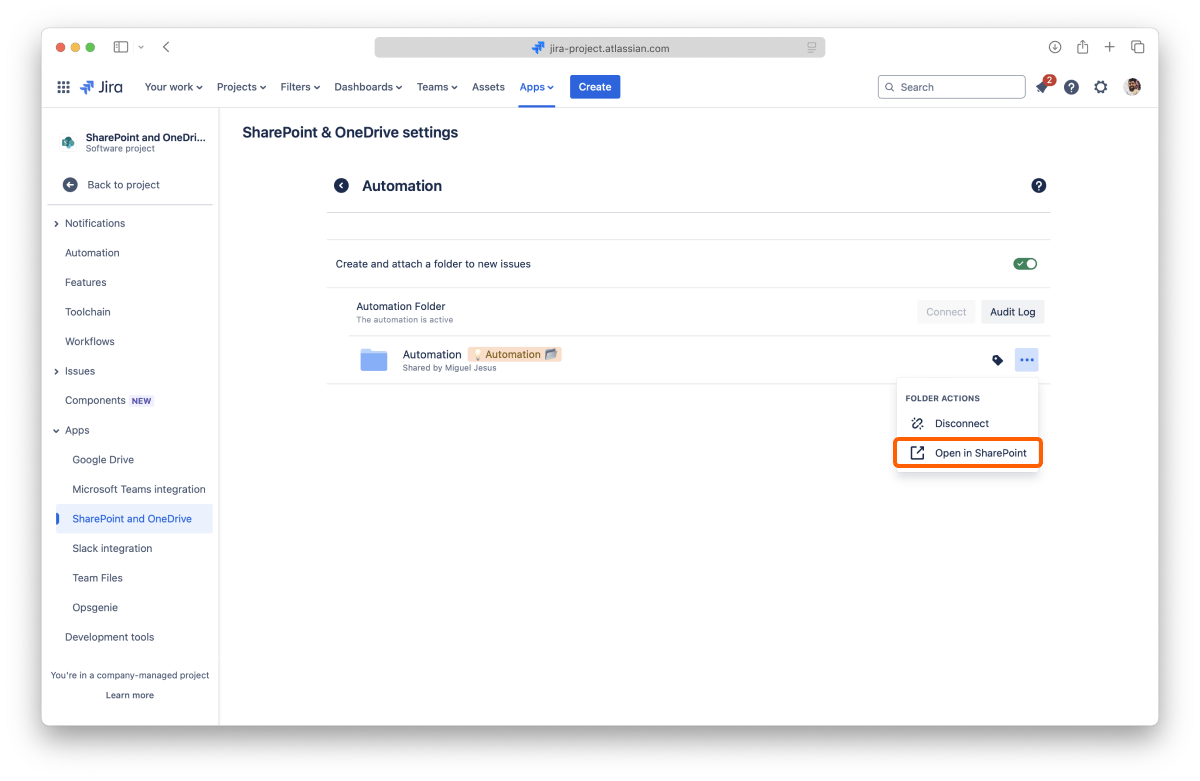
The folder opens in a few seconds on the original storage site.
This automation works mostly the same way as the Create and attach a folder to new issues automation, with some key differences:
With the automation active, the folders are created and attached to the issue, but you still need to add SharePoint Connector to the issue to view them. Customers won’t see the automated folder until you add the app to the issue.
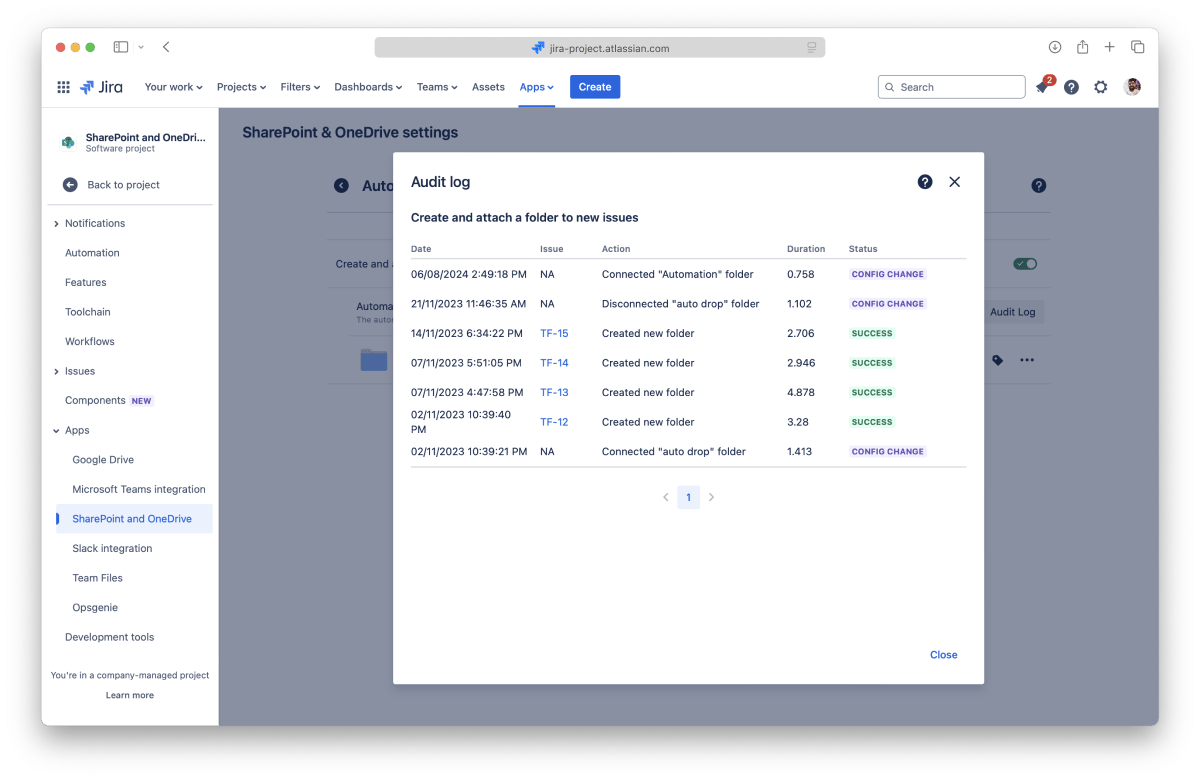 You can check the audit log at any moment to see if the automation is working as intended. The information can help you understand the problem, or you can share it with the support team if you need further help.
The automation folders are shown in the file manager and work as regular folders. Users can browse the content, preview, and edit files, create new documents, or upload content.
You can’t disconnect Automation folders in the File Manager. The project manager must disconnect them from the Automation panel in the Project settings.
If you're having issues with a connected folder, you can check the “Connected folders log” at any moment. The log will give you details on when a user connected it or if someone disconnected it.
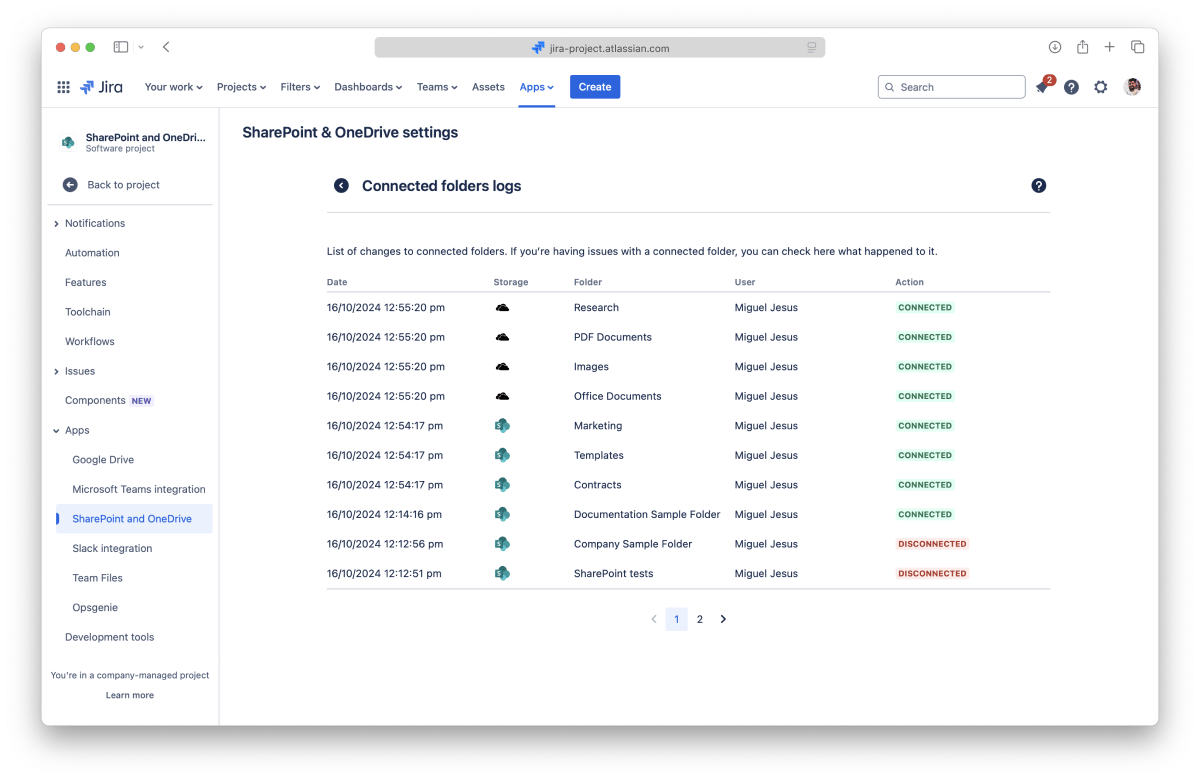
On this page, you learned about all the Project settings available.
If you still have questions about the topics covered on this page, visit our support portal and send them to us. Our team is always happy to help.
Adjust the SharePoint Connector app settings to your needs.
The SharePoint Connector app settings are accessible from the file manager by clicking the context menu in the top right corner and then selecting the "SharePoint Connector settings" option.
Currently, you can only check the name that the Atlassian apps send to the SharePoint Connector app.
You can manage your connected places from the "Places" tab inside the Team File settings. You're in control of your storage places: only you can see the places you allowed, and you, and only you, can disconnect them.
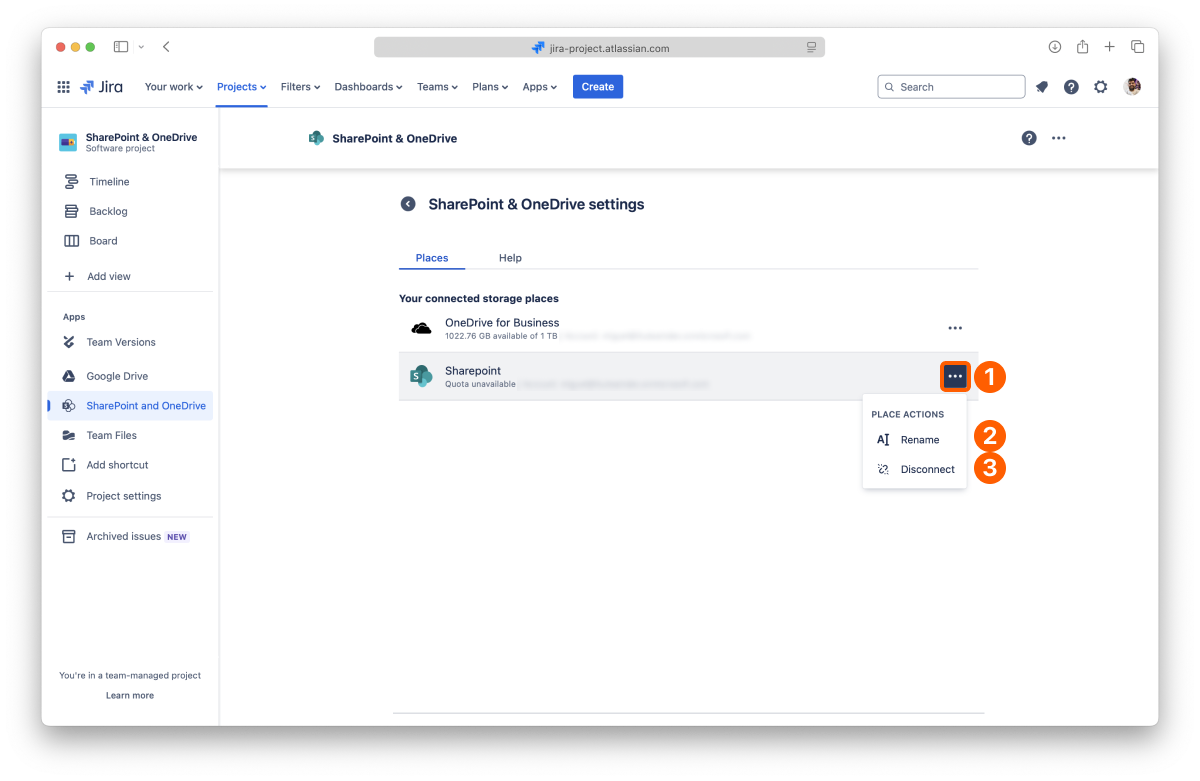
List of your connected places.
You can connect several accounts from the same service, and by default, we add a number at the end when you do it to differentiate them. To help you keep things organized, you can rename your places to something more meaningful to you.
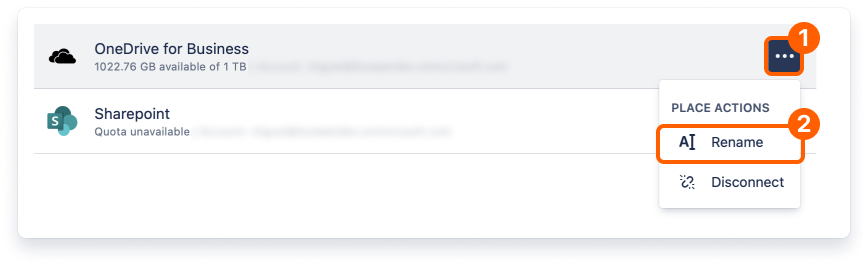
That's it. It just takes a few moments to update the name, and it's ready to use.
You can also rename and manage your places from the "Connect a Folder" dialog.
Before getting into how to do it, it's relevant to know that you're only breaking the link in the SharePoint Connector app to the original storage when you disconnect a place. All your content is safe, but any folders you have connected from that place will also be disconnected. Consequently, files and folders that you or your team attached to Jira issues from the disconnected folders also lose the link to the original storage and become unavailable.
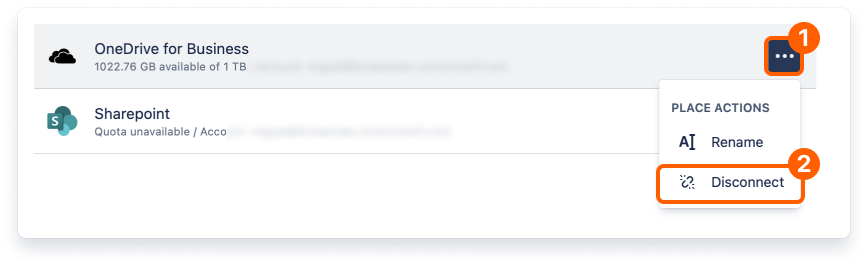
This action is undoable, and even if you connect the same place again, the old links will NOT work.
All done. Your storage place is safe and sound but no longer accessible in the SharePoint Connector app.
You can also disconnect and manage your places from the "Connect a Folder" dialog.
The Help tab contains a brief description of the app and the team that developed it, along with links to learn more.
You also find the links to contact the support team and this documentation.
On this page, you learned about all the settings available at the moment. As we introduce new features, we'll add additional settings so you can further customize your experience.
If you still have questions about the topics covered on this page, visit our support portal and send them to us. Our team is always happy to help.
Learn how to use advanced features included in the SharePoint Connector app.
The SharePoint Connector app now includes a custom field to call with JQL to search for issues or apply workflow rules using the following queries.
To find issues with no items attached:
"Sharepoint & OneDrive attachments" = "false"
"Sharepoint & OneDrive attachments" = "true"
To find issues with no items attached or that never had any SharePoint items attached:
"Sharepoint & OneDrive attachments" is EMPTY OR "Sharepoint & OneDrive attachments" = "false"
IMPORTANT: Only attachments added after v1.2.15-AC (mid-October 2022 release) appear in the JQL search.
Those are all the advanced features included until now.
You can check our public roadmap to see what’s coming next. If you can’t find the feature you’re looking for, you can create a feature request. We’re always looking for ways to improve our apps.
Administrators can adjust how the SharePoint Connector app works to meet your team's needs and comply with company policies.
As the name implies, these settings are only visible to users with Administrator privileges. All the settings on this page are accessible by entering the “Apps” section on Jira settings and then clicking the "SharePoint Connector Settings" link on the sidebar.
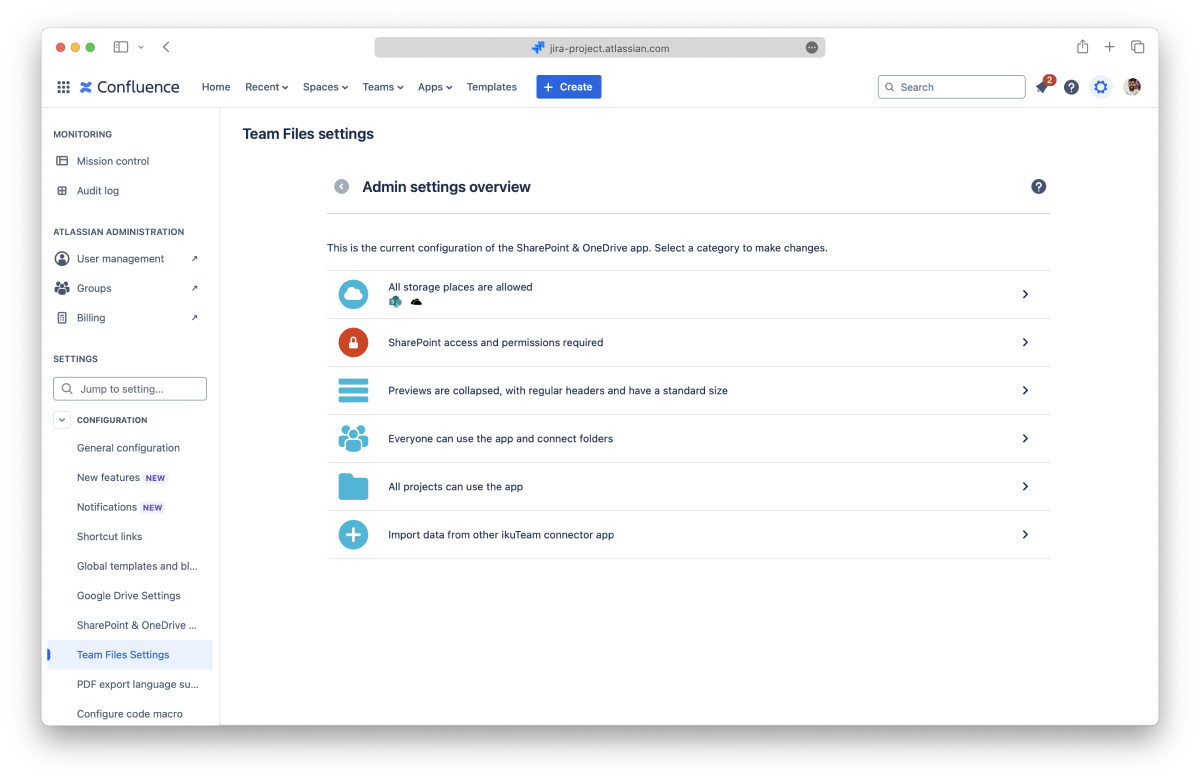
By default, users can connect folders from all the storage places supported by the SharePoint Connector app.
Administrators can easily restrict specific storage places to ensure that the SharePoint Connector's use aligns with company policies.
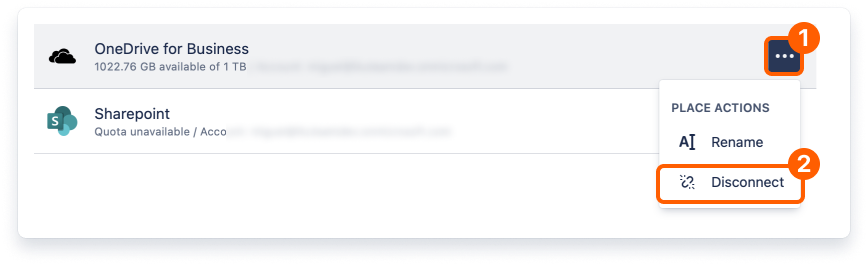
Changes to these settings are saved automatically and applied immediately.
If a user connected a folder from a storage place that the Admin later turns off, it becomes blocked inside the SharePoint Connector app. All connected folders from that place are blocked too, and if there are attached folders and files from a blocked storage place, the content won't be visible, and they'll display a warning mentioning the Admin blocked the access.
Changes to these settings are saved automatically and applied immediately.
The SharePoint Connector app simplifies the authentication by default, favoring ease of use with simplified permissions. Admins can require users to authenticate with an account with access to connected folders to better control how files are shared, viewed, and edited.
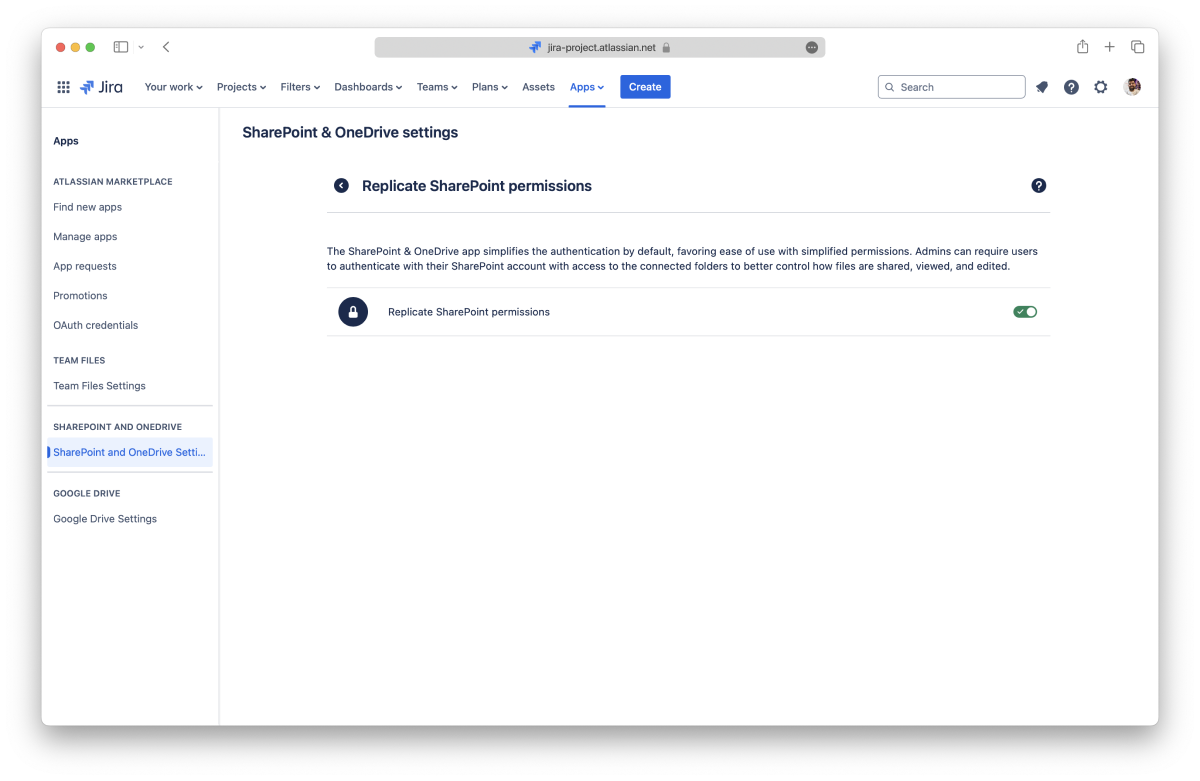
Remember that this option requires users to sign in to each connected folder to view and edit the files so the correct permissions are applied for each user. Learn more
Changes to these settings are saved automatically and applied immediately.
Changing this setting saves automatically and applies immediately.
By default, the files and folders attached to Jira issues use a regular header and appear in the collapsed view to use less space on the screen. It’s easy to preview the file by clicking the arrow to open the expanded view, which uses the width of the page and is 464px tall by default, or clicking the file name (or preview button) to open the full-screen preview.
The Admin can set different defaults for new issues in the Admin settings section dedicated to the preview options.
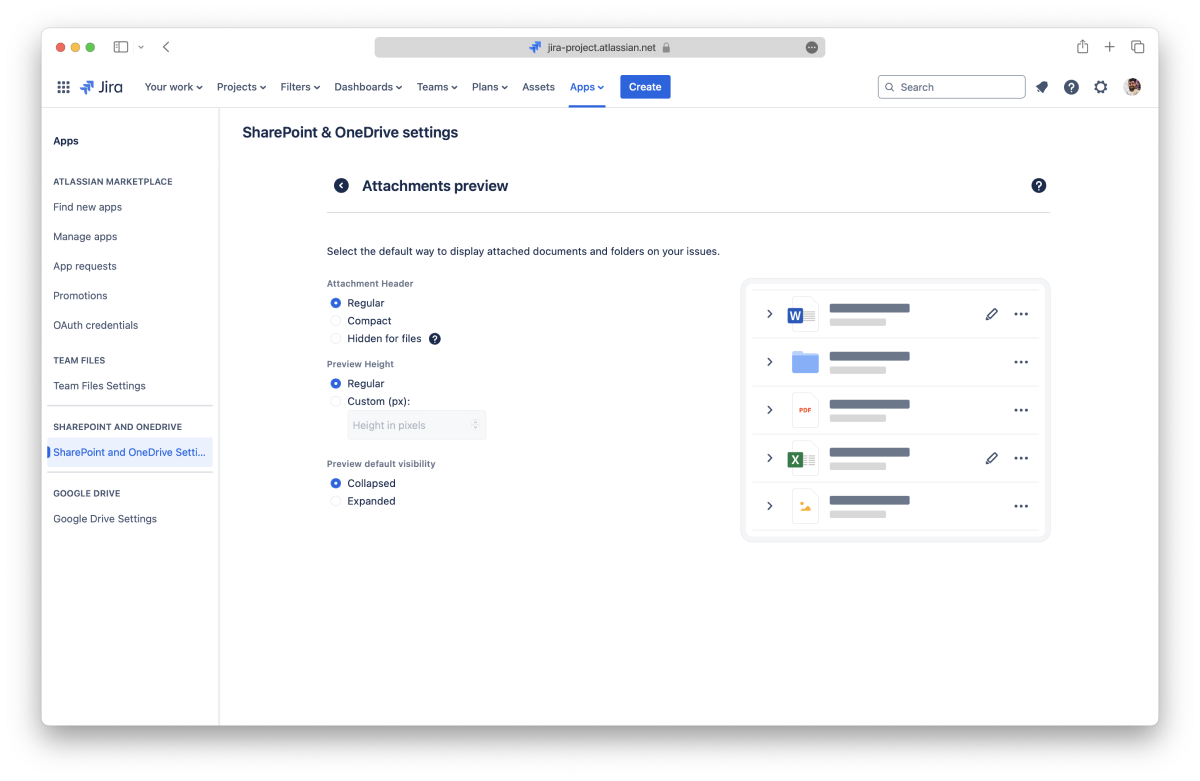
Select the default size for the header of attachments:
Select the default height for the preview:
Select the default behavior for the preview:
Changes to these settings are saved automatically and applied immediately.
By default, all users and groups can use the SharePoint Connector app. It’s accessible with a link on the project sidebar and as a macro on pages to attach files and folders.
However, an Admin can specify which users and groups can use the SharePoint Connector app. When someone doesn’t have permission to use the app, the file manager and the macro are blocked for them.
The current settings are in the "Users & Groups" section. There are three main options that you can select from the drop-down menu:
All users and groups can access the SharePoint Connector app using the default option.
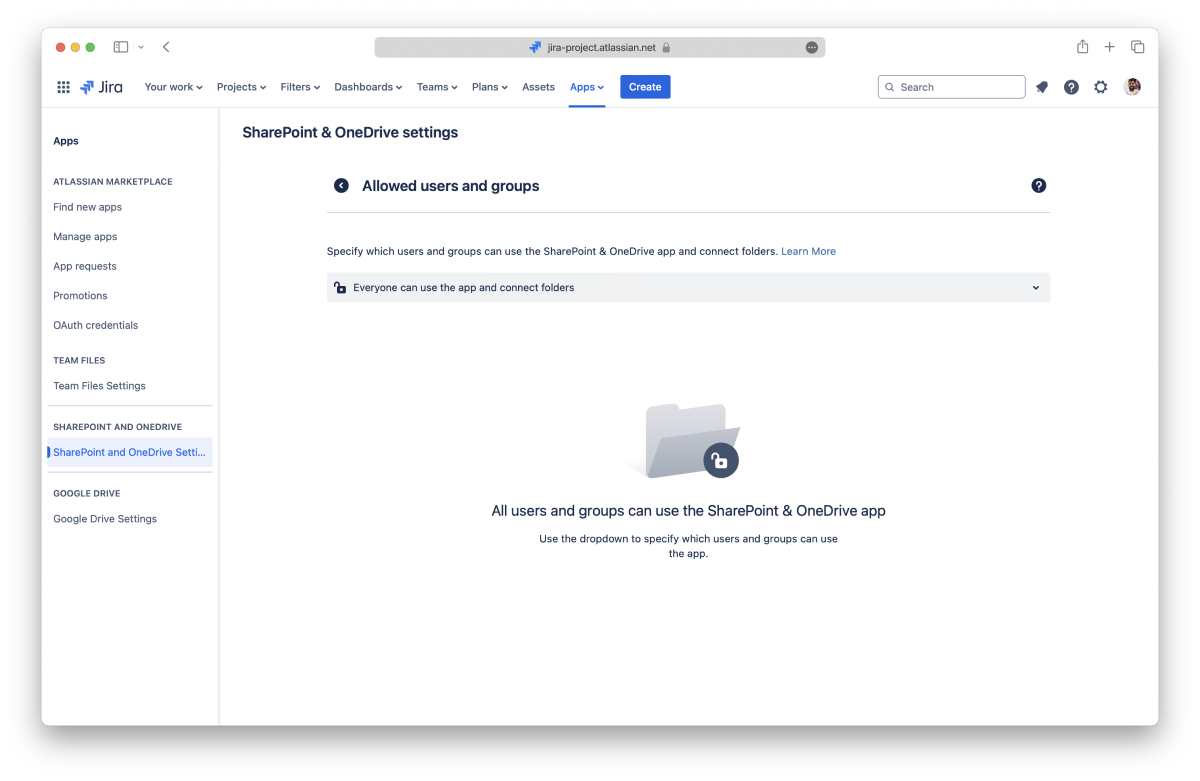
Select this option if everyone should be able to use the SharePoint Connector app, but only some users and groups can connect folders.
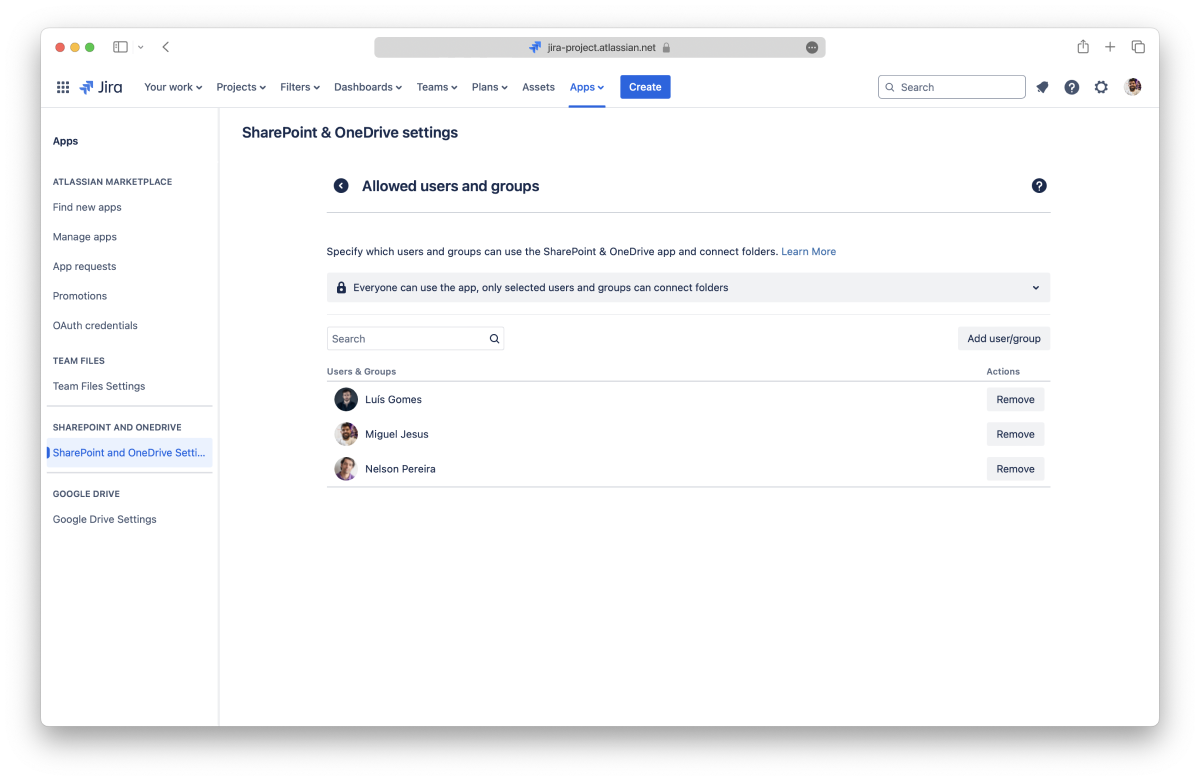
Adding a user or group:
Click the “Add User/Group” button, start typing to select a name, and click the “Add” button. The user or group gets access to connect folders immediately.
Search for the user or group you want to remove, click the “Remove” button, and confirm. The option to connect folders will be hidden from the user or group immediately.
Select this option if you only want some users and groups to use the SharePoint Connector app, and specify who can connect folders.
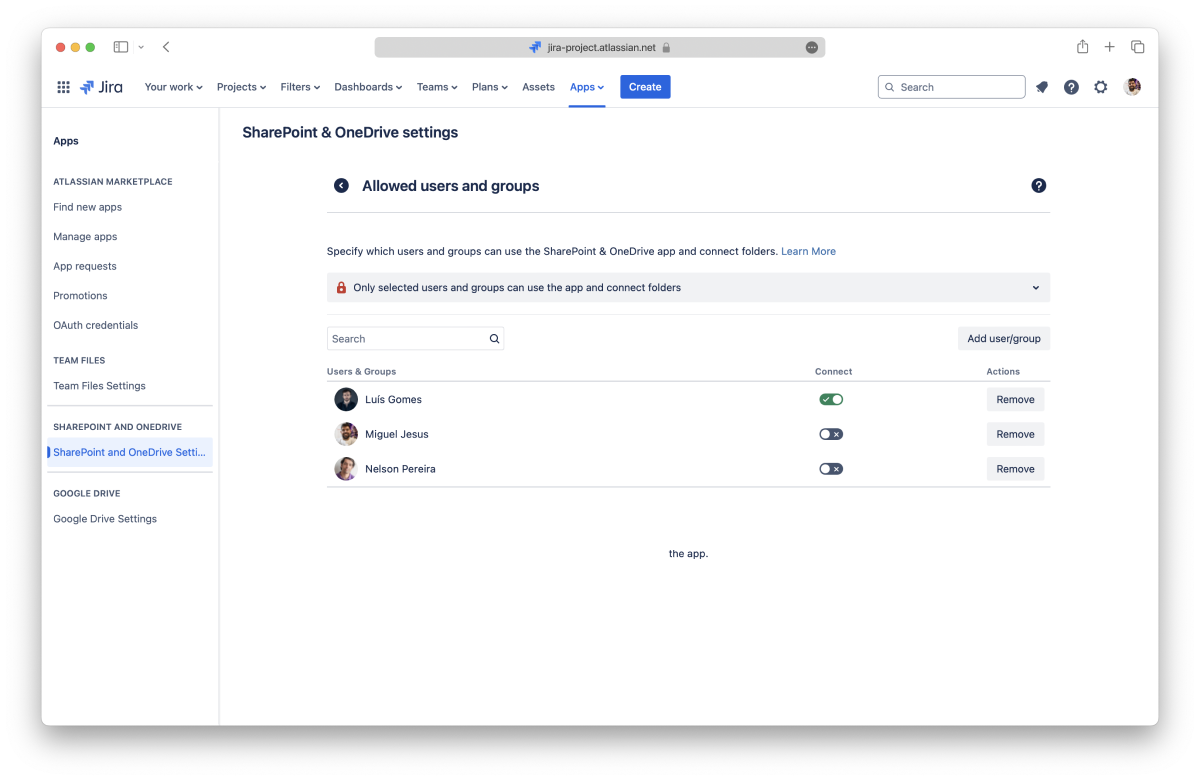
Adding a user or group:
Click the “Add User/Group” button, start typing to select a name, and click the “Add” button again. The user or group will have immediate access to the app.
Use the toggle button to determine if a user or group can connect folders.
Search for the user or group you want to remove, click the “Remove” button, and confirm. The app will be blocked for that user or group immediately.
The SharePoint Connector app can be used on all projects by default. It’s accessible through a link in the project sidebar and a button on the issues to attach files and folders.
However, an Admin can specify which Jira projects can use the SharePoint Connector app. The file manager and the attach button are hidden when a project doesn’t have permission to use the app.
In the "Projects" section, you can see the current settings. There are three main options that you can select from the drop-down menu:
This is the default option, meaning every project can access the SharePoint Connector app.
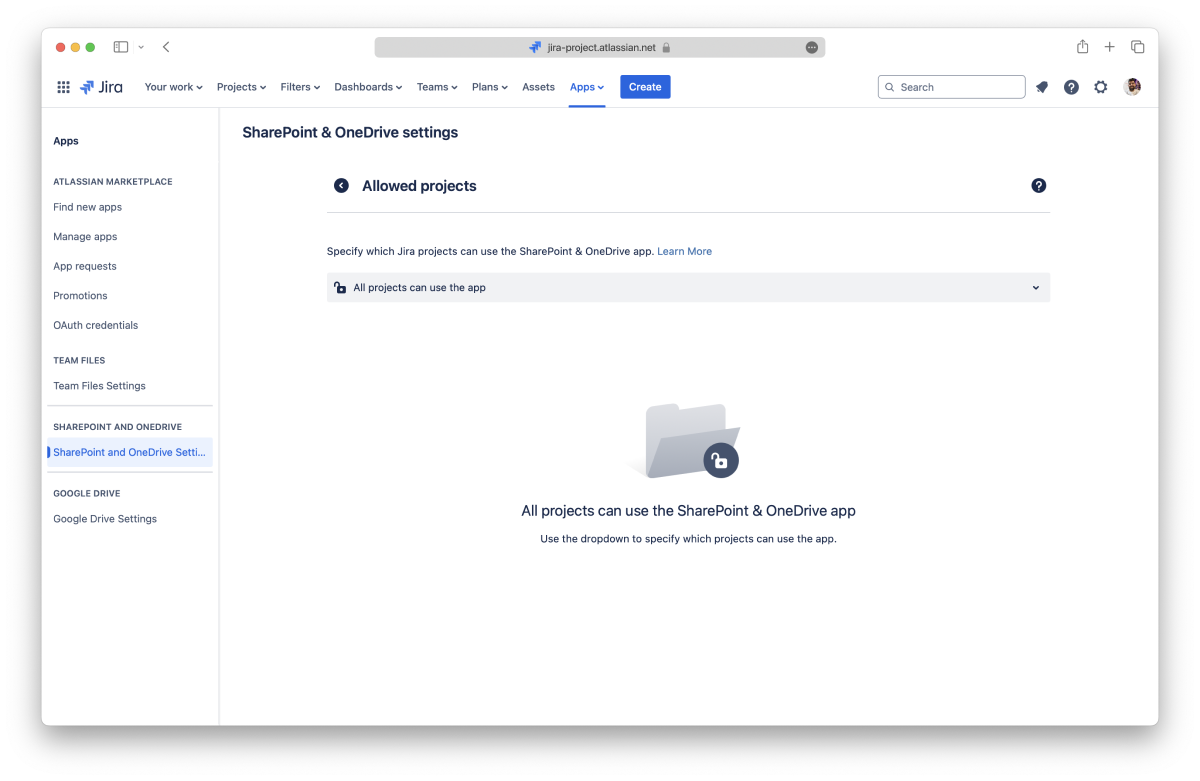
Select this option if you only want to allow the SharePoint Connector app for some projects.
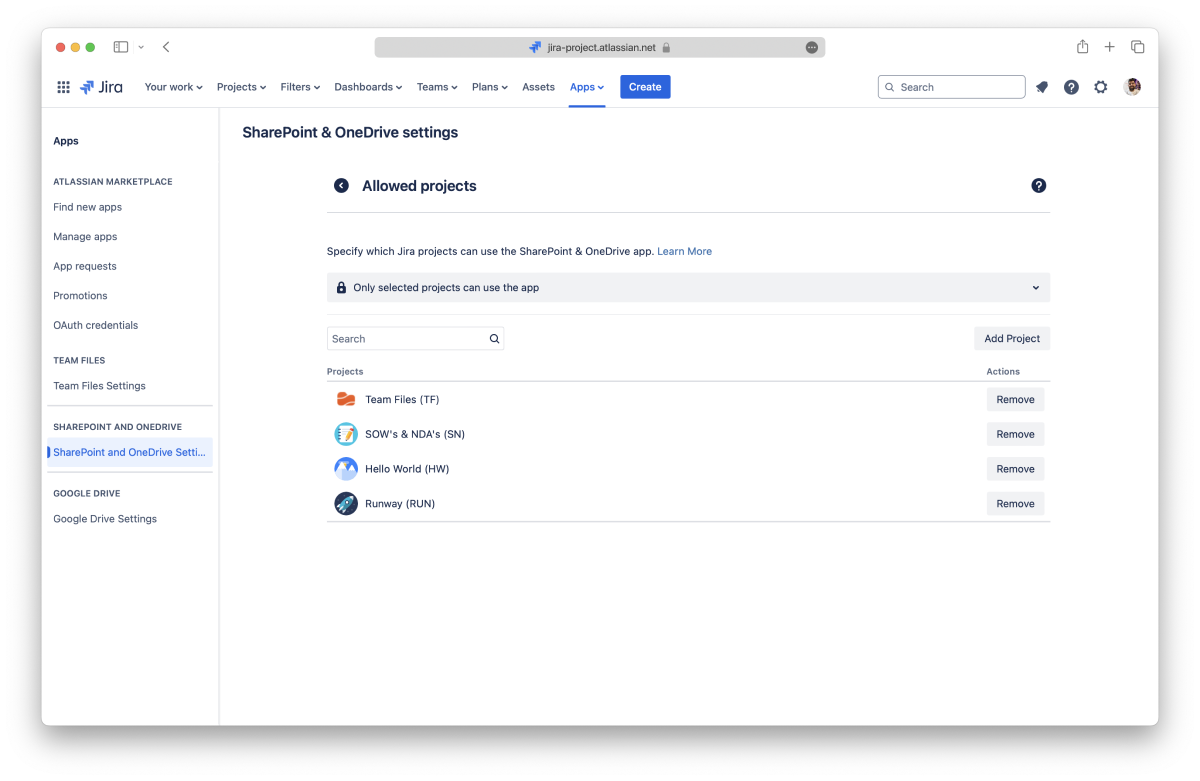
Adding a project:
Click the “Add Project” button, start typing to select a project, and click the “Add” button. The project gets access to the app immediately.
Search for the project you want to remove, click the “Remove” button, and confirm. The app is hidden from the project immediately.
Select this option if you only want to hide the SharePoint Connector app for some projects.
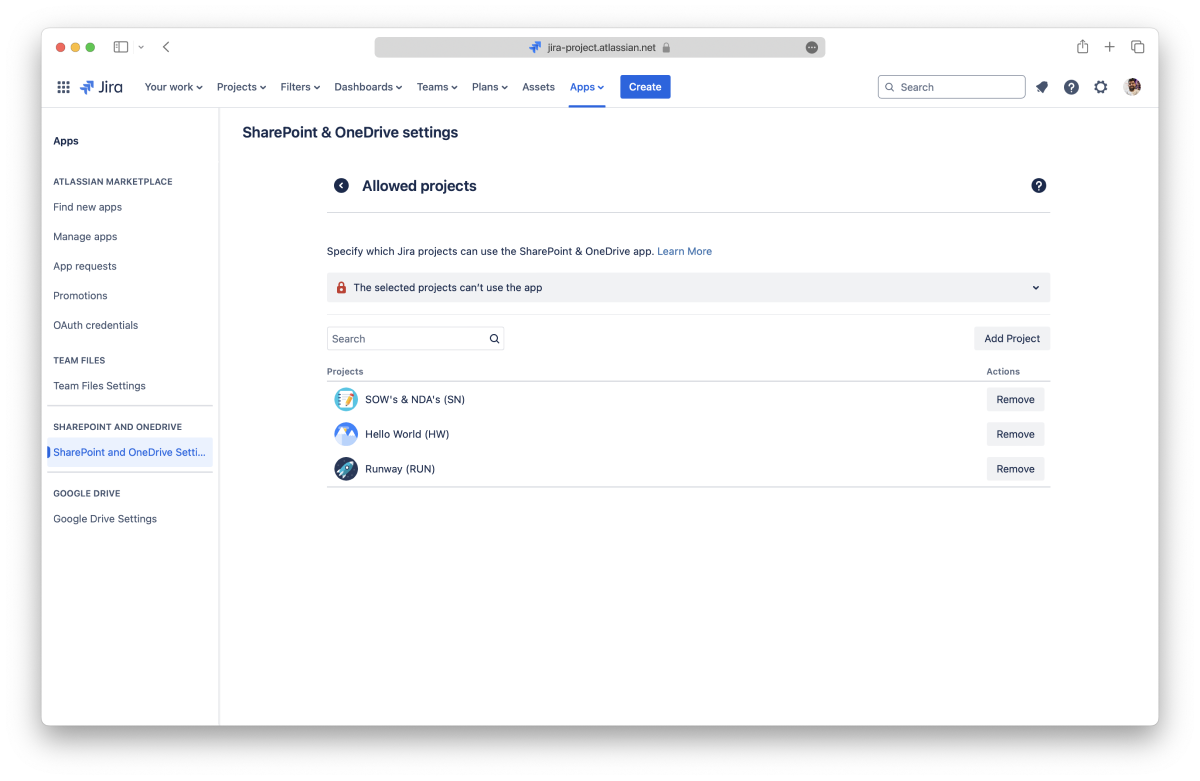
Adding a project:
Click the “Add Project” button, start typing to select a project, and click the “Add” button. The app is hidden from the project immediately.
Search for the project you want to remove, click the “Remove” button, and confirm. The project will immediately gain access to the app.
Blocking the SharePoint Connector app for a project already using it hides the file manager link and all the attached files and folders to issues. The attachments will be there if the app is allowed again.
Project owners can also toggle on/off the SharePoint Connector app in the Project Settings, as long as the Admin allows it.
If your team previously used the Team Files app and downgraded to, or plans to downgrade to, the SharePoint Connector app, you can import the data from Team Files and use it with the connector.
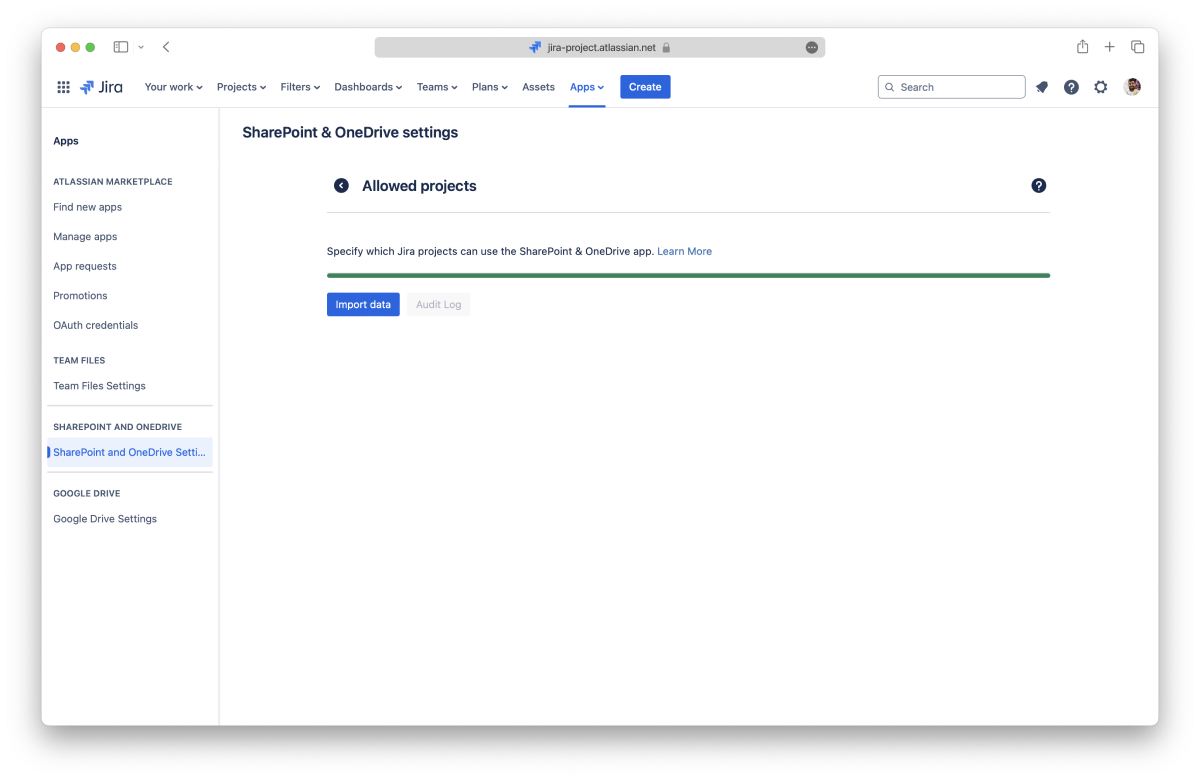
An Admin needs to:
The importing process can take some time, depending on the size of your instance, but you don’t need to wait on the page.
When it finishes, you can check the audit log, which will show the start and finish time and how many issues were imported. If errors occur during the import process, you can repeat it.
On this page, you learned about all the Admin settings currently available.
If you still have questions or require help with other global settings, visit our support portal to send us your questions or feature requests. Our team is always happy to help.
When the "Replicate storage permissions" option is active, users must authenticate to each folder connected by other users to browse folders and preview and edit documents. This applies to the file manager and issues.
The connected folders will show an "Authenticate" button for every folder that the user hasn't connected yet, and they won't be able to open the folder or make changes until they do.
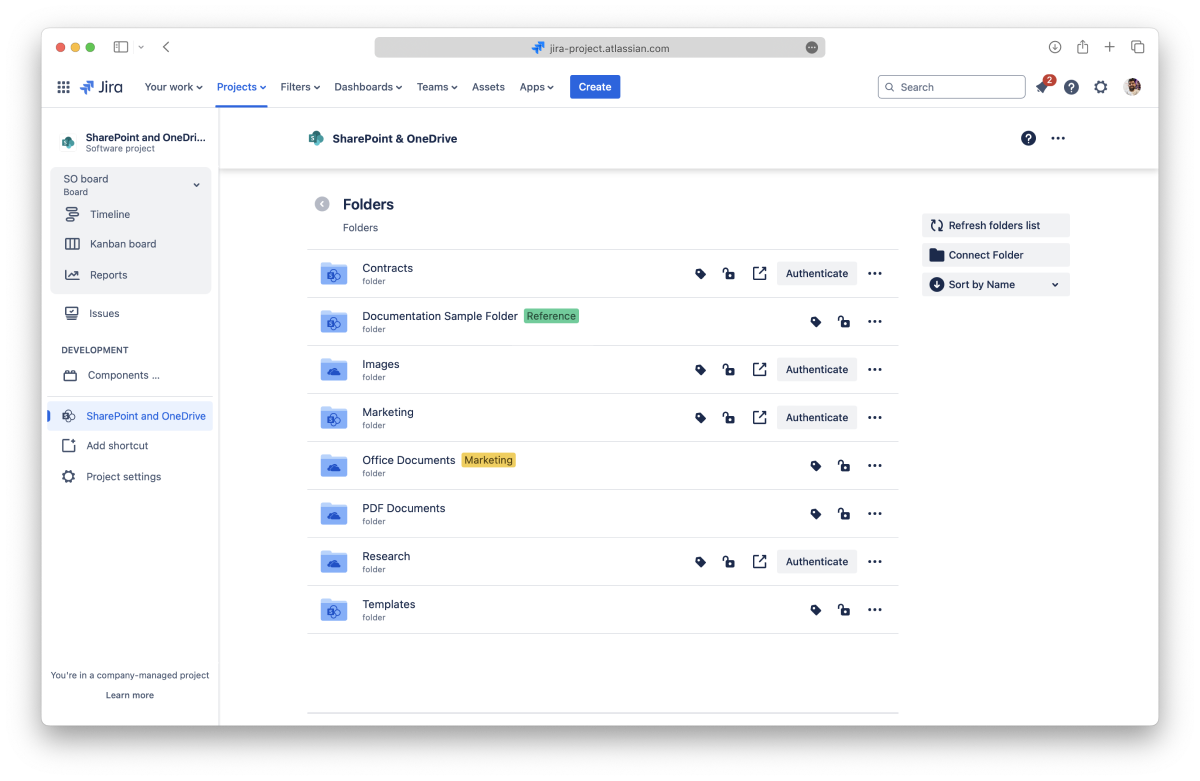
All done. You can now use the folder according to the permissions set for it.
If the account selected doesn't have access to the folder, an error will be shown with the option to connect to a different account.
After authenticating to a folder with an account, you can remove the access if needed (e.g., by authenticating with a different account).
All done. To view the folder's content, you'll need to authenticate again.
The attached files and folders on issues will show an "Authenticate" button for every item that the user hasn't connected yet. They won't be able to open folders or view and edit files until they do.
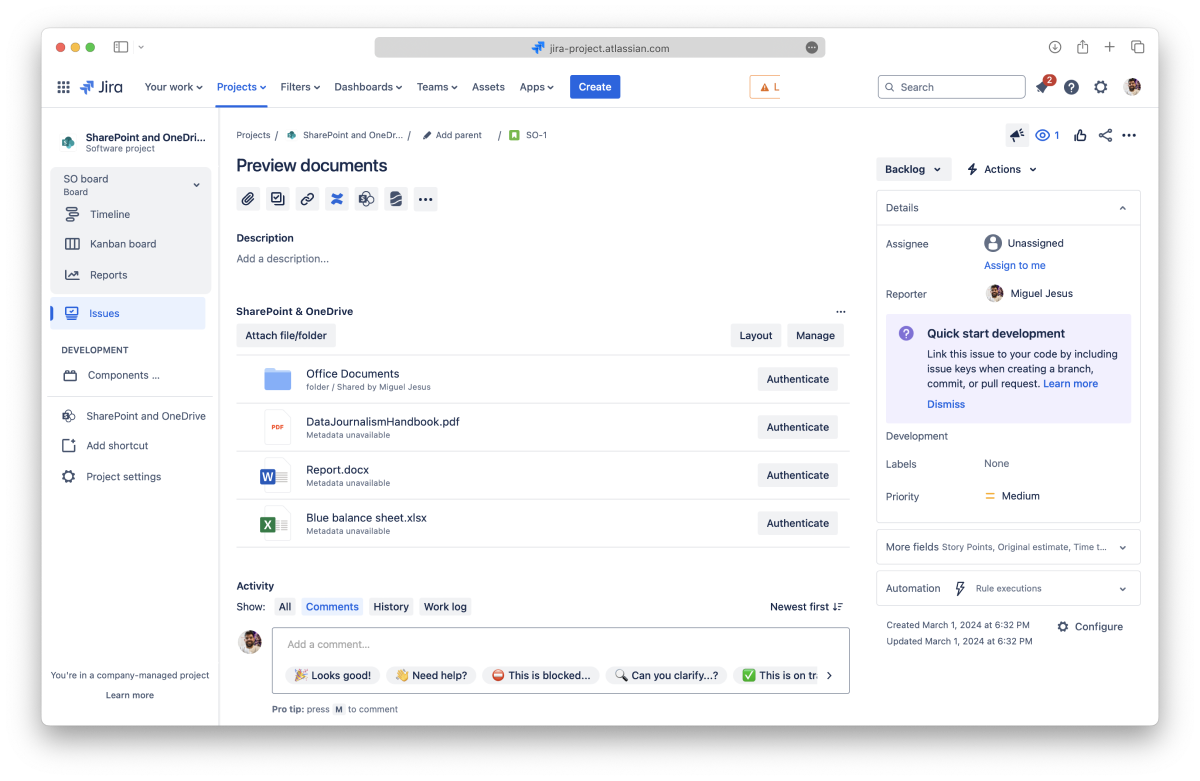
All done. You can now use the folder/file according to the permissions set for it.
If the account selected doesn't have access to the folder, an error will be shown with the option to connect to a different account.
After authenticating to a folder/file with an account, you can remove the access if needed (e.g., by authenticating with a different account).
All done. To view the folder's content or file, you'll need to authenticate again.

_2026-03-26_20-48-42-1.png?length=960&name=untitled_Gemini%203%20(Nano%20Banana%20Pro)_2026-03-26_20-48-42-1.png)


