

Confluence Google Drive Integration
Create a single source of truth with seamless syncing and real-time collaboration.
Read more


_2026-03-26_20-48-42-1.png?length=720&name=untitled_Gemini%203%20(Nano%20Banana%20Pro)_2026-03-26_20-48-42-1.png)






















Embed SharePoint and OneDrive files and folders directly in Jira issues
Preview Word, Excel, PowerPoint, PDFs, and images from SharePoint in Jira
Edit Word, Excel, PowerPoint, and PDF files with real-time collaboration and autosave
Jira triggers run actions like Create folder, named with smart values such as the issue key
Works with single-project or global automation rules
SharePoint remains the single source of truth; nothing is duplicated in Jira
Browse SharePoint document libraries and OneDrive folders from Jira
Attach SharePoint or OneDrive files and folders to Jira issues
Move Jira attachments to SharePoint automatically, and clear them from Jira storage
Rename, delete, or reorganize connected files without leaving Jira
Attach files and folders to the JSM customer portal
Files stay in SharePoint and OneDrive; nothing is copied into Jira
Simplified sharing by default, or mirror Microsoft permissions, or control access via Jira groups
Built on Atlassian Forge, with no external caching layer
Cloud Fortified and data-residency ready; ISO 27001, GDPR, HIPAA, and CCPA compliant
Get AI summaries of heavy SharePoint files, and surface documents with Rovo search agents

Embed SharePoint and OneDrive files and folders directly in Jira issues
Preview Word, Excel, PowerPoint, PDFs, and images from SharePoint in Jira
Edit Word, Excel, PowerPoint, and PDF files with real-time collaboration and autosave
Jira triggers run actions like Create folder, named with smart values such as the issue key
Works with single-project or global automation rules
SharePoint remains the single source of truth; nothing is duplicated in Jira

Browse SharePoint document libraries and OneDrive folders from Jira
Attach SharePoint or OneDrive files and folders to Jira issues
Move Jira attachments to SharePoint automatically, and clear them from Jira storage
Rename, delete, or reorganize connected files without leaving Jira
Attach files and folders to the JSM customer portal
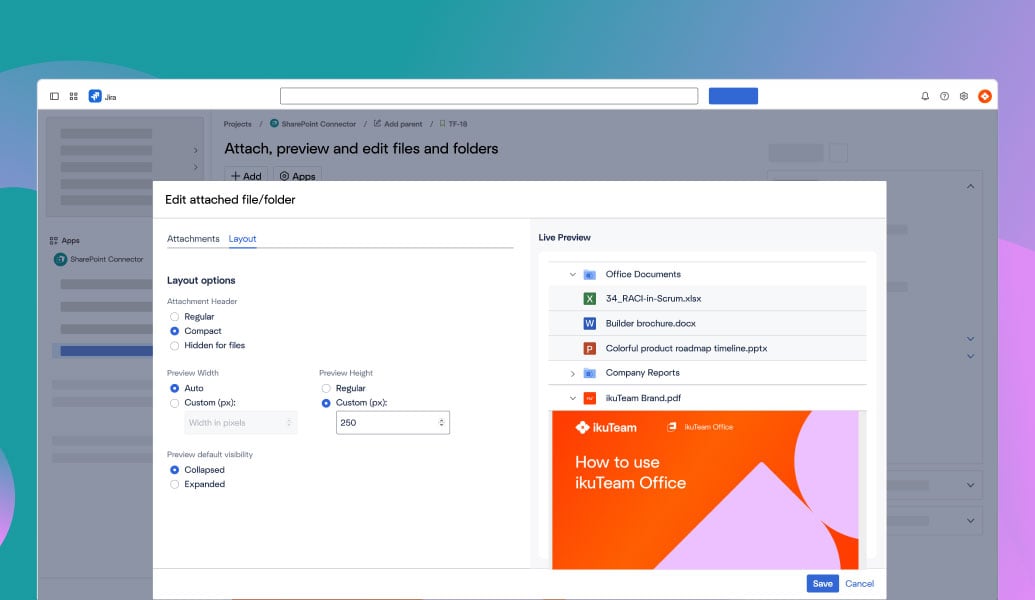
Files stay in SharePoint and OneDrive; nothing is copied into Jira
Simplified sharing by default, or mirror Microsoft permissions, or control access via Jira groups
Built on Atlassian Forge, with no external caching layer
Cloud Fortified and data-residency ready; ISO 27001, GDPR, HIPAA, and CCPA compliant
Get AI summaries of heavy SharePoint files, and surface documents with Rovo search agents


“As a SharePoint-based organization, this integration has saved us a lot of time. We use it in both JSM and Confluence, eliminating the need to re-upload files to tickets. It has been a huge efficiency boost.”

Samantha Starett
Director of Operations
AIQUEOUS

“Great app! A key step toward our single source of truth strategy. Support was fast and our issue was resolved within days.”
-2.png?width=68&height=68&name=eyJwYXRoIjoic2Nod2VpemVyaXNjaGVzLXJvdGVzLWtyZXV6XC9maWxlXC9iU1ZQZjU1OHE1bm9pRlNMWThQZi5qcGcifQschweizerisches-rotes-kreuzxTpxDkc2wR9idlKEwb9wa6i4jEvt3S7mStamTRuMK0Y%20(1)-2.png)
Jonas Reusser
Head of IT
Swiss Red Cross

“This app integrates seamlessly with Jira and is ideal for SharePoint users. It helps us keep all documents centralized while managing access through SharePoint permissions. A great app that is well worth it.”

Heiko Schaper
Project Lead
Stadtwerke Pfaffenhofen a. d. Ilm

Connect SharePoint, Google Drive, Box, Dropbox, or Egnyte to Jira and JSM. Automate folders, edit cloud files in place, and route attachments securely.
Learn more
Integrate SharePoint and OneDrive from Microsoft 365 with Confluence to manage files, permissions, and collaboration.
Learn more
One-click edit for Excel, Word, and PowerPoint attachments directly in Jira, with real-time collaboration and advanced preview.
Learn more
_2026-03-26_20-48-42-1.png?length=960&name=untitled_Gemini%203%20(Nano%20Banana%20Pro)_2026-03-26_20-48-42-1.png)


