team-files-vs-confluence-1
Confluence Smart Links Explained
See how they work, where they fail with external files, and more secure, consistent management alternatives.
Read more about Confluence Smart Links Explained
untitled_Flux 2 Pro_2026-03-26_21-41-00
Jira SharePoint Integration
Discover how to sync files, automate folders, and enhance collaboration in Jira Cloud and Data Center.
Read more about Jira SharePoint Integration
Porto-pic
About Us
From the start, our goal has been to remove the hidden friction that prevents teammates from collaborating easily on the files that matter most. We believe productivity is not about adding more tools but making the ones you already use work together seamlessly. Based in Porto, ikuTeam builds the invisible layer for the Atlassian ecosystem to dissolve file silos and help over a million users stay focused and move faster.
Read more about About Us
team-files-vs-confluence-1

Confluence Smart Links Explained

See how they work, where they fail with external files, and more secure, consistent management alternatives.
Read more about Confluence Smart Links Explained
untitled_Flux 2 Pro_2026-03-26_21-41-00

Jira SharePoint Integration

Discover how to sync files, automate folders, and enhance collaboration in Jira Cloud and Data Center.
Read more about Jira SharePoint Integration

About Us

From the start, our goal has been to remove the hidden friction that prevents teammates from collaborating easily on the files that matter most. We believe productivity is not about adding more tools but making the ones you already use work together seamlessly. Based in Porto, ikuTeam builds the invisible layer for the Atlassian ecosystem to dissolve file silos and help over a million users stay focused and move faster.
Read more about About Us
Porto-pic
Attachment File Editing Release Notes & Roadmap Marketplace & Atlassian Ecosystem

Sep 11, 2024

3 min read

Miguel Jesus

Migrate from Box, Dropbox, and Egnyte to Team Files for Confluence

Sometimes, changes are necessary to allow us to grow and evolve. That’s true for companies, too, and after careful consideration, we have decided to sunset three of our apps: Box Connector for ConfluenceDropbox Connector for Confluence, and Egnyte Connector for Confluence. This decision is part of our broader strategy to streamline and enhance our offerings by focusing on a more robust solution—Team Files for Confluence.

Why the Change?


As technology evolves, we aim to provide you with the best tools to collaborate seamlessly in Confluence. Each of the connectors for Box, Dropbox, and Egnyte has served its purpose well by allowing you to embed and manage files from these platforms directly within your Confluence pages. However, maintaining multiple standalone connectors limits our ability to innovate and expand on your most requested features.


By consolidating our efforts into Team Files, we can deliver a more powerful and feature-rich experience. Team Files supports Box, Dropbox, Egnyte and Google Drive, OneDrive, and SharePoint, providing an all-in-one solution to your diverse storage needs.
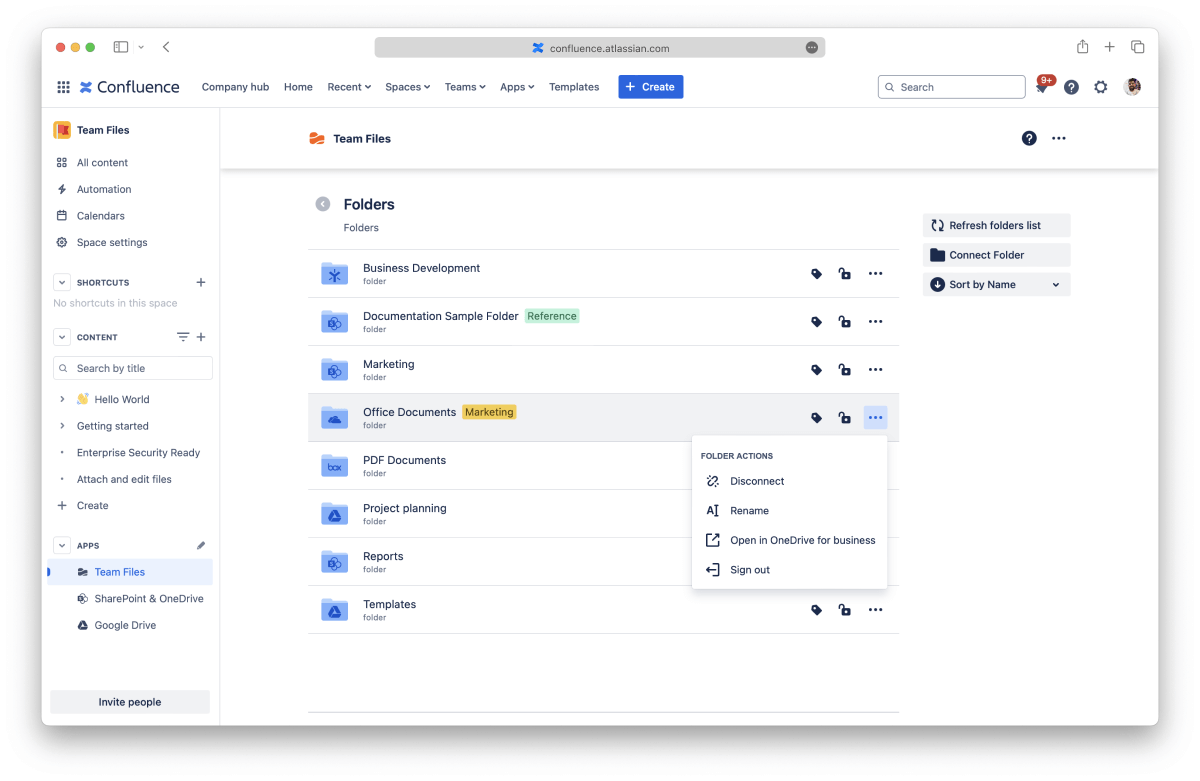
 

confluence-folders

Key Benefits of Migrating to Team Files


Migrating to Team Files for Confluence will provide you with significant advantages:


  • All-in-One Integration: Connect to multiple cloud storage platforms (Box, Dropbox, Egnyte, Google Drive, SharePoint, and OneDrive) from a single app.
  • Seamless Migration: Migrate your current integration with just one click—no hassle, no service disruption.
  • Support for Confluence Native Attachments: Edit embedded Microsoft Word, PowerPoint, or Excel files with one click. No more downloading & uploading to edit an attached document in Confluence.
  • Advanced Features: Beyond file management, Team Files introduces advanced features such as real-time collaboration in Microsoft Office and Google Workspace documents, and enhanced preview options for PDF, image, and video files.
  • AI Capabilities (Coming Soon) Stay ahead with upcoming AI-driven features for intelligent file summaries, find duplicates, and more.

How to Migrate


The migration process is designed to be as easy as possible:
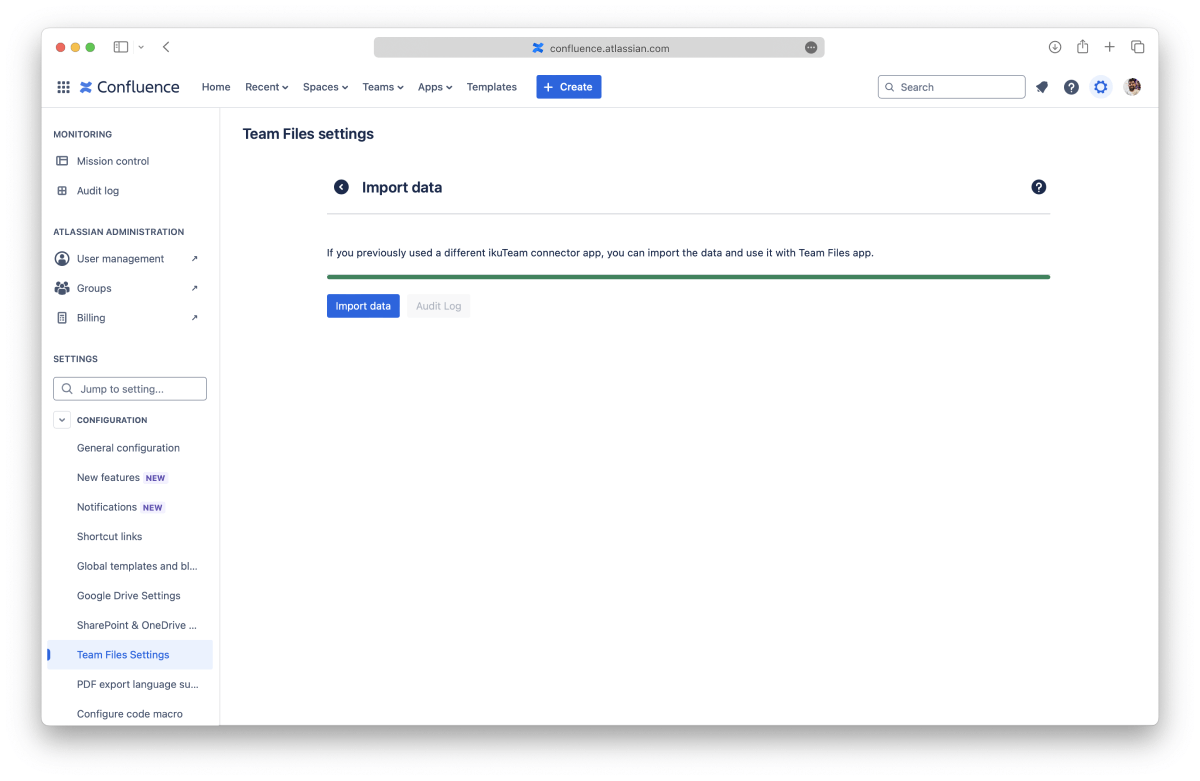
 

  • One-Click Migration: A built-in migration tool will allow you to transition from Box Connector, Dropbox Connector, and Egnyte Connector to Team Files without losing any of your current macros or file links.
  • Discount for Existing Users: To make this transition smoother, we offer a special discount on Team Files for all existing users of the retired apps. Enjoy more features with Team Files at the same price you’re currently paying. Please contact the support team to get your unique discount code.


team-files-import-data

No Disruption to Your Current Workflows


We understand that change can be challenging, but we’re committed to ensuring this transition is seamless. There will be no service disruption as you migrate, and your current file integrations will continue to work within Team Files. Our dedicated support team is here to assist you every step of the way, providing guidance and answering any questions you may have.

Timeline for Sunset


The sunsetting of the Box, Dropbox, and Egnyte Connectors will begin on December 31st, 2024. After this period, support and updates for these apps will cease. We'd like to encourage you to migrate to Team Files before the sunset date to continue receiving support and take advantage of new features.

Get Started Today With Your Migration Today


We are excited about the future and the enhancements we can bring with Team Files for Confluence. By focusing our efforts on this unified solution, we can provide more value and help your teams work even more efficiently. We appreciate your understanding and continued support as we make this transition.


If you have any questions or need assistance with the migration, don't hesitate to get in touch with our support team at our customer portal.


Thank you for being a part of our journey, and we look forward to supporting you with Team Files for Confluence.

Related documentation


Team Files for Confluence: Getting started


Import data with Team Files

Related articles

Explore Blog