team-files-vs-confluence-1
Confluence Smart Links Explained
See how they work, where they fail with external files, and more secure, consistent management alternatives.
Read more: Confluence Smart Links Explained
untitled_Flux 2 Pro_2026-03-26_21-41-00
Jira SharePoint Integration
Discover how to sync files, automate folders, and enhance collaboration in Jira Cloud and Data Center.
Read more: Jira SharePoint Integration
Porto-pic
About us
From the start, our goal has been to remove the hidden friction that prevents teammates from collaborating easily on the files that matter most. We believe productivity is not about adding more tools but making the ones you already use work together seamlessly. Based in Porto, ikuTeam builds the invisible layer for the Atlassian ecosystem to dissolve file silos and help over a million users stay focused and move faster.
Read more: About us
team-files-vs-confluence-1

Confluence Smart Links Explained

See how they work, where they fail with external files, and more secure, consistent management alternatives.
Read more: Confluence Smart Links Explained
untitled_Flux 2 Pro_2026-03-26_21-41-00

Jira SharePoint Integration

Discover how to sync files, automate folders, and enhance collaboration in Jira Cloud and Data Center.
Read more: Jira SharePoint Integration

About us

From the start, our goal has been to remove the hidden friction that prevents teammates from collaborating easily on the files that matter most. We believe productivity is not about adding more tools but making the ones you already use work together seamlessly. Based in Porto, ikuTeam builds the invisible layer for the Atlassian ecosystem to dissolve file silos and help over a million users stay focused and move faster.
Read more: About us
Porto-pic
Product Documentation

Nov 19, 2026

2.1 Preview files

Learn how to preview files with ikuTeam Office for Confluence.


About the preview

With ikuTeam Office for Confluence, you can preview the files attached to your pages without downloading them: Microsoft Office documents, OpenOffice documents and PDF files.


Preview Office on your pages

The ikuTeam Office for Confluence app lets you preview files attached to your Confluence pages.
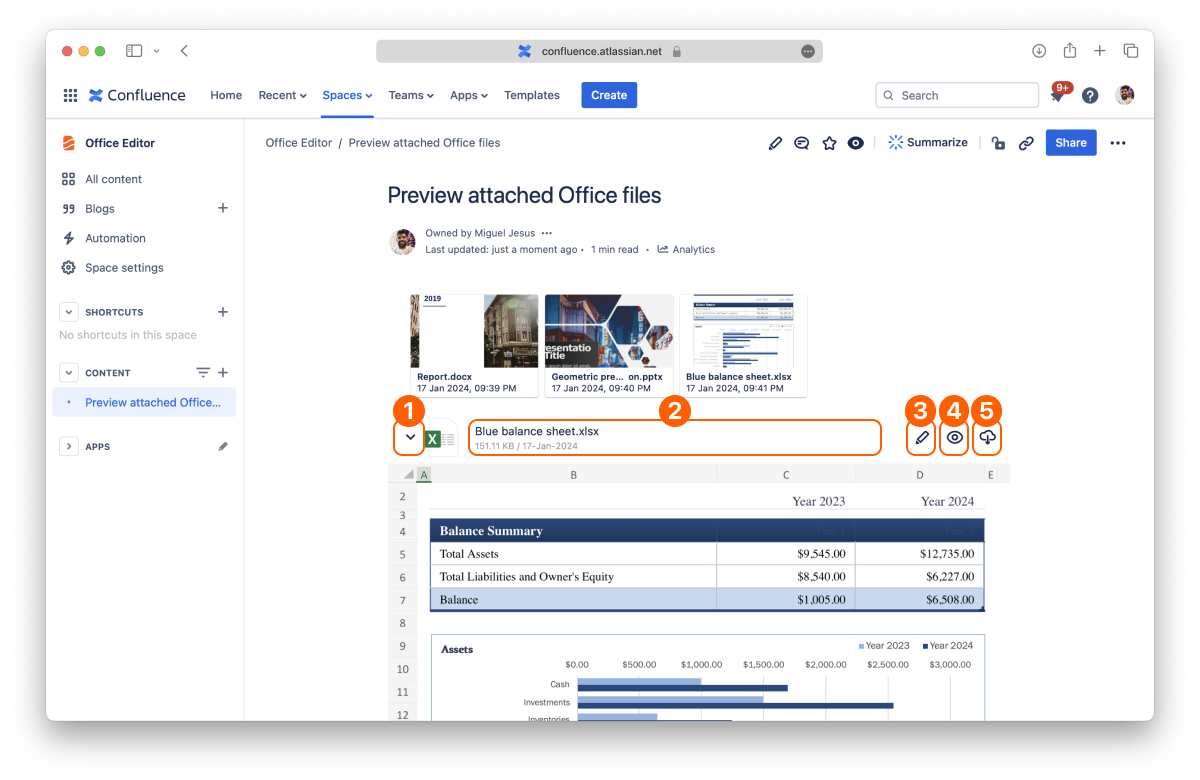
Screenshot: File
  1. Disclosure button 

  2. Document info

  3. Edit document

  4. Full-screen Preview

  5. Download

Inline preview

By default, every attached file displays in a collapsed view to save screen space. You can expand each file by clicking the disclosure button on the left to preview its content.

Anyone who can view the page can preview its files. People without a Confluence license, such as anonymous visitors on a public page, can preview files when your site has the Advanced Edition of ikuTeam Office.

Full-screen preview

Click the Preview button of the file you want to open in the full-screen preview.
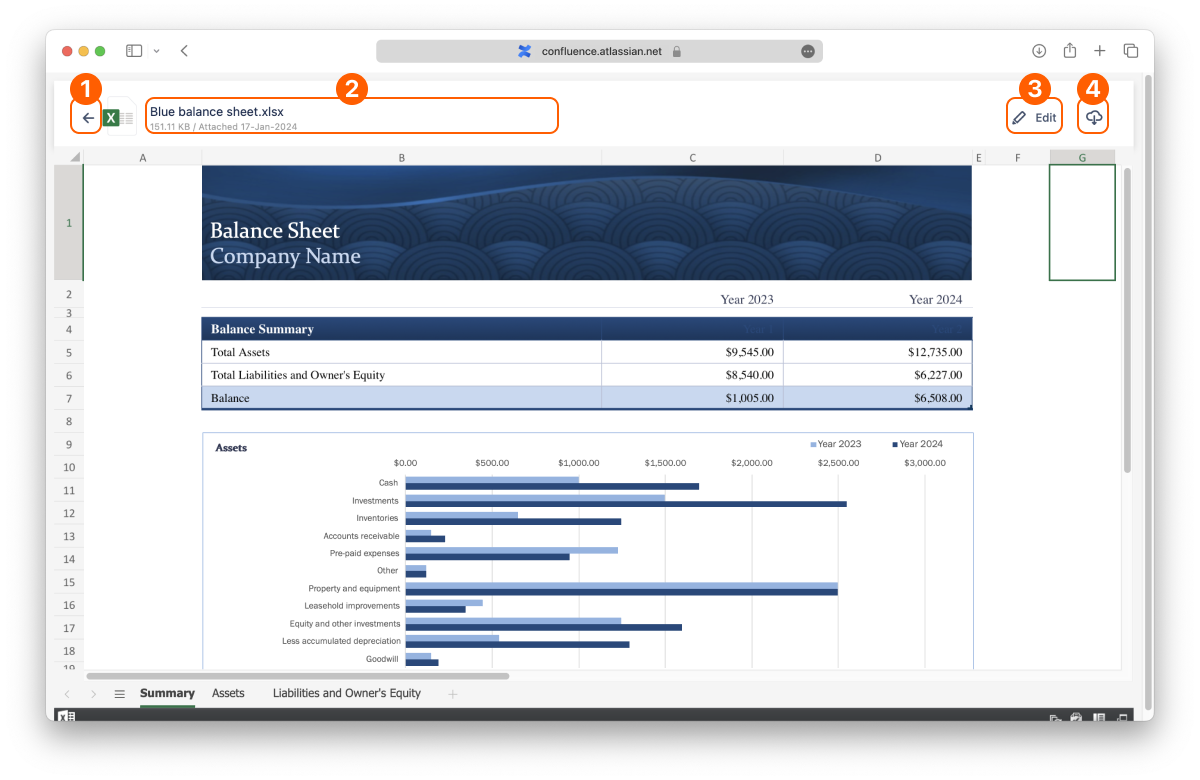
Screenshot: Fullscreen
  1. Back button 

  2. Document info

  3. Edit document

  4. Download

You can change the preview settings with the layout options.


Supported file formats for preview

  • Word documents and templates: DOC, DOCX, DOCM, DOT, DOTX, DOTM

  • Excel spreadsheets and templates: XLS, XLSX, XLSM, XLSB, XLT, XLTX, XLTM

  • PowerPoint presentations and templates: PPT, PPTX, PPTM, PPS, PPSX, PPSM, POT, POTX, POTM

  • OpenOffice documents and templates: ODT, OTT, FODT, ODS, OTS, FODS, ODP, OTP, FODP

  • Older StarOffice and WPS Office files: SXW, STW, SXC, SXI, WPS, WPT, ET, ETT, DPS, DPT

  • Text and web files: RTF, TXT, CSV, HTML, HTM, MHT, MHTML, XML, LOG, CONFIG

  • E-books: EPUB, FB2

  • PDF and similar files: PDF, XPS, OXPS, DJVU, DOCXF, OFORM


Wrap up

That's all on previewing files. Did you know you can also edit documents attached to your pages?

If you still have questions about any of the topics covered on this page, visit our support portal and send us your questions. Our team is always happy to help.